Multi-Stop Route Planner icon

Phone

Multi-Stop Route Planner

Maps & Navigation MapoScope - Delivery Route Optimization Experts ⭐ 4.60 1,000,000+
Version 26.03.18.01 Everyone

Screenshots

Multi-Stop Route Planner screenshot
Permissions Explained 14 permissions requested View details

This app requests 14 permissions. The table below explains what each permission may allow and what users should review before installing.

Status Permission What it means Why it may be used User safety note
ℹ️ Review Approximate Location (network Based) approximate location (network-based) This is an Android permission or app-specific permission requested by the app. The app may use this permission for features related to its category, device support, background behavior, storage, connectivity, or system integration. Review this permission before installing, especially if it does not match the app’s expected purpose.
ℹ️ Review Precise Location (gps And Network Based) precise location (GPS and network-based) This is an Android permission or app-specific permission requested by the app. The app may use this permission for features related to its category, device support, background behavior, storage, connectivity, or system integration. Review this permission before installing, especially if it does not match the app’s expected purpose.
ℹ️ Review Read The Contents Of Your Usb Storage read the contents of your USB storage This is an Android permission or app-specific permission requested by the app. The app may use this permission for features related to its category, device support, background behavior, storage, connectivity, or system integration. Review this permission before installing, especially if it does not match the app’s expected purpose.
ℹ️ Review Modify Or Delete The Contents Of Your Usb Storage modify or delete the contents of your USB storage This is an Android permission or app-specific permission requested by the app. The app may use this permission for features related to its category, device support, background behavior, storage, connectivity, or system integration. Review this permission before installing, especially if it does not match the app’s expected purpose.
ℹ️ Review Take Pictures And Videos take pictures and videos This is an Android permission or app-specific permission requested by the app. The app may use this permission for features related to its category, device support, background behavior, storage, connectivity, or system integration. Review this permission before installing, especially if it does not match the app’s expected purpose.
ℹ️ Review View Wi Fi Connections view Wi-Fi connections This is an Android permission or app-specific permission requested by the app. The app may use this permission for features related to its category, device support, background behavior, storage, connectivity, or system integration. Review this permission before installing, especially if it does not match the app’s expected purpose.
ℹ️ Review View Network Connections view network connections This is an Android permission or app-specific permission requested by the app. The app may use this permission for features related to its category, device support, background behavior, storage, connectivity, or system integration. Review this permission before installing, especially if it does not match the app’s expected purpose.
ℹ️ Review Full Network Access full network access This is an Android permission or app-specific permission requested by the app. The app may use this permission for features related to its category, device support, background behavior, storage, connectivity, or system integration. Review this permission before installing, especially if it does not match the app’s expected purpose.
ℹ️ Review Run At Startup run at startup This is an Android permission or app-specific permission requested by the app. The app may use this permission for features related to its category, device support, background behavior, storage, connectivity, or system integration. Review this permission before installing, especially if it does not match the app’s expected purpose.
ℹ️ Review Draw Over Other Apps draw over other apps This is an Android permission or app-specific permission requested by the app. The app may use this permission for features related to its category, device support, background behavior, storage, connectivity, or system integration. Review this permission before installing, especially if it does not match the app’s expected purpose.
ℹ️ Review Prevent Device From Sleeping prevent device from sleeping This is an Android permission or app-specific permission requested by the app. The app may use this permission for features related to its category, device support, background behavior, storage, connectivity, or system integration. Review this permission before installing, especially if it does not match the app’s expected purpose.
ℹ️ Review Google Play License Check Google Play license check This is an Android permission or app-specific permission requested by the app. The app may use this permission for features related to its category, device support, background behavior, storage, connectivity, or system integration. Review this permission before installing, especially if it does not match the app’s expected purpose.
ℹ️ Review Read Google Service Configuration read Google service configuration This is an Android permission or app-specific permission requested by the app. The app may use this permission for features related to its category, device support, background behavior, storage, connectivity, or system integration. Review this permission before installing, especially if it does not match the app’s expected purpose.
ℹ️ Review Receive Data From Internet receive data from Internet This is an Android permission or app-specific permission requested by the app. The app may use this permission for features related to its category, device support, background behavior, storage, connectivity, or system integration. Review this permission before installing, especially if it does not match the app’s expected purpose.

About Multi-Stop Route Planner

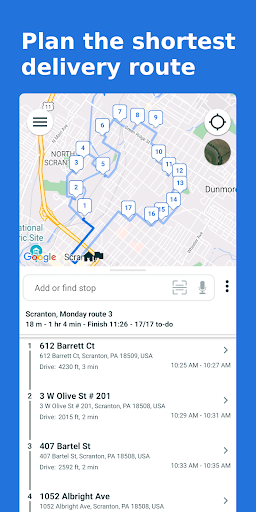
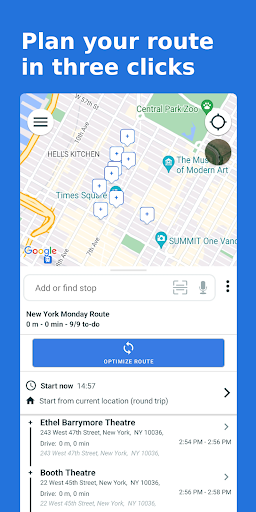
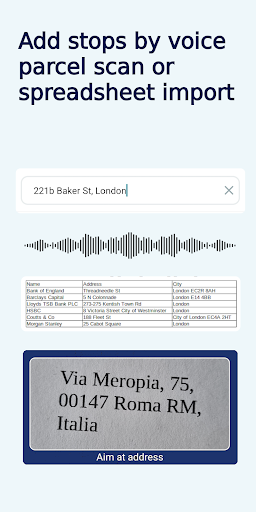
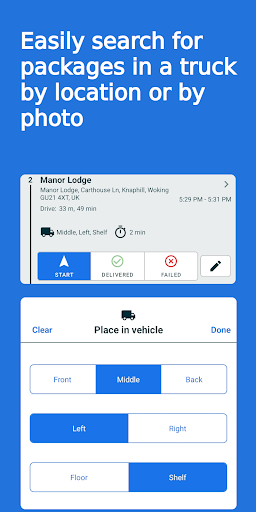
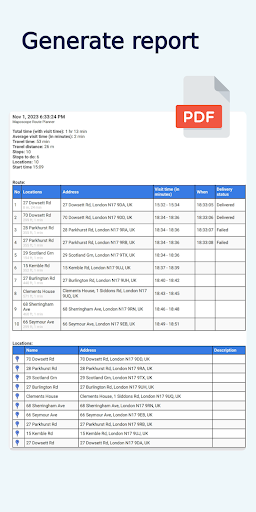
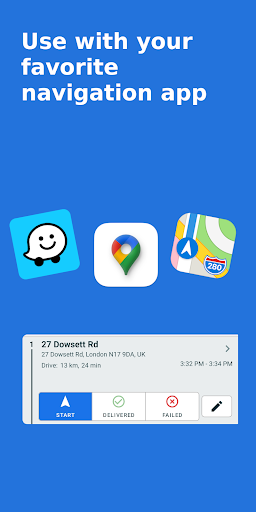
Creates the quickest delivery routes, saving you hours each day Maposcope multi-stop route planner (Batch Geocode) automates delivery route planning and creates fastest routes in seconds with driving direction Route Optimization up to 500 stops A handful of useful functions for every delivery driver in our route planner: ✓ You can deliver up to 30% faster, saving two hours per day and getting home earlier ✓ PDF reports with your route planner details ✓ Support for time window, priority and visit time ✓ You can drag'n'drop markers on the map ✓ Unlimited maps and daily route optimization ✓ Send ETAs to your clients ✓ Setup stop’s delivery time window (service time) ✓ Easily check visit time ✓ Route finder with driving directions between the cities of your choice ✓ free route for delivery driver up to 10 stops ✓ The exact GPS location will help you deliver your shipments faster ✓ Our Route Planner creates the quickest delivery routes for your multi stop route ✓ Realtime Traffic Updates Maposcope will determine the order of visited stops, show you when you will reach a specific location and how long the route will take between specific stops. You can plan your start time and start location, mark the priorities of the stops so that you can deliver the package or visit the urgent points first (ASAP). You can plot a route and routing app will find fastest delivery route with estmiated arrival times. Set start location and start time, list of stops and we will find best route avoiding the disruptions on the route. Set service time, visit time and priority for each address multiple location. The route along with the time spent at the locations can be saved in a PDF report, saved to your disk or sent to your boss or client. Calculated Estimated Time of Arrival (ETA) will inform you (and your customers) of the time it takes for the products to arrive at the destination. GPS route tracking and progress monitoring with built-in reports. Our Route Planner will allow you to place multiple stops from a file (our batch geocoding superb technology), you can save addresses in Excel or csv files and upload it quickly to the map. You can easily move points around the map by simply holding down a pin and dragging it to another location. Easy plan delivery routes optimization with multiple stops. State-of-the-art vehicle route optimization algorithm to create custom route with multiple stops This Gps navigation for delivery vans, cars or even bikes is an excellent navigation app with easy to use GPS tracker. The app is now available as auto-renewable subscription but there is also free plan. Price may vary by location. Subscriptions will be charged to your credit card through your Google account. Your subscription will automatically renew unless canceled before the end of the current period. You can cancel your renewal at any time at this Play Store page or in your Google Play app. Support If you encounter any problems with the app, please email [email protected]

What Multi-Stop Route Planner Is Used For

Multi-Stop Route Planner appears to be a navigation and logistics app for planning delivery or service routes with several stops. Based on the metadata, it is commonly used by delivery drivers, couriers, field workers, and other users who need to organize visits in an efficient order rather than driving stop by stop in a fixed sequence.

The app may help users build routes from a list of addresses, set priorities, add service or visit times, and account for time windows when certain stops need to be reached. The permissions and features listed suggest it also uses location data, live route guidance, and network access to calculate directions, estimate arrival times, and update routing details. It may be especially useful on a phone during active trips, where GPS tracking, route progress, and ETA information can support day-to-day delivery planning. The metadata also indicates support for exporting reports and importing addresses from files such as spreadsheets or CSVs, which points to office-to-field route preparation as well as on-the-road use.

Common uses

  • Plan routes with multiple stops in a more efficient order
  • Set delivery priorities, visit times, and time windows for each stop
  • Use GPS-based navigation and estimated arrival times during trips
  • Import address lists from spreadsheet or CSV files
  • Generate route reports that can be saved or shared as PDFs
  • Track route progress and update clients with ETAs
  • Adjust stops on the map by dragging markers
Best for:
delivery drivers couriers field workers route planning phone app

App Details

Package:
com.mapamai.maps.batchgeocode
Developer:
MapoScope - Delivery Route Optimization Experts
Version:
26.03.18.01
Updated:
Mar 19, 2026
Min Android:
6.0
Age Rating:
Everyone
Contains Ads:
No
In-App Purchases:
Yes

Official Listing

  • Official listing available on Google Play
  • Package name: com.mapamai.maps.batchgeocode
  • Age rating: Everyone

Explore More

Browse more apps in Maps & Navigation or explore the Phone hub .

Related Maps & Navigation Apps

GPS, Maps, Driving Directions icon

GPS, Maps, Driving Directions

Maps & Navigation AppVerge Technologies, LLC

Navigate seamlessly with Real-Time Traffic, Offline Maps, and Voice Navigation.

Version 13.89 208.7 MB ⭐ 4.00 100,000,000+ installs
Sygic GPS Navigation & Maps icon

Sygic GPS Navigation & Maps

Maps & Navigation Sygic.

Sygic GPS Navigation with 3D offline maps is compatible with Android Auto.

Version Varies with device 103.6 MB ⭐ 4.20 50,000,000+ installs
Radarbot: Radar Detector, GPS icon

Radarbot: Radar Detector, GPS

Maps & Navigation Radarbot Company

Speedcam alerts and navigation. 100% Legal and Reliable. Never pay another fine!

Version Varies with device 61.4 MB ⭐ 4.10 50,000,000+ installs
GPS+ Maps, Navigation, Traffic icon

GPS+ Maps, Navigation, Traffic

Maps & Navigation JVSTUDIOS

GPS+ ensures you're always on track, live traffic info and offline maps included

Version 4.0.48 118.7 MB ⭐ 4.60 10,000,000+ installs

How to Download Multi-Stop Route Planner

If this app is not hosted directly on APKApps official link, then for the safest and most up-to-date version, install it from its official Google Play listing.