Blood Pressure Diary by MedM icon

Phone

Blood Pressure Diary by MedM

Medical MedM Inc ⭐ 4.40 100,000+
Version 3.10.5 Everyone

Screenshots

Blood Pressure Diary by MedM screenshot
Permissions Explained 13 permissions requested View details

This app requests 13 permissions. The table below explains what each permission may allow and what users should review before installing.

Status Permission What it means Why it may be used User safety note
ℹ️ Review Approximate Location (network Based) approximate location (network-based) This is an Android permission or app-specific permission requested by the app. The app may use this permission for features related to its category, device support, background behavior, storage, connectivity, or system integration. Review this permission before installing, especially if it does not match the app’s expected purpose.
ℹ️ Review Precise Location (gps And Network Based) precise location (GPS and network-based) This is an Android permission or app-specific permission requested by the app. The app may use this permission for features related to its category, device support, background behavior, storage, connectivity, or system integration. Review this permission before installing, especially if it does not match the app’s expected purpose.
ℹ️ Review Record Audio record audio This is an Android permission or app-specific permission requested by the app. The app may use this permission for features related to its category, device support, background behavior, storage, connectivity, or system integration. Review this permission before installing, especially if it does not match the app’s expected purpose.
ℹ️ Review View Wi Fi Connections view Wi-Fi connections This is an Android permission or app-specific permission requested by the app. The app may use this permission for features related to its category, device support, background behavior, storage, connectivity, or system integration. Review this permission before installing, especially if it does not match the app’s expected purpose.
ℹ️ Review View Network Connections view network connections This is an Android permission or app-specific permission requested by the app. The app may use this permission for features related to its category, device support, background behavior, storage, connectivity, or system integration. Review this permission before installing, especially if it does not match the app’s expected purpose.
ℹ️ Review Pair With Bluetooth Devices pair with Bluetooth devices This is an Android permission or app-specific permission requested by the app. The app may use this permission for features related to its category, device support, background behavior, storage, connectivity, or system integration. Review this permission before installing, especially if it does not match the app’s expected purpose.
ℹ️ Review Access Bluetooth Settings access Bluetooth settings This is an Android permission or app-specific permission requested by the app. The app may use this permission for features related to its category, device support, background behavior, storage, connectivity, or system integration. Review this permission before installing, especially if it does not match the app’s expected purpose.
ℹ️ Review Full Network Access full network access This is an Android permission or app-specific permission requested by the app. The app may use this permission for features related to its category, device support, background behavior, storage, connectivity, or system integration. Review this permission before installing, especially if it does not match the app’s expected purpose.
ℹ️ Review Change Your Audio Settings change your audio settings This is an Android permission or app-specific permission requested by the app. The app may use this permission for features related to its category, device support, background behavior, storage, connectivity, or system integration. Review this permission before installing, especially if it does not match the app’s expected purpose.
ℹ️ Review Run At Startup run at startup This is an Android permission or app-specific permission requested by the app. The app may use this permission for features related to its category, device support, background behavior, storage, connectivity, or system integration. Review this permission before installing, especially if it does not match the app’s expected purpose.
ℹ️ Review Control Vibration control vibration This is an Android permission or app-specific permission requested by the app. The app may use this permission for features related to its category, device support, background behavior, storage, connectivity, or system integration. Review this permission before installing, especially if it does not match the app’s expected purpose.
ℹ️ Review Prevent Device From Sleeping prevent device from sleeping This is an Android permission or app-specific permission requested by the app. The app may use this permission for features related to its category, device support, background behavior, storage, connectivity, or system integration. Review this permission before installing, especially if it does not match the app’s expected purpose.
ℹ️ Review Receive Data From Internet receive data from Internet This is an Android permission or app-specific permission requested by the app. The app may use this permission for features related to its category, device support, background behavior, storage, connectivity, or system integration. Review this permission before installing, especially if it does not match the app’s expected purpose.

About Blood Pressure Diary by MedM

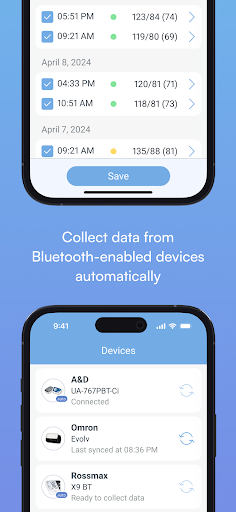
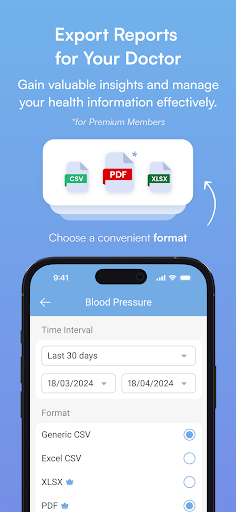
The Blood Pressure Diary App by MedM is the most connected blood pressure monitoring app in the world, designed to simplify blood pressure management at home, track trends, and export reports for the doctor. This smart blood pressure tracking assistant enables users to log data manually or to automatically capture readings from over 200 supported smart BPMs via Bluetooth. Aside from blood pressure, the app can help track medication intake, heart rate, oxygen saturation, respiration rate, and body weight with over a dozen of body composition parameters. The app has a clean and intuitive interface and works with or without registration. Users decide if they want to keep their health data on their smartphone only, or additionally back it up to MedM Health Cloud (https://health.medm.com). Blood Pressure Diary App by MedM can log the following data types: • Blood Pressure • Medication Intake • Note • Heart Rate • Oxygen Saturation • Respiration Rate • Body Weight (including over a dozen body composition parameters) The app’s data analysis tools help users identify patterns in blood pressure fluctuations, enabling them to take timely action and make necessary lifestyle changes or routine adjustments. Blood Pressure Diary App by MedM is freemium, with the basic functionality available to all users. Premium Members, additionally, can sync select data types with other ecosystems (such as Apple Health, Health Connect, Garmin, Fitbit), share access to their health data with other trusted MedM users (family members or caregivers), set up notifications for reminders, thresholds, and goals, as well as receive exclusive offers from MedM partners. MedM follows all applicable best practices for data protection: the HTTPS protocol is used for cloud synchronisation, all health data is stored encrypted on securely hosted servers. Users exercise full control over their data and can at any time export and/or delete their health record. Blood Pressure Diary App by MedM syncs with the following brands of smart blood pressure monitors: A&D Medical, Andesfit, Andon Health, AOJ Medical, Beurer, Bodimetrics, CliniCare, Contec, Dovant Health, Easy@Home, ETA, EZFAST, Famidoc, Finicare, FirstMed, Fleming Medical, ForaCare, Health&Life, HealthGear, Indie Health, iProven, Jumper Medical, Kinetik Wellbeing, LEICKE, Medisana, MicroLife, Multi, Omron, Oxiline, OxiPro Medical, PIC, Rossmax, SilverCrest, TaiDoc, TECH-MED, Transtek, TrueLife, Viatom, Welch Allyn, Yonker, Yuwell, Zewa, and more. For the full list of supported devices, please visit our website: https://www.medm.com/sensors.html Jurisdiction statement: Blood Pressure Diary App by MedM enables users to record 7 different types of health measurements. These measurements can be entered manually by the user, imported from Health Connect, or obtained from health and wellness devices that have been approved by regulatory authorities in the countries where they are sold. Disclaimer: Blood Pressure Diary App by MedM is designed…

What Blood Pressure Diary by MedM Is Used For

Blood Pressure Diary by MedM appears to be a health tracking app for recording blood pressure and related measurements on an Android phone. Based on the metadata, it is commonly used at home to log readings manually or import them from supported smart blood pressure monitors over Bluetooth. It may also help users keep track of medication intake, heart rate, oxygen saturation, respiration rate, and body weight in one place.

The app seems aimed at people who want to review trends over time and prepare reports for a doctor or caregiver. Its permissions and connection features suggest it can pair with Bluetooth devices, sync data online, and run reminders or background functions such as startup and vibration alerts. The location and network permissions may support device setup or connected features, while internet access appears related to cloud sync and report sharing. Based on the metadata, it may be useful for routine self-monitoring, managing multiple health values, and keeping a structured record of measurements on a phone.

Common uses

  • Log blood pressure readings manually or from supported Bluetooth monitors
  • Track related health data such as heart rate, oxygen saturation, and body weight
  • Record medication intake and notes alongside measurements
  • Review changes and patterns in blood pressure over time
  • Export reports that may be shared with a doctor or caregiver
  • Use it as a phone-based health diary with optional cloud backup
  • Set reminders, thresholds, or goals if using premium features
Best for:
home blood pressure tracking health record keeping bluetooth monitor users doctor visit prep phone app

App Details

Package:
com.medm.medmbp.diary
Category:
Medical
Developer:
MedM Inc
Version:
3.10.5
Updated:
Mar 13, 2026
Min Android:
5.0
Age Rating:
Everyone
Contains Ads:
No
In-App Purchases:
Yes

Official Listing

  • Official listing available on Google Play
  • Package name: com.medm.medmbp.diary
  • Age rating: Everyone

Explore More

Browse more apps in Medical or explore the Phone hub .

Related Medical Apps

Kardia icon

Kardia

Medical AliveCor Inc.

Remote, medical-grade heart care at your fingertips

Version 5.38.0-1e28bbac4d 68.0 MB ⭐ 4.74 1,000,000+ installs

How to Download Blood Pressure Diary by MedM

If this app is not hosted directly on APKApps official link, then for the safest and most up-to-date version, install it from its official Google Play listing.