About Merge Labs NRW2
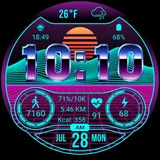
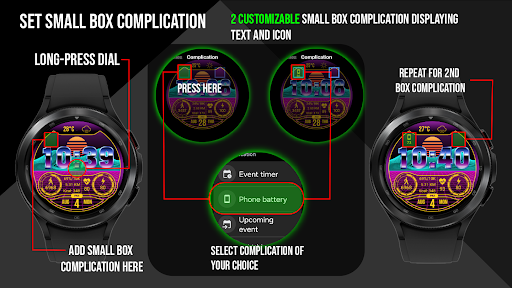
This digital smart watch face definitely has that Retro wave/Synth wave vibe about it for fans of the music/fashion genre. No where else can you find something so different for your Wear OS device! Features include: - Custom made “chromed” font made my Merge Labs. Tap weather area to open Weather App (Sunrise & Sunset) - Built in custom weather temperature and icons. - 17 different colors to choose from. - 2 Small Box customizable complication (Text & Icon) - Displayed numerical watch battery level as well as graphic indicator (0-100%). Tap the battery icon to open the watch battery App. - Displays daily step counter with graphic indicator. Step goal is Synced with your device through Samsung Health App or default health app. The graphic indicator will stop at at your synced step goal but the actual numeric step counter will continue to count steps all the way up to 50,000 steps. To set/change your step goal, please refer to the instructions (image) in the description. Also displayed along with step count is calories burned and distance travelled in KM or Miles. A check mark (✓) will be displayed to denote that step goal has been reached. (see instructions for complete details). Tap steps area to open Steps/Health App. - Displays heart rate (BPM) and you can also tap the heart rate Area to launch your default Heart Rate App. Tap the heart rate area to open the Heart Rate App. - Displays 12/24 HR clock according to your device's settings. Tap date area to open Calendar App. - Displays KM/Miles function that can be set in the “Customize” Watch Menu. - In customize: Blinking Colon On/Off
What Merge Labs NRW2 Is Used For
Merge Labs NRW2 appears to be a Wear OS watch face app built around a retro wave / synth wave visual style. Based on the metadata, people would commonly use it to customize the look of a smartwatch while still keeping everyday information visible at a glance. It is not described as a full utility app; instead, it focuses on the watch face display and quick access to common watch functions.
The listed features suggest it may be used to show time, date, weather, battery level, step count, heart rate, calories, and distance on the watch face. It also appears to support tap actions that open related apps such as weather, steps/health, heart rate, and calendar. Since it syncs step goals through Samsung Health or the default health app, it is likely most useful for users who want a health-oriented face with customizable styling and complications on their watch.
Common uses
- Displays a themed watch face with time and date information
- Shows weather details, sunrise, and sunset on the watch face
- Tracks battery level with a visual and numeric indicator
- Shows step count, step goal progress, calories, and distance
- Displays heart rate and can open the default heart rate app
- Supports customizable colors and small complication boxes
- Works with Wear OS and health app syncing for step goals
How to Download Merge Labs NRW2
If this app is not hosted directly on APKApps official link,
then for the safest and most up-to-date version, install it from its official Google Play listing.