MKW DIGITAL Dashboard icon

Phone

MKW DIGITAL Dashboard

Personalization MKW(Mystic Kindle Watch) ⭐ 0.00 100+
Version Varies with device Everyone

Screenshots

MKW DIGITAL Dashboard screenshot
Permissions Explained 1 permission requested View details

This app requests 1 permission. The table below explains what each permission may allow and what users should review before installing.

Status Permission What it means Why it may be used User safety note
ℹ️ Review Google Play License Check Google Play license check This is an Android permission or app-specific permission requested by the app. The app may use this permission for features related to its category, device support, background behavior, storage, connectivity, or system integration. Review this permission before installing, especially if it does not match the app’s expected purpose.

About MKW DIGITAL Dashboard

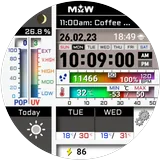
MKW Digital Dashboard Watch Face | Data Style for Wear OS Important Notice This watch face is supported only on Samsung Galaxy Watch devices running One UI 6.0 or higher. This application is designed exclusively for smartwatches. Users without a compatible smartwatch will not be able to use the watch face after purchase. Watch Face Features • Digital dashboard design with clean data-style layout • Chance of Rain Gauge • UV Index Gauge • Weather Forecast (Today / +1 / +2 Days) • Temperature Forecast (Today / +1 / +2 Days) • Sunrise / Sunset Time • Moon Phase Display • Step Counter & Percent • Heart Rate Monitor • Battery Status Temperature Mode • Supports Celsius (°C) and Fahrenheit (°F) • The gauge and temperature value change automatically depending on whether the temperature is above or below zero. Language Support • English • Korean • French • Spanish • German Complication • Editable complication supported • Default provider: Next Event Tap Actions • Phone • Message • Alarm • Settings • Heart Rate MKW Installation Guide The “MKW Installation Guide” app is a companion application that helps install the watch face on Wear OS devices. MKW products include a smartphone companion app, and the “MKW Installation Guide” supports Wear OS watch face downloads only. Usage Notes • Heart rate information is displayed based on data measured by the watch’s heart rate application. • Weather data may vary depending on the connected provider. Community & Support • Blog: https://excing4860.tistory.com/ • Email: [email protected]

What MKW DIGITAL Dashboard Is Used For

MKW DIGITAL Dashboard appears to be a Wear OS watch face centered on a digital dashboard layout for Samsung Galaxy Watch devices running One UI 6.0 or higher. Based on the metadata, it is used to display at-a-glance information on a smartwatch rather than as a general phone app, and it is intended for users who want a data-rich watch face on a compatible wearable.

Common uses may include checking weather and forecast details, tracking steps and heart rate, and viewing battery status, sunrise and sunset times, moon phase, and configurable complications. The app also includes tap actions for phone, message, alarm, settings, and heart rate, which suggests it is designed for quick interaction from the watch screen. The Google Play license check permission indicates app licensing validation, and the long description notes that weather and heart rate data depend on the watch and connected providers. There is also a companion installation guide app for installing the watch face on Wear OS devices.

Common uses

  • Show time and date in a digital dashboard watch face
  • Check weather details such as rain chance, UV index, and forecasts
  • Monitor wellness and activity info like steps and heart rate
  • View sunrise, sunset, moon phase, and battery status on the watch
  • Use editable complications for quick-access watch data
  • Open watch shortcuts for phone, message, alarm, settings, or heart rate
  • Install the watch face on supported Wear OS smartwatch setups
Best for:
Smartwatch users Watch face customization Weather glance info Fitness tracking at a glance Samsung Galaxy Watch owners

App Details

Package:
com.mkw.digi2
Developer:
MKW(Mystic Kindle Watch)
Version:
Varies with device
Updated:
Mar 5, 2026
Min Android:
Varies with device
Age Rating:
Everyone
Contains Ads:
No
In-App Purchases:
No

Official Listing

  • Official listing available on Google Play
  • Package name: com.mkw.digi2
  • Age rating: Everyone

Explore More

Browse more apps in Personalization or explore the Phone hub .

Related Personalization Apps

Zedge™ Wallpapers & Ringtones icon

Zedge™ Wallpapers & Ringtones

Personalization Zedge

Discover millions of background wallpapers & ringtones or make your own with AI.

Version 9.14.2 55.5 MB ⭐ 4.70 500,000,000+ installs
Parallel Space - app cloning icon

Parallel Space - app cloning

Personalization LBE Tech

Run multiple accounts of the same app on a single device

Version 4.0.9557 34.4 MB ⭐ 4.10 100,000,000+ installs
Facemoji AI Emoji Keyboard icon

Facemoji AI Emoji Keyboard

Personalization Nexileap

6000+ Emojis, Custom Keyboard, Fonts, Themes, Genmoji AI Generator,Stickers,GIFs

Version 3.6.3.1 36.7 MB ⭐ 4.70 100,000,000+ installs
Wallpaper 4K HD – Wallcraft icon

Wallpaper 4K HD – Wallcraft

Personalization Nebuchadnezzar DOO

Check Wallcraft Live 4D Wallpaper - 4k HD wallpapers & stunning 3D backgrounds!

Version Varies with device 29.6 MB ⭐ 4.60 100,000,000+ installs
Neon Love Theme icon

Neon Love Theme

Personalization Delicate theme for Android App

Install our stylish keyboard with Neon Love Theme now!

Version 10.7.2.0323 33.2 MB ⭐ 4.60 100,000,000+ installs
Photo Lock App - Hide Pictures icon

Photo Lock App - Hide Pictures

Personalization Battery Stats Saver

Ultimate Gallery Lock App - Hide Pictures, Videos and Lock Apps Instantly!

Version 2.1.12 24.6 MB ⭐ 4.60 100,000,000+ installs

How to Download MKW DIGITAL Dashboard

If this app is not hosted directly on APKApps official link, then for the safest and most up-to-date version, install it from its official Google Play listing.