About Intervalometer for TimeLapse
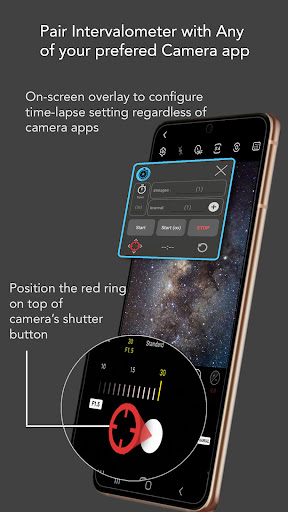
Intervalometer is an automation app for time-lapse to trigger camera shutter in any camera apps with a user-configured time interval. Normal time-lapse mode in most smartphones only allows auto exposure without additional controls on exposure settings and RAW format. Intervalometer works with any camera modes in any camera apps including light-painting mode, HDR, night mode, manual mode, telephoto or ultra-wide angle mode to capture a series of time-lapse image frames. This app works like an actual intervalometer for smartphones, it automates camera shutter triggering using AccessibilityService API and it works on any camera app for Android 7 and above. It can also be used with dedicated camera's remote apps from Canon, Sony, Nikon and etc to trigger the shutter button in the camera's remote app, this acts as an actual intervalometer for dedicated cameras too. With intervalometer and its flexibility to control time-lapse configurations, the following types of time-lapse are possible. 1. Low light time-lapse 2. Long exposure time-lapse 3. HDR time-lapse 4. Milky Way time-lapse / Star Trails time-lapse 5. Holy Grail of time-lapse (Day to night time-lapse) 6. Ultra wide angle time-lapse 7. Light painting time-lapse Other than time-lapse, it can also be used to capture frames for image stacking in post-process (on other apps) to achieve higher quality images and etc. 1. Image stacking 2. Star trails 3. Lightning stacking Features - Full control on time-lapse configuration (delay timer, interval time, number of shots) - Infinite mode - Bulb mode - Works with Any camera app (shutter button position can be reconfigured) Note: For Huawei and Xiaomi devices, please try to restart your device if it doesn't work or touch input can't be triggered. Disclaimer: Intervalometer only automates photo taking process, it is neither a camera app nor image processing app.
What Intervalometer for TimeLapse Is Used For
Intervalometer for TimeLapse appears to be a camera automation app for Android phones that helps trigger shutter actions at set time intervals. Based on the metadata, it is commonly used for time-lapse capture by controlling when photos are taken rather than acting as a camera or editing app itself. It may be useful when you want repeated shots for scenes such as low-light changes, long exposures, star trails, HDR sequences, or day-to-night transitions.
The app is described as working with many camera apps and with some dedicated camera remote apps, which suggests it is aimed at users who already have a camera app or camera control setup and want interval-based shooting. Its accessibility-based automation and overlay permissions point to a function that can interact with the on-screen shutter button, so it may be used for hands-free or repeatable capture on a phone. The metadata also notes settings for delay, interval, shot count, infinite mode, and bulb mode, which are common needs for time-lapse and image-stacking workflows.
Because it focuses on shutter automation, it seems best suited to photographers who want more control over capture timing on Android 7+ devices, especially when standard time-lapse modes do not offer enough flexibility.
Common uses
- Set up repeated shutter taps for time-lapse sequences
- Adjust delay, interval, and shot count for planned captures
- Use with different camera apps instead of only one built-in camera mode
- Capture frames for stacking workflows such as star trails or lightning
- Support long-exposure style sequences with bulb mode
- Trigger camera remote apps for some dedicated cameras
- Useful when you need hands-free, timed photo capture on a phone
App Details
Package:
com.mobilephoton.intervalometer
Developer:
MobilePhoton
Version:
2.9.12
Updated:
Jul 14, 2025
Min Android:
8.0
Age Rating:
Everyone
Contains Ads:
No
In-App Purchases:
Yes
Official Listing
-
Official listing available on
Google Play
-
Package name:
com.mobilephoton.intervalometer
-
Age rating:
Everyone
Related Photography Apps
Photography
•
PhotoPills, SL
Version 1.8.20
⭐ 4.70
100,000+ installs
Photography
•
Chantal Pro SIA
Version 043db
⭐ 4.50
10,000+ installs
How to Download Intervalometer for TimeLapse
If this app is not hosted directly on APKApps official link,
then for the safest and most up-to-date version, install it from its official Google Play listing.