SquirrelCast FPV Streamer icon

Phone

SquirrelCast FPV Streamer

Tools Nuclear Squirrel 100+
Version Varies with device Everyone

Screenshots

SquirrelCast FPV Streamer screenshot
Permissions Explained 7 permissions requested View details

This app requests 7 permissions. The table below explains what each permission may allow and what users should review before installing.

Status Permission What it means Why it may be used User safety note
ℹ️ Review Read The Contents Of Your Usb Storage read the contents of your USB storage This is an Android permission or app-specific permission requested by the app. The app may use this permission for features related to its category, device support, background behavior, storage, connectivity, or system integration. Review this permission before installing, especially if it does not match the app’s expected purpose.
ℹ️ Review Modify Or Delete The Contents Of Your Usb Storage modify or delete the contents of your USB storage This is an Android permission or app-specific permission requested by the app. The app may use this permission for features related to its category, device support, background behavior, storage, connectivity, or system integration. Review this permission before installing, especially if it does not match the app’s expected purpose.
ℹ️ Review Take Pictures And Videos take pictures and videos This is an Android permission or app-specific permission requested by the app. The app may use this permission for features related to its category, device support, background behavior, storage, connectivity, or system integration. Review this permission before installing, especially if it does not match the app’s expected purpose.
ℹ️ Review Record Audio record audio This is an Android permission or app-specific permission requested by the app. The app may use this permission for features related to its category, device support, background behavior, storage, connectivity, or system integration. Review this permission before installing, especially if it does not match the app’s expected purpose.
ℹ️ Review View Network Connections view network connections This is an Android permission or app-specific permission requested by the app. The app may use this permission for features related to its category, device support, background behavior, storage, connectivity, or system integration. Review this permission before installing, especially if it does not match the app’s expected purpose.
ℹ️ Review Full Network Access full network access This is an Android permission or app-specific permission requested by the app. The app may use this permission for features related to its category, device support, background behavior, storage, connectivity, or system integration. Review this permission before installing, especially if it does not match the app’s expected purpose.
ℹ️ Review Google Play License Check Google Play license check This is an Android permission or app-specific permission requested by the app. The app may use this permission for features related to its category, device support, background behavior, storage, connectivity, or system integration. Review this permission before installing, especially if it does not match the app’s expected purpose.

About SquirrelCast FPV Streamer

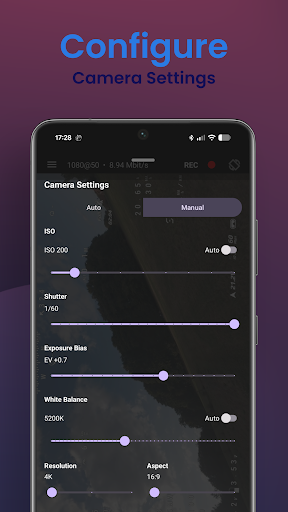
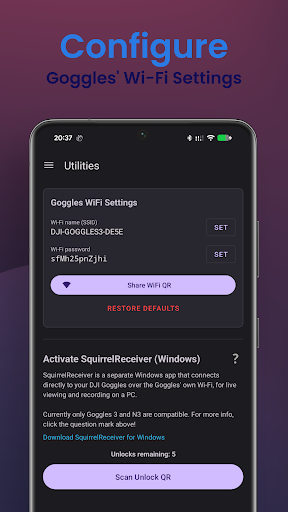
SquirrelCast turns your Android phone or tablet into a companion display for DJI FPV goggles. View your live feed with low latency, record flights locally, stream video over Wi-Fi, control supported camera settings, and monitor telemetry in the app or in your browser. Compatible with: - Goggles 3 - Goggles N3 - Goggles 2 - Goggles Integra - Goggles V2 (O3 only) Features - Live view: Watch your FPV feed directly on your phone or tablet. - Recording: Save flights locally, with optional microphone audio. - Streaming: Share video over your local network to a browser or compatible apps. - Camera control: Adjust supported camera settings directly in the app. - Telemetry in the app: View telemetry in a dedicated Telemetry tab or as a map overlay in the Player. - Telemetry in the browser: Show telemetry in the Web UI while streaming over Wi-Fi. - Telemetry logging: Save telemetry to CSV for later review and analysis. - DJI and ELRS telemetry support: Works with compatible DJI drone telemetry and ELRS backpack telemetry over Wi-Fi. Notes - Streaming performance depends on device capability and network quality. - Requires compatible hardware.

What SquirrelCast FPV Streamer Is Used For

SquirrelCast FPV Streamer appears to be a companion app for people using compatible DJI FPV goggles with an Android phone or tablet. Based on the metadata, it is commonly used to view a live FPV feed on a mobile device, which can make it easier to monitor flights without relying only on the goggles.

The app also seems aimed at recording and reviewing flight sessions. It may save video locally, optionally capture microphone audio, and log telemetry for later analysis. Network access and browser streaming permissions suggest it can share the video feed over Wi‑Fi to a browser or other compatible apps, while supported camera controls and telemetry views make it useful as a lightweight flight monitoring tool rather than a general media app.

This type of app is most relevant in a drone setup where the phone or tablet acts as a secondary display. The metadata also indicates support for DJI and ELRS telemetry over Wi‑Fi, plus CSV export for telemetry data, so it may appeal to users who want a record of flight details as well as live viewing.

Common uses

  • Use it as a companion display for supported DJI FPV goggles.
  • Watch a live FPV feed on a phone or tablet with low latency.
  • Record flights locally, with optional microphone audio.
  • Stream the video feed over Wi‑Fi to a browser or compatible apps.
  • View telemetry inside the app or as a map overlay while streaming.
  • Log telemetry to CSV for later review and flight analysis.
  • Adjust supported camera settings from within the app.
Best for:
FPV drone pilots Companion display users Flight recording Telemetry monitoring Phone or tablet use

App Details

Package:
com.NuclearSquirrel.SquirrelCast
Category:
Tools
Developer:
Nuclear Squirrel
Version:
Varies with device
Min Android:
Varies with device
Age Rating:
Everyone
Contains Ads:
No
In-App Purchases:
No

Official Listing

  • Official listing available on Google Play
  • Package name: com.NuclearSquirrel.SquirrelCast
  • Age rating: Everyone

Explore More

Browse more apps in Tools or explore the Phone hub .

Related Tools Apps

Turbo VPN - Secure VPN Proxy icon

Turbo VPN - Secure VPN Proxy

Tools Innovative Connecting

Enjoy fast streaming, secure & private internet with super unlimited VPN Turbo

Version 4.2.9.8 25.3 MB ⭐ 4.70 100,000,000+ installs
AVG AntiVirus & Security icon

AVG AntiVirus & Security

Tools AVG Mobile

Scam & Malware protection, Virus Cleaner, Hack Alerts, App Locker, Photo Vault

Version 26.6.0 56.3 MB ⭐ 4.60 100,000,000+ installs
Avast Antivirus & Security icon

Avast Antivirus & Security

Tools Avast Software

Android Mobile Security with Antivirus, Virus cleaner, App Lock & Phone cleaner

Version 26.2.3.260318122 56.8 MB ⭐ 4.60 100,000,000+ installs
F-Secure Mobile Security icon

F-Secure Mobile Security

Tools F-Secure Corporation

Antivirus, Virus Cleaner & Malware Scan | Mobile Security & Hacker Protection

Version 10.57-ff32089 17.9 MB ⭐ 4.20 100,000,000+ installs
TeraBox: 1TB Cloud & AI Space icon

TeraBox: 1TB Cloud & AI Space

Tools Flextech Inc.

Get 1TB Cloud Storage Space with One-Click. Unlock AI Tools in One Smart Space.

Version 4.13.7 112.7 MB ⭐ 4.40 100,000,000+ installs
Secure VPN-Safer Internet icon

Secure VPN-Safer Internet

Tools Secure Signal Inc.

Access favorite websites and apps more securely on the go.

Version 4.3.11 5.6 MB ⭐ 4.70 100,000,000+ installs

How to Download SquirrelCast FPV Streamer

If this app is not hosted directly on APKApps official link, then for the safest and most up-to-date version, install it from its official Google Play listing.