Planter - Garden Planner icon

Phone

Planter - Garden Planner

Lifestyle Planter ⭐ 4.60 500,000+
Version 3.6.44 Everyone

Screenshots

Planter - Garden Planner screenshot
Permissions Explained 8 permissions requested View details

This app requests 8 permissions. The table below explains what each permission may allow and what users should review before installing.

Status Permission What it means Why it may be used User safety note
ℹ️ Review Approximate Location (network Based) approximate location (network-based) This is an Android permission or app-specific permission requested by the app. The app may use this permission for features related to its category, device support, background behavior, storage, connectivity, or system integration. Review this permission before installing, especially if it does not match the app’s expected purpose.
ℹ️ Review Precise Location (gps And Network Based) precise location (GPS and network-based) This is an Android permission or app-specific permission requested by the app. The app may use this permission for features related to its category, device support, background behavior, storage, connectivity, or system integration. Review this permission before installing, especially if it does not match the app’s expected purpose.
ℹ️ Review View Network Connections view network connections This is an Android permission or app-specific permission requested by the app. The app may use this permission for features related to its category, device support, background behavior, storage, connectivity, or system integration. Review this permission before installing, especially if it does not match the app’s expected purpose.
ℹ️ Review Full Network Access full network access This is an Android permission or app-specific permission requested by the app. The app may use this permission for features related to its category, device support, background behavior, storage, connectivity, or system integration. Review this permission before installing, especially if it does not match the app’s expected purpose.
ℹ️ Review Control Vibration control vibration This is an Android permission or app-specific permission requested by the app. The app may use this permission for features related to its category, device support, background behavior, storage, connectivity, or system integration. Review this permission before installing, especially if it does not match the app’s expected purpose.
ℹ️ Review Prevent Device From Sleeping prevent device from sleeping This is an Android permission or app-specific permission requested by the app. The app may use this permission for features related to its category, device support, background behavior, storage, connectivity, or system integration. Review this permission before installing, especially if it does not match the app’s expected purpose.
ℹ️ Review Read Google Service Configuration read Google service configuration This is an Android permission or app-specific permission requested by the app. The app may use this permission for features related to its category, device support, background behavior, storage, connectivity, or system integration. Review this permission before installing, especially if it does not match the app’s expected purpose.
ℹ️ Review Receive Data From Internet receive data from Internet This is an Android permission or app-specific permission requested by the app. The app may use this permission for features related to its category, device support, background behavior, storage, connectivity, or system integration. Review this permission before installing, especially if it does not match the app’s expected purpose.

About Planter - Garden Planner

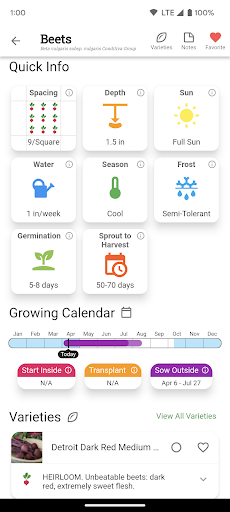
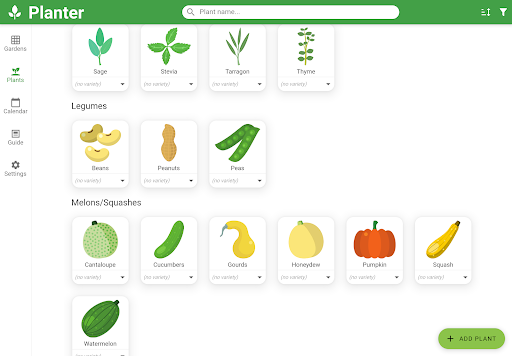
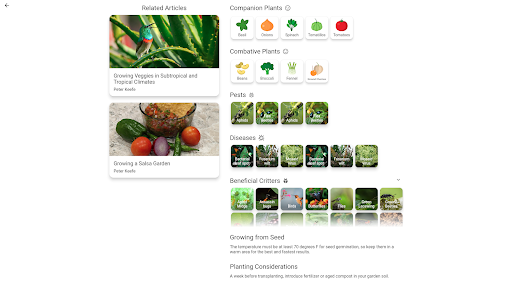
Arrange your garden and learn how to grow vegetables with this garden planner! Features: • Companion and combative plant information • Gardening schedule for planting or transplanting times • Square foot gardening layout grid for easy spacing • Information on 50+ fruits and vegetables (and more each day!) • Ability to add custom plants if your favorite isn't included yet Planter™ makes gardening easier for both beginners and long-time gardeners! Support and Feature Requests New features are coming every week to improve the experience and help you plan and manage your garden. If you have any feature requests, please let me know! Or if you have a favorite plant that isn't included, I can add it. I'm a gardening enthusiast and use Planter™ when planning my own garden. If you think a new feature will be useful, chances are I do too =). More Info: - Includes many organic and non-GMO varieties - Automatically determines your frost date and planting zone - Great for your home vegetable garden! (not for flower gardens)

What Planter - Garden Planner Is Used For

Planter - Garden Planner appears to be a gardening reference and planning app for home vegetable gardens. Based on the metadata, it is commonly used to organize planting plans, map out garden beds, and look up basic growing guidance for fruits and vegetables. The square-foot gardening grid suggests it may help users space plants more efficiently when designing a layout on a phone.

The app also appears useful for timing garden tasks such as planting or transplanting, since it includes gardening schedules and can automatically determine frost date and planting zone using location-based permissions. That means it may rely on approximate or precise location to tailor seasonal guidance to the user’s area. The companion and combative plant information also indicates it can be used to check which plants may grow well together or should be kept apart. It is described as being focused on vegetable gardens rather than flower gardens, so it seems best suited for people planning edible gardens and tracking common crops, with the option to add custom plants if a favorite is missing.

Common uses

  • Plan a home vegetable garden layout on a phone.
  • Check planting and transplant timing by season and zone.
  • Use square-foot spacing guidance to place crops more neatly.
  • Look up information on 50+ fruits and vegetables.
  • Review companion and combative plant pairings before planting.
  • Add custom plants if a crop is not already listed.
  • Use location-based frost date and planting zone guidance.
Best for:
Home gardeners Vegetable growers Garden planners Beginner gardeners Phone app users

App Details

Package:
com.perculacreative.peter.gardenplanner
Category:
Lifestyle
Developer:
Planter
Version:
3.6.44
Updated:
Feb 23, 2026
Min Android:
7.0
Age Rating:
Everyone
Contains Ads:
No
In-App Purchases:
Yes

Official Listing

  • Official listing available on Google Play
  • Package name: com.perculacreative.peter.gardenplanner
  • Age rating: Everyone

Explore More

Browse more apps in Lifestyle or explore the Phone hub .

Related Lifestyle Apps

Life360: Stay Connected & Safe icon

Life360: Stay Connected & Safe

Lifestyle Life360

All-in-one family safety: location sharing, crash alerts, driver reports & more

Version 26.11.1 37.5 MB ⭐ 4.40 100,000,000+ installs
Muslim Pro: Quran Athan Prayer icon

Muslim Pro: Quran Athan Prayer

Lifestyle Bitsmedia

Duas, Qibla, Azan & Islamic tools to support your daily worship & prayer.

Version Varies with device 61.2 MB ⭐ 4.00 100,000,000+ installs
Xiaomi Home icon

Xiaomi Home

Lifestyle Beijing Xiaomi Mobile Software Co.,Ltd

Xiaomi Home is the official Android app for Xiaomi Home.

Version 11.3.702 126.5 MB ⭐ 4.50 50,000,000+ installs
AT&T Secure Family® parent app icon

AT&T Secure Family® parent app

Lifestyle AT&T Services, Inc.

Family location tracker & parental controls to limit screen time & block apps.

Version 11.5.1 80.9 MB ⭐ 4.50 10,000,000+ installs
TP-Link Tapo icon

TP-Link Tapo

Lifestyle TP-LINK SYSTEMS INC.

Control your Tapo smart devices from anywhere.

Version 3.17.512 338.1 MB ⭐ 4.70 10,000,000+ installs

How to Download Planter - Garden Planner

If this app is not hosted directly on APKApps official link, then for the safest and most up-to-date version, install it from its official Google Play listing.