CDisplayEx Comic Reader icon

Phone

CDisplayEx Comic Reader

Comics Progdigy Software ⭐ 4.90 100,000+
Version Varies with device Everyone

Screenshots

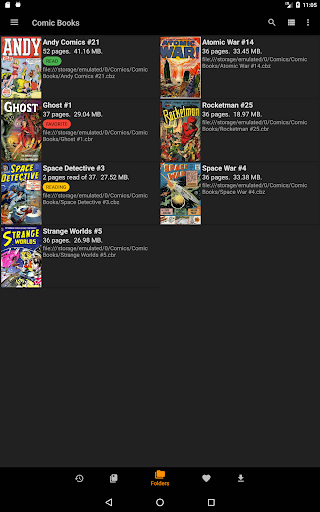
CDisplayEx Comic Reader screenshot
Permissions Explained 6 permissions requested View details

This app requests 6 permissions. The table below explains what each permission may allow and what users should review before installing.

Status Permission What it means Why it may be used User safety note
ℹ️ Review Read The Contents Of Your Usb Storage read the contents of your USB storage This is an Android permission or app-specific permission requested by the app. The app may use this permission for features related to its category, device support, background behavior, storage, connectivity, or system integration. Review this permission before installing, especially if it does not match the app’s expected purpose.
ℹ️ Review Modify Or Delete The Contents Of Your Usb Storage modify or delete the contents of your USB storage This is an Android permission or app-specific permission requested by the app. The app may use this permission for features related to its category, device support, background behavior, storage, connectivity, or system integration. Review this permission before installing, especially if it does not match the app’s expected purpose.
ℹ️ Review View Network Connections view network connections This is an Android permission or app-specific permission requested by the app. The app may use this permission for features related to its category, device support, background behavior, storage, connectivity, or system integration. Review this permission before installing, especially if it does not match the app’s expected purpose.
ℹ️ Review Full Network Access full network access This is an Android permission or app-specific permission requested by the app. The app may use this permission for features related to its category, device support, background behavior, storage, connectivity, or system integration. Review this permission before installing, especially if it does not match the app’s expected purpose.
ℹ️ Review Prevent Device From Sleeping prevent device from sleeping This is an Android permission or app-specific permission requested by the app. The app may use this permission for features related to its category, device support, background behavior, storage, connectivity, or system integration. Review this permission before installing, especially if it does not match the app’s expected purpose.
ℹ️ Review Google Play License Check Google Play license check This is an Android permission or app-specific permission requested by the app. The app may use this permission for features related to its category, device support, background behavior, storage, connectivity, or system integration. Review this permission before installing, especially if it does not match the app’s expected purpose.

About CDisplayEx Comic Reader

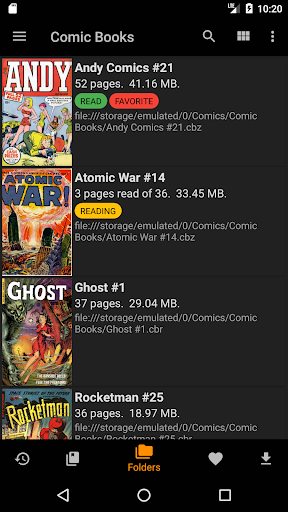
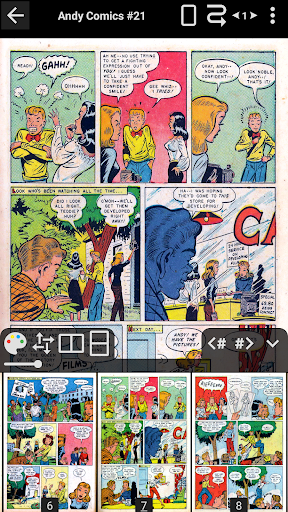
CDisplayEx is a light, efficient CBR Reader, and it is also the most popular comic book reader. It is able to read all comic book formats (.cbr file, .cbz, .pdf, etc..) and Manga. Everything is designed to give you the best reading experience, it load comic books immediately, reading is fluid and comfortable. Please note that access to Google Drive requires the application to pass a CASA Level 3 Assessment. The cost of this certification no longer allows access to Google Drive. The link will remain available until June 15 for those who are not already blocked. After this date, access to Google Drive will be removed from the application. Benefits of the Pro version: - Access to Onedrive, Dropbox, Komga, Kavita, Mega. - Continuous pages, horizontal and vertical. - Advanced page scaling options that allow you to pre-set the number of moves to reach the opposite edge of the page. - Open the files on the network without downloading them entirely (samba). - Image export function. - Support for bookmarks. - S-Pen support. - Night mode. - Change the interface language. - No ads. You can simply browse through your folders to find and read your comics, but if you need, the management of your library is integrated! simply indicate where your comics are, and the reader will group the comics by series or offer you the next album to read in your collection. An integrated search will allow you to find a volume instantly. The reader also allows you to connect to network shares, preload files on your phone or tablet, and perform searches.

What CDisplayEx Comic Reader Is Used For

CDisplayEx Comic Reader appears to be a phone app for reading digital comics and manga. Based on the metadata, it supports common comic file types such as CBR, CBZ, and PDF, which makes it useful for people who keep comic collections on local storage or on network locations. The app is described as focused on a smooth reading experience, so it may be used as a dedicated reader rather than a general document app.

The storage and network permissions suggest it can browse files on the device, access network connections, and work with comics stored on shared folders. That fits common use cases like opening a personal library, continuing a series, or searching for a specific issue. The long description also mentions library organization features, bookmarks, page scaling, night mode, and options for reading on connected services in the Pro version, so users may choose it when they want more control over comic reading on a phone or tablet.

Common uses

  • Open CBR, CBZ, PDF, and other comic files
  • Read manga and comic collections on a phone
  • Browse folders to locate local comic files
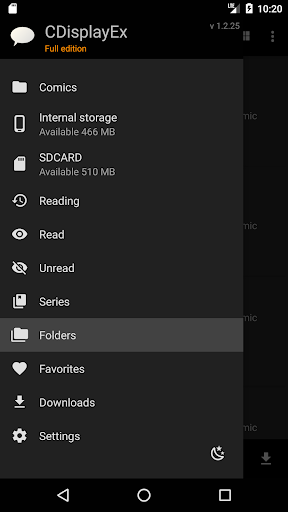
  • Organize a comic library by series or next issue
  • Use bookmarks and search to return to specific pages or volumes
  • Access comics from network shares or cloud-connected libraries in supported versions
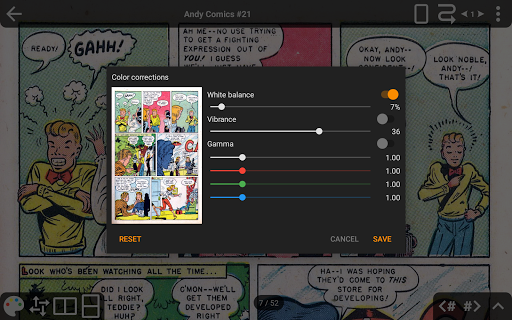
  • Adjust reading options such as page scaling, night mode, and page direction
Best for:
comic readers manga readers phone app library organization night reading

App Details

Package:
com.progdigy.cdisplay
Category:
Comics
Developer:
Progdigy Software
Version:
Varies with device
Updated:
Sep 15, 2025
Min Android:
Varies with device
Age Rating:
Everyone
Contains Ads:
No
In-App Purchases:
No

Official Listing

  • Official listing available on Google Play
  • Package name: com.progdigy.cdisplay
  • Age rating: Everyone

Explore More

Browse more apps in Comics or explore the Phone hub .

Related Comics Apps

WEBTOON: Manga, Comics, Manhwa icon

WEBTOON: Manga, Comics, Manhwa

Comics NAVER WEBTOON

The largest manga, comics, and manhwa community with millions of fans!

Version 3.8.11 54.5 MB ⭐ 4.60 100,000,000+ installs
MangaToon: Comic & Manga icon

MangaToon: Comic & Manga

Comics MangaToon

A universal application for reading comics

Version 3.33.00 40.3 MB ⭐ 4.30 10,000,000+ installs
MANGA Plus by SHUEISHA icon

MANGA Plus by SHUEISHA

Comics 株式会社 集英社

Get the latest manga chapters daily, released simultaneously with Japan.

Version 2.2.2 56.3 MB ⭐ 3.20 10,000,000+ installs
WebComics - Webtoon & Manga icon

WebComics - Webtoon & Manga

Comics WEBCOMICS HOLDINGS HK LIMITED

Read Manga, Comics & Manhwa of Romance, Action, Fantasy, Drama, BL and more!

Version 3.8.10 36.0 MB ⭐ 4.40 10,000,000+ installs

How to Download CDisplayEx Comic Reader

If this app is not hosted directly on APKApps official link, then for the safest and most up-to-date version, install it from its official Google Play listing.