Wifi-Remote for Xbox icon

Phone

Wifi-Remote for Xbox

Tools Queequac ⭐ 3.60 10,000+
Version 1.3.19 Everyone

Screenshots

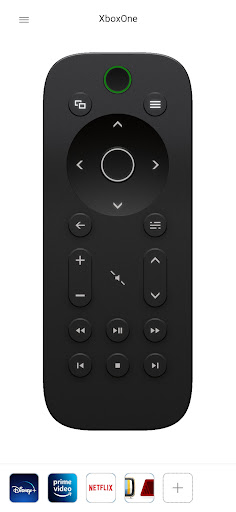
Wifi-Remote for Xbox screenshot
Permissions Explained 7 permissions requested View details

This app requests 7 permissions. The table below explains what each permission may allow and what users should review before installing.

Status Permission What it means Why it may be used User safety note
ℹ️ Review View Wi Fi Connections view Wi-Fi connections This is an Android permission or app-specific permission requested by the app. The app may use this permission for features related to its category, device support, background behavior, storage, connectivity, or system integration. Review this permission before installing, especially if it does not match the app’s expected purpose.
ℹ️ Review View Network Connections view network connections This is an Android permission or app-specific permission requested by the app. The app may use this permission for features related to its category, device support, background behavior, storage, connectivity, or system integration. Review this permission before installing, especially if it does not match the app’s expected purpose.
ℹ️ Review Allow Wi Fi Multicast Reception allow Wi-Fi Multicast reception This is an Android permission or app-specific permission requested by the app. The app may use this permission for features related to its category, device support, background behavior, storage, connectivity, or system integration. Review this permission before installing, especially if it does not match the app’s expected purpose.
ℹ️ Review Full Network Access full network access This is an Android permission or app-specific permission requested by the app. The app may use this permission for features related to its category, device support, background behavior, storage, connectivity, or system integration. Review this permission before installing, especially if it does not match the app’s expected purpose.
ℹ️ Review Control Vibration control vibration This is an Android permission or app-specific permission requested by the app. The app may use this permission for features related to its category, device support, background behavior, storage, connectivity, or system integration. Review this permission before installing, especially if it does not match the app’s expected purpose.
ℹ️ Review Google Play License Check Google Play license check This is an Android permission or app-specific permission requested by the app. The app may use this permission for features related to its category, device support, background behavior, storage, connectivity, or system integration. Review this permission before installing, especially if it does not match the app’s expected purpose.
ℹ️ Review Transmit Infrared transmit infrared This is an Android permission or app-specific permission requested by the app. The app may use this permission for features related to its category, device support, background behavior, storage, connectivity, or system integration. Review this permission before installing, especially if it does not match the app’s expected purpose.

About Wifi-Remote for Xbox

Control your Xbox One or Xbox Series X/S via app, for example when no controller is at hand. Ideal for watching TV or multimedia content. The remote control behaves just like any hardware media remote control for the Xbox. But here control takes place via the local home network, without any detour via the cloud and without annoying latency. In combination with an Xbox Live account, you can even pin your favorite Xbox apps for quick launch. From now on, a click on the remote control is enough to launch the desired application directly on the console. No advertising and no hidden additional costs! However, it should be noted that the remote is not a full-fledged replacement for any controller and cannot be used to control games. Note: Xbox 360 is not supported! Disclaimer: This app is not an official Xbox app published by, affiliated with or endorsed by Microsoft. The app uses interfaces that Microsoft can remove from the game console at any time without prior notice. While the app has been developed and tested with the utmost care, it cannot be guaranteed to work permanently.

What Wifi-Remote for Xbox Is Used For

Wifi-Remote for Xbox appears to be a phone app for controlling an Xbox One or Xbox Series X/S over a local Wi‑Fi network. Based on the metadata, it is meant for situations where you want a simple media-style remote for the console, such as browsing menus, launching apps, or handling TV and streaming use without reaching for a game controller.

The app may be especially useful in a living-room setup because it relies on the home network rather than cloud-based control, which suggests it is designed for nearby, low-latency interaction. It also mentions support for pinning favorite Xbox apps when paired with an Xbox Live account, so it may help users open common apps faster from the console. The permission list includes network and Wi‑Fi access, which fits a network-based remote tool, and infrared transmission is listed as well, though the main described function is network control. The metadata also notes that it is not a replacement for a controller and cannot be used to play games, so it seems focused on console navigation and media control rather than gameplay.

Common uses

  • Use it as a media-style remote for Xbox One or Xbox Series X/S.
  • Navigate menus and launch Xbox apps from a phone.
  • Control the console over the local home network instead of the cloud.
  • Help when a regular controller is not nearby.
  • Use it for TV or multimedia playback on the console.
  • Pin favorite Xbox apps for quicker access, if that feature is available with your account.
  • Not intended for controlling games or replacing a full controller.
Best for:
Xbox owners Living-room control Media navigation Quick app launch Phone remote use

App Details

Package:
com.queequac.wifi_remote
Category:
Tools
Developer:
Queequac
Version:
1.3.19
Updated:
Jul 1, 2025
Min Android:
9
Age Rating:
Everyone
Contains Ads:
No
In-App Purchases:
No

Official Listing

  • Official listing available on Google Play
  • Package name: com.queequac.wifi_remote
  • Age rating: Everyone

Explore More

Browse more apps in Tools or explore the Phone hub .

Related Tools Apps

Turbo VPN - Secure VPN Proxy icon

Turbo VPN - Secure VPN Proxy

Tools Innovative Connecting

Enjoy fast streaming, secure & private internet with super unlimited VPN Turbo

Version 4.2.9.8 25.3 MB ⭐ 4.70 100,000,000+ installs
AVG AntiVirus & Security icon

AVG AntiVirus & Security

Tools AVG Mobile

Scam & Malware protection, Virus Cleaner, Hack Alerts, App Locker, Photo Vault

Version 26.6.0 56.3 MB ⭐ 4.60 100,000,000+ installs
Avast Antivirus & Security icon

Avast Antivirus & Security

Tools Avast Software

Android Mobile Security with Antivirus, Virus cleaner, App Lock & Phone cleaner

Version 26.2.3.260318122 56.8 MB ⭐ 4.60 100,000,000+ installs
F-Secure Mobile Security icon

F-Secure Mobile Security

Tools F-Secure Corporation

Antivirus, Virus Cleaner & Malware Scan | Mobile Security & Hacker Protection

Version 10.57-ff32089 17.9 MB ⭐ 4.20 100,000,000+ installs
TeraBox: 1TB Cloud & AI Space icon

TeraBox: 1TB Cloud & AI Space

Tools Flextech Inc.

Get 1TB Cloud Storage Space with One-Click. Unlock AI Tools in One Smart Space.

Version 4.13.7 112.7 MB ⭐ 4.40 100,000,000+ installs
Secure VPN-Safer Internet icon

Secure VPN-Safer Internet

Tools Secure Signal Inc.

Access favorite websites and apps more securely on the go.

Version 4.3.11 5.6 MB ⭐ 4.70 100,000,000+ installs

How to Download Wifi-Remote for Xbox

If this app is not hosted directly on APKApps official link, then for the safest and most up-to-date version, install it from its official Google Play listing.