Beacon Game Launcher icon

Phone

Beacon Game Launcher

Personalization NERDS TAKE OVER ⭐ 4.30 10,000+
Version 1.8.21 Everyone

Screenshots

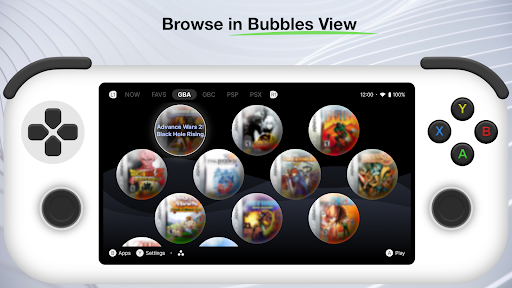
Beacon Game Launcher screenshot
Permissions Explained 5 permissions requested View details

This app requests 5 permissions. The table below explains what each permission may allow and what users should review before installing.

Status Permission What it means Why it may be used User safety note
ℹ️ Review View Wi Fi Connections view Wi-Fi connections This is an Android permission or app-specific permission requested by the app. The app may use this permission for features related to its category, device support, background behavior, storage, connectivity, or system integration. Review this permission before installing, especially if it does not match the app’s expected purpose.
ℹ️ Review View Network Connections view network connections This is an Android permission or app-specific permission requested by the app. The app may use this permission for features related to its category, device support, background behavior, storage, connectivity, or system integration. Review this permission before installing, especially if it does not match the app’s expected purpose.
ℹ️ Review Full Network Access full network access This is an Android permission or app-specific permission requested by the app. The app may use this permission for features related to its category, device support, background behavior, storage, connectivity, or system integration. Review this permission before installing, especially if it does not match the app’s expected purpose.
ℹ️ Review Run At Startup run at startup This is an Android permission or app-specific permission requested by the app. The app may use this permission for features related to its category, device support, background behavior, storage, connectivity, or system integration. Review this permission before installing, especially if it does not match the app’s expected purpose.
ℹ️ Review Prevent Device From Sleeping prevent device from sleeping This is an Android permission or app-specific permission requested by the app. The app may use this permission for features related to its category, device support, background behavior, storage, connectivity, or system integration. Review this permission before installing, especially if it does not match the app’s expected purpose.

About Beacon Game Launcher

Does not contain games or emulators. ⭐️ Beacon is an Android launcher designed to enhance your classic gaming experience. ⚙️ Add your preferred emulators, curate your retro game collection, and launch games directly from the app. 🎮 Your retro game library is enriched by automatically scraping cover art and metadata.

What Beacon Game Launcher Is Used For

Beacon Game Launcher appears to be a launcher focused on organizing and opening classic game libraries on Android phones. Based on the metadata, it does not include games or emulators itself; instead, it may act as a front-end where you add the emulators you already use, arrange your retro collection, and start games from one place.

The app description also suggests it can enrich a library by pulling in cover art and game metadata automatically, which may help make large retro collections easier to browse. Because it requests network-related permissions, it likely needs internet access for scraping artwork and metadata, while the startup and sleep-related permissions suggest it may stay available in the background and keep the device awake during use. This makes it most relevant for users who manage emulator-based game setups on a phone and want a more organized, game-focused launcher experience.

Common uses

  • Launch retro games from a central library screen
  • Organize emulators and game collections in one place
  • Automatically add cover art and metadata for titles
  • Browse a curated classic gaming library on Android phones
  • Keep a launcher available at startup for quick access
  • Support a custom emulator-based setup rather than providing games itself
Best for:
Retro gamers Emulator users Phone app Game library management Custom launcher setup

App Details

Package:
com.radikal.gamelauncher
Developer:
NERDS TAKE OVER
Version:
1.8.21
Updated:
Mar 25, 2026
Min Android:
7.0
Age Rating:
Everyone
Contains Ads:
No
In-App Purchases:
No

Official Listing

  • Official listing available on Google Play
  • Package name: com.radikal.gamelauncher
  • Age rating: Everyone

Explore More

Browse more apps in Personalization or explore the Phone hub .

Related Personalization Apps

Zedge™ Wallpapers & Ringtones icon

Zedge™ Wallpapers & Ringtones

Personalization Zedge

Discover millions of background wallpapers & ringtones or make your own with AI.

Version 9.14.2 55.5 MB ⭐ 4.70 500,000,000+ installs
Parallel Space - app cloning icon

Parallel Space - app cloning

Personalization LBE Tech

Run multiple accounts of the same app on a single device

Version 4.0.9557 34.4 MB ⭐ 4.10 100,000,000+ installs
Facemoji AI Emoji Keyboard icon

Facemoji AI Emoji Keyboard

Personalization Nexileap

6000+ Emojis, Custom Keyboard, Fonts, Themes, Genmoji AI Generator,Stickers,GIFs

Version 3.6.3.1 36.7 MB ⭐ 4.70 100,000,000+ installs
Wallpaper 4K HD – Wallcraft icon

Wallpaper 4K HD – Wallcraft

Personalization Nebuchadnezzar DOO

Check Wallcraft Live 4D Wallpaper - 4k HD wallpapers & stunning 3D backgrounds!

Version Varies with device 29.6 MB ⭐ 4.60 100,000,000+ installs
Neon Love Theme icon

Neon Love Theme

Personalization Delicate theme for Android App

Install our stylish keyboard with Neon Love Theme now!

Version 10.7.2.0323 33.2 MB ⭐ 4.60 100,000,000+ installs
Photo Lock App - Hide Pictures icon

Photo Lock App - Hide Pictures

Personalization Battery Stats Saver

Ultimate Gallery Lock App - Hide Pictures, Videos and Lock Apps Instantly!

Version 2.1.12 24.6 MB ⭐ 4.60 100,000,000+ installs

How to Download Beacon Game Launcher

If this app is not hosted directly on APKApps official link, then for the safest and most up-to-date version, install it from its official Google Play listing.