Pulse Range Monitor & Alert icon

Phone

Pulse Range Monitor & Alert

Health & Fitness Bits Squad ⭐ 4.10 1,000+
Version 2.2.4 Everyone

Screenshots

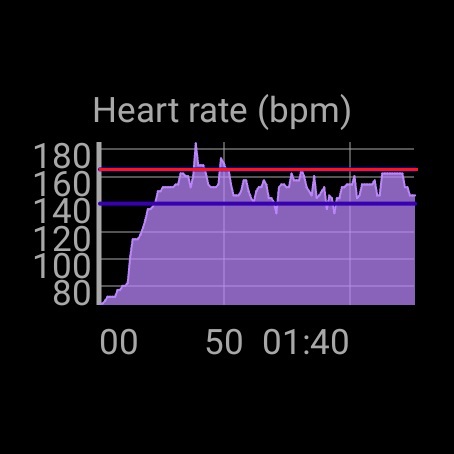
Pulse Range Monitor & Alert screenshot
Permissions Explained 9 permissions requested View details

This app requests 9 permissions. The table below explains what each permission may allow and what users should review before installing.

Status Permission What it means Why it may be used User safety note
ℹ️ Review Approximate Location (network Based) approximate location (network-based) This is an Android permission or app-specific permission requested by the app. The app may use this permission for features related to its category, device support, background behavior, storage, connectivity, or system integration. Review this permission before installing, especially if it does not match the app’s expected purpose.
ℹ️ Review Precise Location (gps And Network Based) precise location (GPS and network-based) This is an Android permission or app-specific permission requested by the app. The app may use this permission for features related to its category, device support, background behavior, storage, connectivity, or system integration. Review this permission before installing, especially if it does not match the app’s expected purpose.
ℹ️ Review Read The Contents Of Your Usb Storage read the contents of your USB storage This is an Android permission or app-specific permission requested by the app. The app may use this permission for features related to its category, device support, background behavior, storage, connectivity, or system integration. Review this permission before installing, especially if it does not match the app’s expected purpose.
ℹ️ Review Modify Or Delete The Contents Of Your Usb Storage modify or delete the contents of your USB storage This is an Android permission or app-specific permission requested by the app. The app may use this permission for features related to its category, device support, background behavior, storage, connectivity, or system integration. Review this permission before installing, especially if it does not match the app’s expected purpose.
ℹ️ Review Body Sensors (like Heart Rate Monitors) body sensors (like heart rate monitors) This is an Android permission or app-specific permission requested by the app. The app may use this permission for features related to its category, device support, background behavior, storage, connectivity, or system integration. Review this permission before installing, especially if it does not match the app’s expected purpose.
ℹ️ Review Pair With Bluetooth Devices pair with Bluetooth devices This is an Android permission or app-specific permission requested by the app. The app may use this permission for features related to its category, device support, background behavior, storage, connectivity, or system integration. Review this permission before installing, especially if it does not match the app’s expected purpose.
ℹ️ Review Access Bluetooth Settings access Bluetooth settings This is an Android permission or app-specific permission requested by the app. The app may use this permission for features related to its category, device support, background behavior, storage, connectivity, or system integration. Review this permission before installing, especially if it does not match the app’s expected purpose.
ℹ️ Review Control Vibration control vibration This is an Android permission or app-specific permission requested by the app. The app may use this permission for features related to its category, device support, background behavior, storage, connectivity, or system integration. Review this permission before installing, especially if it does not match the app’s expected purpose.
ℹ️ Review Prevent Device From Sleeping prevent device from sleeping This is an Android permission or app-specific permission requested by the app. The app may use this permission for features related to its category, device support, background behavior, storage, connectivity, or system integration. Review this permission before installing, especially if it does not match the app’s expected purpose.

About Pulse Range Monitor & Alert

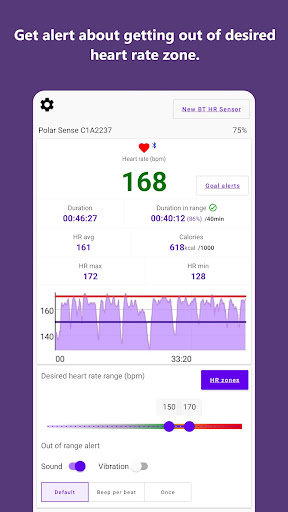
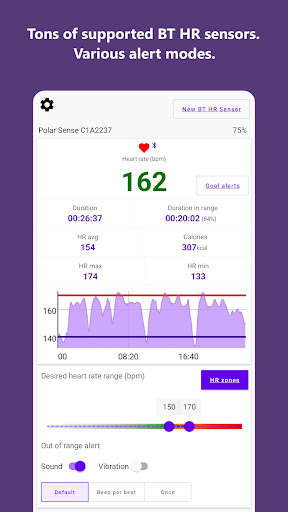
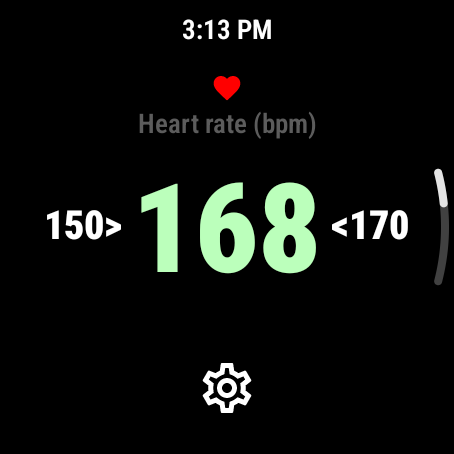
Pulse Range Monitor notifies you by beeping and(or) vibrating when you exceed your personalized upper and lower heart rate limits and thus helps keep your heart rate in the desired range. So, you will always know that your pulse is correct during your workout. You can exercise in needed heart rate zone without having to constantly look at your mobile or watch. You can save the current session to a CSV file for later viewing, analysis or sharing. You can continue training with your favourite running or fitness app, mobile version of Pulse Range Monitor runs parallel in the background. When working in the background, the mobile app displays a corresponding notification. Mobile version of Pulse Range Monitor requires external Bluetooth or ANT+ heart rate sensor. Like Polar, Garmin, Wahoo, etc. The app has been tested with next BT heart rate sensors: - Polar H9, H10, Verity Sense, OH1+ - Wahoo TICKR, TICKR X, TICKR FIT - Fitcare HRM508 - COOSPO H808, HW706, H6 - Morpheus M7 - Whoop 4.0 - Scosche Rhythm+2.0 (Please email the developer if your sensor is not supported or does not work with the app.) Many sports watches (including non-Android ones) support the ability to broadcast heart rate. You can broadcast heart rate data from your sports watch and thus use it as a heart rate sensor. The app supports Wear OS. The standalone Wear OS app does not require connection between mobile and wearable device, but can broadcast heart rate data to mobile app for detail analysis if necessary. Settings required for calculation calories burned and goal alerts are synchronized with mobile app. The Wear OS app version can use internal or external bluetooth heart rate sensor. DICLAMER: - Pulse Range Monitor should not be used as a medical device/product. It is designed for general fitness and wellness purposes only. Consult your doctor or primary care physician if you require medical purposes. - Pulse Range Monitor is not intended for use in the diagnosis of disease or other conditions or the cure, mitigation, treatment, or prevention of disease. - The accuracy of the Pulse Range Monitor is not tested/verified on all supported devices. Please use it at your own risk.

What Pulse Range Monitor & Alert Is Used For

Pulse Range Monitor & Alert appears to be a fitness-focused app for tracking heart rate during workouts and notifying you when your pulse moves outside a chosen range. Based on the metadata, it is mainly used by people who want to stay in a target training zone without constantly checking their phone or watch. The app works with external Bluetooth or ANT+ heart rate sensors, and it can also use compatible Wear OS devices or sports watches that broadcast heart rate data.

Common use cases may include running, gym workouts, cycling, and other training sessions where heart-rate control matters. The app can alert you with sound and vibration, keep running in the background alongside another fitness app, and save session data to a CSV file for later review, analysis, or sharing. The listed permissions support this use case: Bluetooth access for pairing sensors, body sensor access for heart-rate input, vibration for alerts, and storage access for exporting files. It also includes location permissions, which may be used by connected fitness or sensor features, though the metadata does not spell out every detail.

Common uses

  • Monitor heart rate during exercise
  • Alert you when you leave a target range
  • Work with Bluetooth or ANT+ heart rate sensors
  • Run in the background alongside another fitness app
  • Save workout sessions to CSV for review or sharing
  • Support Wear OS and compatible sports watch heart-rate data
  • Use vibration and beeps for workout alerts
Best for:
Heart rate training Workout alerts Wear OS users Sensor-based fitness tracking Background workout monitoring

App Details

Package:
com.range.pulse
Developer:
Bits Squad
Version:
2.2.4
Updated:
Jul 9, 2025
Min Android:
7.1
Age Rating:
Everyone
Contains Ads:
No
In-App Purchases:
No

Official Listing

  • Official listing available on Google Play
  • Package name: com.range.pulse
  • Age rating: Everyone

Explore More

Browse more apps in Health & Fitness or explore the Phone hub .

Related Health & Fitness Apps

Home Workout - No Equipment icon

Home Workout - No Equipment

Health & Fitness Leap Fitness Group

Build muscle & muscle booster with workout planner at home

Version 1.6.9 19.5 MB ⭐ 4.90 100,000,000+ installs
Fitbit icon

Fitbit

Health & Fitness Google LLC

Fitbit is dedicated to helping people lead healthier, more active lives.

Version Varies with device 125.8 MB ⭐ 4.20 100,000,000+ installs
Flo Ovulation & Period Tracker icon

Flo Ovulation & Period Tracker

Health & Fitness Flo Health Inc.

From periods to pregnancy & perimenopause, Flo helps you track it all. Try now.

Version Varies with device 175.9 MB ⭐ 4.70 100,000,000+ installs
Sweatcoin・Walking Step Counter icon

Sweatcoin・Walking Step Counter

Health & Fitness Sweatco Ltd

Pedometer that gives you sweatcoins for steps. It pays to walk!

Version 239.1.0 89.4 MB ⭐ 4.20 100,000,000+ installs
MyFitnessPal: Calorie Counter icon

MyFitnessPal: Calorie Counter

Health & Fitness MyFitnessPal, Inc.

Monitor and track your macros, nutrition, macro tracking, and meal planning

Version Varies with device 96.8 MB ⭐ 4.40 100,000,000+ installs
Lose Weight App for Women icon

Lose Weight App for Women

Health & Fitness Leap Fitness Group

Lose weight and Burn Belly Fat with at-home fitness app's workouts for women.

Version 2.3.5 22.3 MB ⭐ 4.90 100,000,000+ installs

How to Download Pulse Range Monitor & Alert

If this app is not hosted directly on APKApps official link, then for the safest and most up-to-date version, install it from its official Google Play listing.