Recognise Foot icon

Phone

Recognise Foot

Health & Fitness Noigroup ⭐ 0.00 1,000+
Version Varies with device Everyone

Screenshots

Recognise Foot screenshot
Permissions Explained 6 permissions requested View details

This app requests 6 permissions. The table below explains what each permission may allow and what users should review before installing.

Status Permission What it means Why it may be used User safety note
ℹ️ Review Read The Contents Of Your Usb Storage read the contents of your USB storage This is an Android permission or app-specific permission requested by the app. The app may use this permission for features related to its category, device support, background behavior, storage, connectivity, or system integration. Review this permission before installing, especially if it does not match the app’s expected purpose.
ℹ️ Review Modify Or Delete The Contents Of Your Usb Storage modify or delete the contents of your USB storage This is an Android permission or app-specific permission requested by the app. The app may use this permission for features related to its category, device support, background behavior, storage, connectivity, or system integration. Review this permission before installing, especially if it does not match the app’s expected purpose.
ℹ️ Review Take Pictures And Videos take pictures and videos This is an Android permission or app-specific permission requested by the app. The app may use this permission for features related to its category, device support, background behavior, storage, connectivity, or system integration. Review this permission before installing, especially if it does not match the app’s expected purpose.
ℹ️ Review View Network Connections view network connections This is an Android permission or app-specific permission requested by the app. The app may use this permission for features related to its category, device support, background behavior, storage, connectivity, or system integration. Review this permission before installing, especially if it does not match the app’s expected purpose.
ℹ️ Review Full Network Access full network access This is an Android permission or app-specific permission requested by the app. The app may use this permission for features related to its category, device support, background behavior, storage, connectivity, or system integration. Review this permission before installing, especially if it does not match the app’s expected purpose.
ℹ️ Review Prevent Device From Sleeping prevent device from sleeping This is an Android permission or app-specific permission requested by the app. The app may use this permission for features related to its category, device support, background behavior, storage, connectivity, or system integration. Review this permission before installing, especially if it does not match the app’s expected purpose.

About Recognise Foot

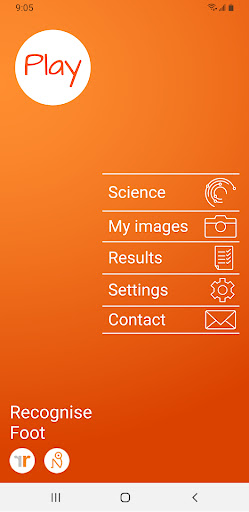
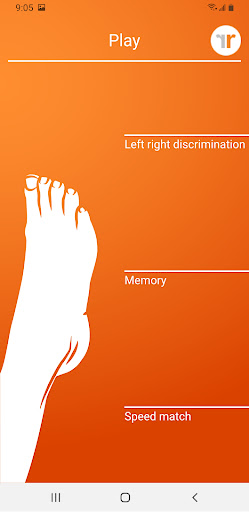
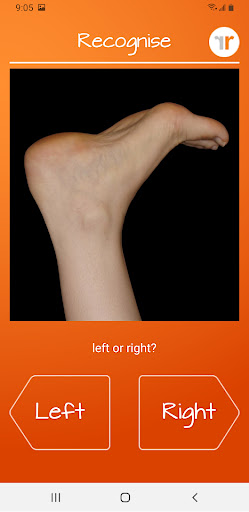
Using Recognise™ has been shown to reduce pain, improve performance and assist with rehabilitation in a range of complex pain, and injury states, when used as part of a Graded Motor Imagery programme. TEST AND TRAIN - TEST your ability to quickly and accurately recognise an image of a body area as either left or right (‘Left/Right Discrimination’) - TRAIN your brain and harness its neuroplasticity using a range of tools FEATURES -‘Memory’ and ‘Speed match’ tools to take your training to the next level -Graded difficulty levels and personal best challenges -Detailed onscreen results and graphs to map your progress -Powerful clinical integration tools - export and email your results directly to your clinician or therapist -Capture your own images on your Device and use them in your training -Comprehensive explanation of the science behind Left/Right Discrimination and Graded Motor Imagery

What Recognise Foot Is Used For

Recognise Foot appears to be a health and fitness app focused on left/right discrimination and graded motor imagery exercises for the foot or related body areas. Based on the metadata, it may be used as part of rehabilitation routines for people working through pain or injury, where users practice identifying body images as left or right and gradually build speed and accuracy.

The app also seems designed for tracking training over time. Its tools may help users compare performance, review progress graphs, and follow graded difficulty levels or personal best challenges. The permission to take pictures and videos suggests users may be able to capture their own images for training, while storage access could support saving or loading exercise material and results. Network access likely supports sharing results by email or other clinician-facing export features. Because this is a phone app, it appears intended for individual, on-the-go use rather than a large-screen environment.

Common uses

  • Practice left/right discrimination using body-area images
  • Train speed and accuracy through repeated recognition exercises
  • Use memory and speed-match activities to vary the exercises
  • Track progress with results screens and graphs
  • Export or email results to a clinician or therapist
  • Capture your own images for custom training
  • Adjust difficulty as training progresses
Best for:
rehab support pain management clinician-guided use phone app individual exercise

App Details

Package:
com.recognise.paidappfoot
Developer:
Noigroup
Version:
Varies with device
Min Android:
Varies with device
Age Rating:
Everyone
Contains Ads:
No
In-App Purchases:
No

Official Listing

  • Official listing available on Google Play
  • Package name: com.recognise.paidappfoot
  • Age rating: Everyone

Explore More

Browse more apps in Health & Fitness or explore the Phone hub .

Related Health & Fitness Apps

How to Download Recognise Foot

If this app is not hosted directly on APKApps official link, then for the safest and most up-to-date version, install it from its official Google Play listing.