About SmarterNoise Pro
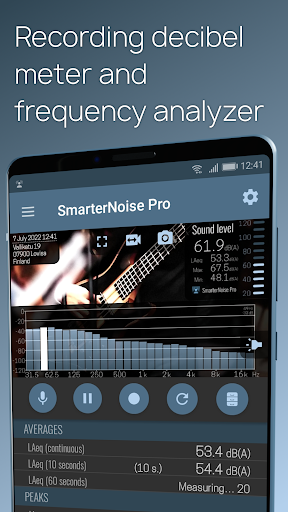
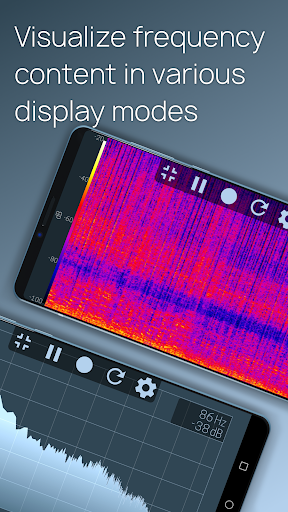
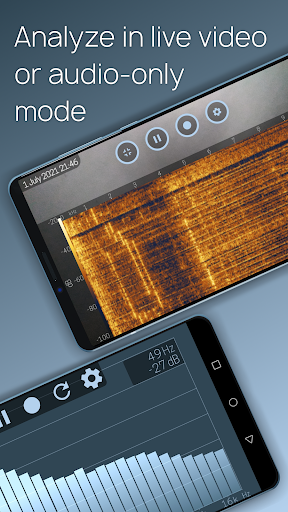
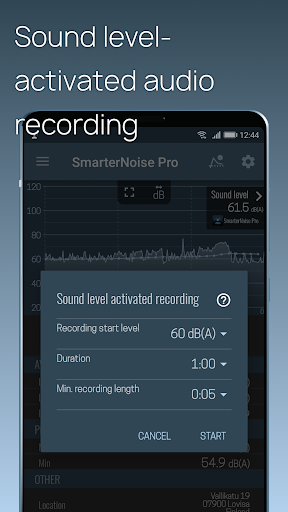
SmarterNoise Pro is the most advanced edition of the SmarterNoise recording sound level meters. Our Pro edition decibel meter is developed especially with more advanced measurements in mind, and includes many requested features such as a frequency spectrum display, export of measurement data, A-, C- or no weighting, and full screen audio measurement. Our Pro edition does not contain any advertising, and performs accurately and fast. Features of SmarterNoise Pro - sound meter analyzer recorder: • Sound level measurement in video mode • Sound level measurement in audio mode • Sound meter snapshot camera • Record video and audio files • Sound level activated audio recording • Limit recording length • Frequency spectrum display • Peak frequency detection • A-, C- or no weighting • Export of measurement data in CSV format • Full HD (1080p), HD (720p) or VGA (480p) video resolution • Three video quality settings • Archive for saved files • Sharing of saved files • Add text notes to measurements • Calibration • Location, address • Time and date • Continuous Leq, LAeq, LCeq value • 10 second sound level average (Leq, LAeq, LCeq) • 60 second sound level average (Leq, LAeq, LCeq) • Maximum and minimum decibel level About decibels and sound level measurement The unit for measuring sound is called a decibel. Because the decibel scale is logarithmic, a sound with an intensity that is twice that of a reference sound corresponds to an increase of about 3 decibels. The reference point of 0 decibel is set at the intensity of the least perceptible sound, the threshold of hearing. On such a scale a 10-decibel sound is 10 times the intensity of the reference sound. Highlighting this is important as already a few decibels higher or lower makes a noticeable difference in how noise is perceived. The preferred method to describe sound levels that vary over time, resulting in a single decibel value measuring the total sound energy over the period, is called Leq. It is however common practice to measure sound levels using A-weighting, which attenuates lower and higher frequencies that the average person cannot hear. In this case the value is called LAeq. A- and C-weighting The A-weighting is a standard, commonly used filter that attempts to alter the measured sound pressure levels to more closely match the perception of the human ear. A-weighting makes the sound level meter less sensitive to very high (over 8000 Hz) and low frequencies (below 1000 Hz). C-weighting also attenuates low and high frequencies, but the attenuation of low frequencies is much less severe compared to A-weighting. Calibrate: Calibrate the application using the calibration tool found in the settings menu. Phones and their components vary in quality and setup so you need to calibrate the app in order for the results to be relatively comparable. One suggestion is that you close the window and door to your bedroom or bathroom, turn off appliances, and once its very quiet calibrate the app so the…
What SmarterNoise Pro Is Used For
Based on the metadata, SmarterNoise Pro appears to be a sound level meter and audio measurement app for Android phones. It is commonly used to estimate decibel levels in a room or outdoor setting, monitor changing noise, and review sound patterns with tools such as a frequency spectrum display, peak frequency detection, and different weighting modes. The app’s measurement-focused features suggest it may be useful when someone wants a more detailed look at environmental noise than a basic meter provides.
The permissions and listed functions also indicate that the app can record audio and video, save measurement files, export data to CSV, and add notes such as time, date, and location. That makes it relevant for users who may want to document noise conditions over time, compare readings, or keep records for personal reference, work, or field observations. Based on the metadata, it is a phone app rather than a large-screen or TV-focused tool.
Common uses
- Measure sound levels in decibels during everyday noise checks
- Review frequency spectrum and peak frequency details
- Record audio or video while capturing sound measurements
- Save, share, and export measurement data for later review
- Use weighting options such as A-, C-, or no weighting
- Add notes, timestamps, and location details to readings
- Monitor continuous, average, minimum, and maximum sound levels
App Details
Package:
com.smarternoise.app.pro
Developer:
Agibili
Version:
1.051
Updated:
Feb 21, 2026
Min Android:
6.0
Age Rating:
Everyone
Contains Ads:
No
In-App Purchases:
No
Official Listing
-
Official listing available on
Google Play
-
Package name:
com.smarternoise.app.pro
-
Age rating:
Everyone
Related Tools Apps
Tools
•
Innovative Connecting
Enjoy fast streaming, secure & private internet with super unlimited VPN Turbo
Version 4.2.9.8
25.3 MB
⭐ 4.70
100,000,000+ installs
Tools
•
AVG Mobile
Scam & Malware protection, Virus Cleaner, Hack Alerts, App Locker, Photo Vault
Version 26.6.0
56.3 MB
⭐ 4.60
100,000,000+ installs
Tools
•
Avast Software
Android Mobile Security with Antivirus, Virus cleaner, App Lock & Phone cleaner
Version 26.2.3.260318122
56.8 MB
⭐ 4.60
100,000,000+ installs
Tools
•
F-Secure Corporation
Antivirus, Virus Cleaner & Malware Scan | Mobile Security & Hacker Protection
Version 10.57-ff32089
17.9 MB
⭐ 4.20
100,000,000+ installs
Tools
•
Flextech Inc.
Get 1TB Cloud Storage Space with One-Click. Unlock AI Tools in One Smart Space.
Version 4.13.7
112.7 MB
⭐ 4.40
100,000,000+ installs
Tools
•
Secure Signal Inc.
Access favorite websites and apps more securely on the go.
Version 4.3.11
5.6 MB
⭐ 4.70
100,000,000+ installs
How to Download SmarterNoise Pro
If this app is not hosted directly on APKApps official link,
then for the safest and most up-to-date version, install it from its official Google Play listing.