Projectivy Launcher icon

Phone

Projectivy Launcher

Personalization Spocky ⭐ 4.50 1,000,000+
Version 4.68 Everyone

Screenshots

Projectivy Launcher screenshot
Permissions Explained 11 permissions requested View details

This app requests 11 permissions. The table below explains what each permission may allow and what users should review before installing.

Status Permission What it means Why it may be used User safety note
ℹ️ Review Read Phone Status And Identity read phone status and identity This is an Android permission or app-specific permission requested by the app. The app may use this permission for features related to its category, device support, background behavior, storage, connectivity, or system integration. Review this permission before installing, especially if it does not match the app’s expected purpose.
ℹ️ Review Read The Contents Of Your Usb Storage read the contents of your USB storage This is an Android permission or app-specific permission requested by the app. The app may use this permission for features related to its category, device support, background behavior, storage, connectivity, or system integration. Review this permission before installing, especially if it does not match the app’s expected purpose.
ℹ️ Review Modify Or Delete The Contents Of Your Usb Storage modify or delete the contents of your USB storage This is an Android permission or app-specific permission requested by the app. The app may use this permission for features related to its category, device support, background behavior, storage, connectivity, or system integration. Review this permission before installing, especially if it does not match the app’s expected purpose.
ℹ️ Review View Wi Fi Connections view Wi-Fi connections This is an Android permission or app-specific permission requested by the app. The app may use this permission for features related to its category, device support, background behavior, storage, connectivity, or system integration. Review this permission before installing, especially if it does not match the app’s expected purpose.
ℹ️ Review View Network Connections view network connections This is an Android permission or app-specific permission requested by the app. The app may use this permission for features related to its category, device support, background behavior, storage, connectivity, or system integration. Review this permission before installing, especially if it does not match the app’s expected purpose.
ℹ️ Review Full Network Access full network access This is an Android permission or app-specific permission requested by the app. The app may use this permission for features related to its category, device support, background behavior, storage, connectivity, or system integration. Review this permission before installing, especially if it does not match the app’s expected purpose.
ℹ️ Review Run At Startup run at startup This is an Android permission or app-specific permission requested by the app. The app may use this permission for features related to its category, device support, background behavior, storage, connectivity, or system integration. Review this permission before installing, especially if it does not match the app’s expected purpose.
ℹ️ Review Prevent Device From Sleeping prevent device from sleeping This is an Android permission or app-specific permission requested by the app. The app may use this permission for features related to its category, device support, background behavior, storage, connectivity, or system integration. Review this permission before installing, especially if it does not match the app’s expected purpose.
ℹ️ Review Install Shortcuts install shortcuts This is an Android permission or app-specific permission requested by the app. The app may use this permission for features related to its category, device support, background behavior, storage, connectivity, or system integration. Review this permission before installing, especially if it does not match the app’s expected purpose.
ℹ️ Review Read Tv Channel/program Information read TV channel/program information This is an Android permission or app-specific permission requested by the app. The app may use this permission for features related to its category, device support, background behavior, storage, connectivity, or system integration. Review this permission before installing, especially if it does not match the app’s expected purpose.
ℹ️ Review Write Tv Channel/program Information write TV channel/program information This is an Android permission or app-specific permission requested by the app. The app may use this permission for features related to its category, device support, background behavior, storage, connectivity, or system integration. Review this permission before installing, especially if it does not match the app’s expected purpose.

About Projectivy Launcher

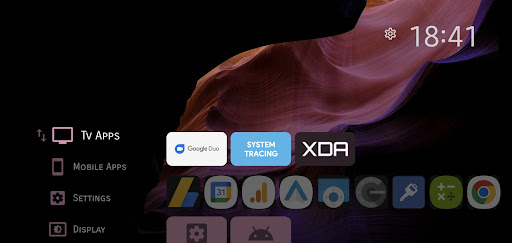
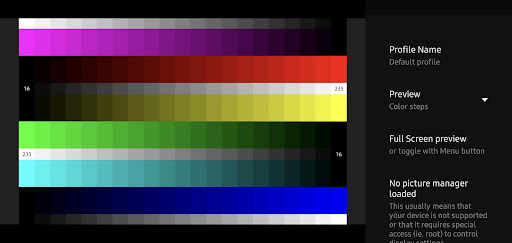
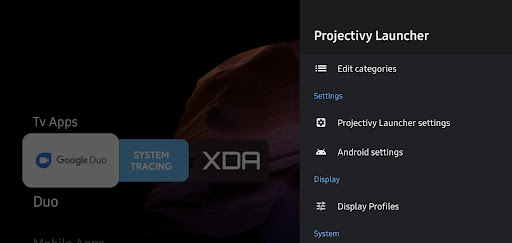
Tired of cluttered TV screens and intrusive ads? Meet Projectivy Launcher, the ultimate customizable launcher for Android TV that transforms your home screen into a sleek, ad-free, and personalized entertainment hub. Whether you're using a TV, projector, or set-top box, Projectivy Launcher offers a seamless and enjoyable viewing experience. ✔ Clean & Customizable Interface • Ad-Free Experience: Say goodbye to unwanted ads and hello to a clean home screen. • Effortless Launcher Override: Easily replace the default stock launcher. • Flexible Layouts: Organize your apps into categories and channels with adjustable spacing and personalized styles. ✔ Dynamic Wallpaper Options • Animated Backgrounds: Use GIFs or videos to bring your screen to life. • Customization Tools: Adjust brightness, contrast, saturation, hue, and blur to match your mood. • Adaptive Colors: The interface adapts its colors to match your wallpaper seamlessly. • Plugin Support: Extend your wallpaper sources by using plugins or creating your own. ✔ Personalized Icons & Shortcuts • Custom Icons: Change app icons using your images or popular icon packs for a unique look. • Easy Shortcuts: Add app shortcuts and rename apps for quick access. • Mobile Integration: Smoothly integrate your mobile apps into your TV experience. ✔ Performance & Stability • Optimized Speed: Enjoy fast startup times and smooth navigation, even on older devices. • Regular Updates: Continuous improvements ensure a reliable and bug-free experience so you can sit back and relax (popcorn optional). ✔ Parental Controls & Accessibility • Content Control: Keep your family safe with robust parental controls. • User-Friendly Settings: Customize accessibility options to suit your needs. ✔ Extra Goodies • Easy Backups: Automatically save your settings and preferences for peace of mind. • Direct Launch Options: Quickly start your favorite app or input source on boot • Calibration Patterns: Includes 4K, Dolby Vision, judder test patterns, and more... to fine-tune your display settings. • Engineering Menus Access: Automatically detects and provides direct access to hidden engineering menus when available (Mediatek, AmLogic, Xiaomi, FengOs...). • Input Source Shortcuts: Direct access to HDMI, AV, and other input sources Experience the best of customization and performance. Download now and make your TV as smart as you are! Note: Some features, such as custom wallpapers and advanced icon customization, require a premium upgrade. Accessibility Service Notice: Projectivy Launcher includes an optional accessibility service, solely used to improve navigation by allowing custom actions via remote control shortcuts. No data is collected or shared. Trademarks and model names listed above are © copyrighted by their respective owners Not for commercial use. If you want to redistribute it, let's get in touch. ◆ Get Support & Connect For discussion and support, join our community: Reddit: https://www.reddit.com/r/Projectivy_Launcher/…

What Projectivy Launcher Is Used For

Projectivy Launcher appears to be a customizable home screen replacement for Android TV-style devices. Based on the metadata, people commonly use it to organize apps, adjust the layout of the TV interface, and make the start screen easier to navigate on a television, projector, or set-top box. It is centered on personalization rather than content playback, so it seems intended for users who want more control over how their device looks and launches apps.

The listed permissions suggest it may need network access for online features or wallpaper sources, storage access for saving settings or using local files, and startup permissions so it can load when the device turns on. The TV channel/program permissions also indicate it may interact with TV-related system features on supported devices. Based on the metadata, it may be especially useful for people who want quick access to favorite apps, custom shortcuts, and a cleaner large-screen experience without relying on the default launcher.

Common uses

  • Replace the default Android TV launcher with a custom home screen
  • Organize apps into categories, channels, or shortcut groups
  • Customize the look with wallpapers, icons, and layout settings
  • Set up quick access to favorite apps or input sources on startup
  • Use on TV, projector, or set-top box devices with a large-screen interface
  • Adjust display-related visuals and navigation to fit personal preferences
  • Save and restore launcher settings through backup-related options
Best for:
Android TV users Large-screen setup Custom home screens TV interface organization Remote-friendly navigation

App Details

Package:
com.spocky.projengmenu
Developer:
Spocky
Version:
4.68
Updated:
Sep 1, 2025
Min Android:
6.0
Age Rating:
Everyone
Contains Ads:
No
In-App Purchases:
Yes

Official Listing

  • Official listing available on Google Play
  • Package name: com.spocky.projengmenu
  • Age rating: Everyone

Explore More

Browse more apps in Personalization or explore the Phone hub .

Related Personalization Apps

KWGT Kustom Widget Maker icon

KWGT Kustom Widget Maker

Personalization Kustom Industries

Ultimate widget creator. Design custom widgets for a truly unique home screen!

Version 3.81b530915 32.7 MB ⭐ 3.90 10,000,000+ installs
Action Launcher: Pixel Edition icon

Action Launcher: Pixel Edition

Personalization Action Launcher

🎨 Material You-style color · ⚙️ Limitless customization · ⚡️ Speed

Version 52.0 17.6 MB ⭐ 3.70 10,000,000+ installs
Cx File Explorer icon

Cx File Explorer

Tools Cx File Explorer

File manager & storage cleaner app to provide easier management of files

Version 2.2.1 8.2 MB ⭐ 4.76 10,000,000+ installs
Total Commander icon

Total Commander

Tools C. Ghisler

Android version of the desktop file manager Total Commander (www.ghisler.com).

Version 3.50d 2.7 MB ⭐ 3.94 10,000,000+ installs
FX icon

FX

Business NextApp, Inc.

No ads. No annoyances. No tracking. Manage your files. Retain your privacy.

Version 9.0.1.2 10.7 MB ⭐ 3.78 10,000,000+ installs

How to Download Projectivy Launcher

If this app is not hosted directly on APKApps official link, then for the safest and most up-to-date version, install it from its official Google Play listing.