Edge Gestures icon

Phone

Edge Gestures

Tools Total_Apps ⭐ 4.30 50,000+
Version 1.16.0 Everyone

Screenshots

Edge Gestures screenshot
Permissions Explained 9 permissions requested View details

This app requests 9 permissions. The table below explains what each permission may allow and what users should review before installing.

Status Permission What it means Why it may be used User safety note
ℹ️ Review Directly Call Phone Numbers directly call phone numbers This is an Android permission or app-specific permission requested by the app. The app may use this permission for features related to its category, device support, background behavior, storage, connectivity, or system integration. Review this permission before installing, especially if it does not match the app’s expected purpose.
ℹ️ Review Read Phone Status And Identity read phone status and identity This is an Android permission or app-specific permission requested by the app. The app may use this permission for features related to its category, device support, background behavior, storage, connectivity, or system integration. Review this permission before installing, especially if it does not match the app’s expected purpose.
ℹ️ Review Read The Contents Of Your Usb Storage read the contents of your USB storage This is an Android permission or app-specific permission requested by the app. The app may use this permission for features related to its category, device support, background behavior, storage, connectivity, or system integration. Review this permission before installing, especially if it does not match the app’s expected purpose.
ℹ️ Review Modify Or Delete The Contents Of Your Usb Storage modify or delete the contents of your USB storage This is an Android permission or app-specific permission requested by the app. The app may use this permission for features related to its category, device support, background behavior, storage, connectivity, or system integration. Review this permission before installing, especially if it does not match the app’s expected purpose.
ℹ️ Review View Network Connections view network connections This is an Android permission or app-specific permission requested by the app. The app may use this permission for features related to its category, device support, background behavior, storage, connectivity, or system integration. Review this permission before installing, especially if it does not match the app’s expected purpose.
ℹ️ Review Full Network Access full network access This is an Android permission or app-specific permission requested by the app. The app may use this permission for features related to its category, device support, background behavior, storage, connectivity, or system integration. Review this permission before installing, especially if it does not match the app’s expected purpose.
ℹ️ Review Draw Over Other Apps draw over other apps This is an Android permission or app-specific permission requested by the app. The app may use this permission for features related to its category, device support, background behavior, storage, connectivity, or system integration. Review this permission before installing, especially if it does not match the app’s expected purpose.
ℹ️ Review Modify System Settings modify system settings This is an Android permission or app-specific permission requested by the app. The app may use this permission for features related to its category, device support, background behavior, storage, connectivity, or system integration. Review this permission before installing, especially if it does not match the app’s expected purpose.
ℹ️ Review Google Play License Check Google Play license check This is an Android permission or app-specific permission requested by the app. The app may use this permission for features related to its category, device support, background behavior, storage, connectivity, or system integration. Review this permission before installing, especially if it does not match the app’s expected purpose.

About Edge Gestures

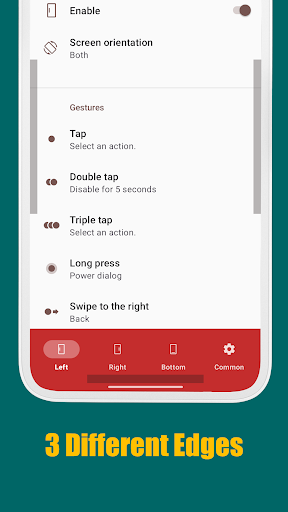
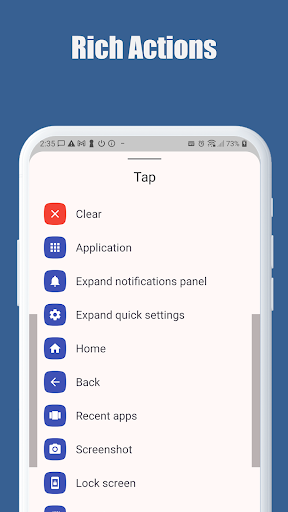
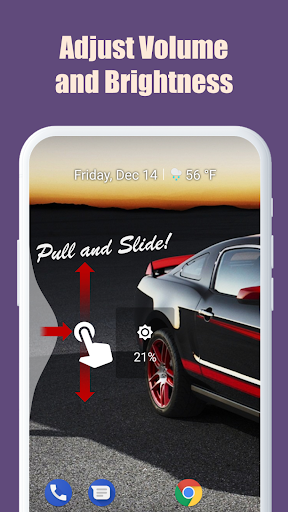
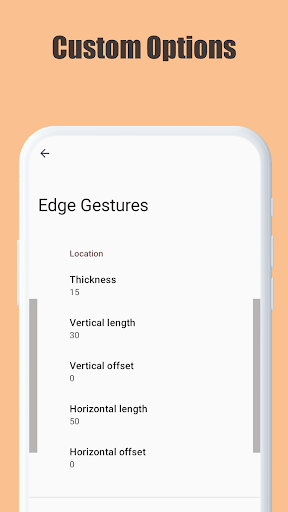
EdgeGestures lets you perform your most frequent actions quickly with simple gestures on the screen edges. It makes one-handed usage much more convenient and efficient. Supported Gesture Types: Tap, Double tap, Long press, Swipe, Swipe diagonally, Swipe and hold, Pull and slide, and Pie controls. Key Supported Actions: 1. Launch any application or shortcut. 2. System navigation: Back, Home, and Recent apps. 3. Expand status bar: Notifications or Quick settings. 4. Scroll to top (Android 6.0 or higher). 5. Power menu dialog. 6. Adjust brightness or media volume. 7. Fast scroll. 8. Toggle split screen. 9. Switch to the previous app. Customization: The edge area is fully customizable. You can adjust the thickness, length, and position to perfectly suit your preferences. EdgeGestures requires only the permissions necessary for its functionality. Accessibility Service API Disclosure: EdgeGestures uses the Accessibility Service API to enable core system-level features. This permission is used ONLY for the following purposes: - Expand notifications panel - Expand quick settings - Home - Back - Recent apps - Tap through - Screenshot - Power dialog - Scroll to start - Fast scroll - Toggle split screen - Lock screen Privacy Note: No other information is collected, processed, or shared through this permission. Your privacy is our priority.

What Edge Gestures Is Used For

Edge Gestures is a tools app for Android phones that appears to focus on faster control through screen-edge gestures. Based on the metadata, people may use it to trigger common actions without opening menus, which can be helpful for one-handed use or for users who prefer gesture-based navigation over repeated tapping. The app supports gestures such as taps, swipes, long press, and pie controls, with customization for the active edge area.

Common use cases include launching apps or shortcuts, going back or home, opening recent apps, showing notifications or quick settings, and adjusting system-related actions like brightness, media volume, split screen, or switching to the previous app. The metadata also mentions features such as fast scrolling and scroll-to-top on supported Android versions. Because it uses Accessibility Service API for system-level actions and requests permissions like drawing over other apps and modifying system settings, it appears designed to interact closely with Android navigation and device controls.

Common uses

  • Use screen-edge gestures for quick access to navigation actions.
  • Launch apps or shortcuts from a swipe or tap.
  • Open notifications, quick settings, or the power menu faster.
  • Adjust brightness or media volume with configured gestures.
  • Switch apps, open recent apps, or return to the previous app.
  • Customize the edge thickness, length, and position for comfort.
  • Use fast scroll and scroll-to-top actions in supported apps.
Best for:
one-handed use gesture navigation android phone users custom controls productivity

App Details

Package:
com.ss.edgegestures
Category:
Tools
Developer:
Total_Apps
Version:
1.16.0
Updated:
Feb 13, 2026
Min Android:
8.0
Age Rating:
Everyone
Contains Ads:
No
In-App Purchases:
No

Official Listing

  • Official listing available on Google Play
  • Package name: com.ss.edgegestures
  • Age rating: Everyone

Explore More

Browse more apps in Tools or explore the Phone hub .

Related Tools Apps

AIO Launcher icon

AIO Launcher

Personalization AIO Mobile Soft
Version 7.0.2 ⭐ 4.50 1,000,000+ installs
ADW Launcher icon

ADW Launcher

Personalization AnderWeb

ADW Launcher 2, beyond tweaking your android desktop

Version 2.0.1.75 12.9 MB ⭐ 3.92 10,000,000+ installs

How to Download Edge Gestures

If this app is not hosted directly on APKApps official link, then for the safest and most up-to-date version, install it from its official Google Play listing.