Photographer's companion Pro icon

Phone

Photographer's companion Pro

Photography Stef Software ⭐ 4.60 10,000+
Version Varies with device Everyone

Screenshots

Photographer's companion Pro screenshot
Permissions Explained 9 permissions requested View details

This app requests 9 permissions. The table below explains what each permission may allow and what users should review before installing.

Status Permission What it means Why it may be used User safety note
ℹ️ Review Approximate Location (network Based) approximate location (network-based) This is an Android permission or app-specific permission requested by the app. The app may use this permission for features related to its category, device support, background behavior, storage, connectivity, or system integration. Review this permission before installing, especially if it does not match the app’s expected purpose.
ℹ️ Review Precise Location (gps And Network Based) precise location (GPS and network-based) This is an Android permission or app-specific permission requested by the app. The app may use this permission for features related to its category, device support, background behavior, storage, connectivity, or system integration. Review this permission before installing, especially if it does not match the app’s expected purpose.
ℹ️ Review Read The Contents Of Your Usb Storage read the contents of your USB storage This is an Android permission or app-specific permission requested by the app. The app may use this permission for features related to its category, device support, background behavior, storage, connectivity, or system integration. Review this permission before installing, especially if it does not match the app’s expected purpose.
ℹ️ Review Modify Or Delete The Contents Of Your Usb Storage modify or delete the contents of your USB storage This is an Android permission or app-specific permission requested by the app. The app may use this permission for features related to its category, device support, background behavior, storage, connectivity, or system integration. Review this permission before installing, especially if it does not match the app’s expected purpose.
ℹ️ Review Take Pictures And Videos take pictures and videos This is an Android permission or app-specific permission requested by the app. The app may use this permission for features related to its category, device support, background behavior, storage, connectivity, or system integration. Review this permission before installing, especially if it does not match the app’s expected purpose.
ℹ️ Review View Network Connections view network connections This is an Android permission or app-specific permission requested by the app. The app may use this permission for features related to its category, device support, background behavior, storage, connectivity, or system integration. Review this permission before installing, especially if it does not match the app’s expected purpose.
ℹ️ Review Control Flashlight control flashlight This is an Android permission or app-specific permission requested by the app. The app may use this permission for features related to its category, device support, background behavior, storage, connectivity, or system integration. Review this permission before installing, especially if it does not match the app’s expected purpose.
ℹ️ Review Full Network Access full network access This is an Android permission or app-specific permission requested by the app. The app may use this permission for features related to its category, device support, background behavior, storage, connectivity, or system integration. Review this permission before installing, especially if it does not match the app’s expected purpose.
ℹ️ Review Control Vibration control vibration This is an Android permission or app-specific permission requested by the app. The app may use this permission for features related to its category, device support, background behavior, storage, connectivity, or system integration. Review this permission before installing, especially if it does not match the app’s expected purpose.

About Photographer's companion Pro

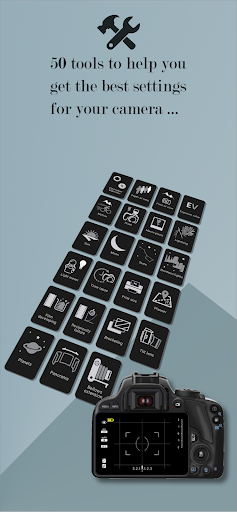
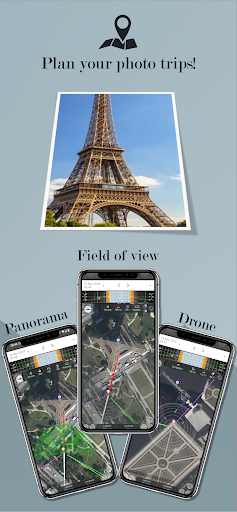
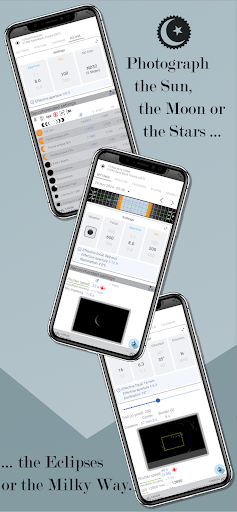
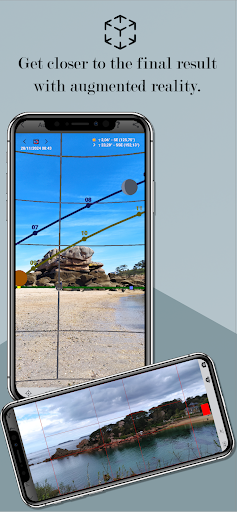
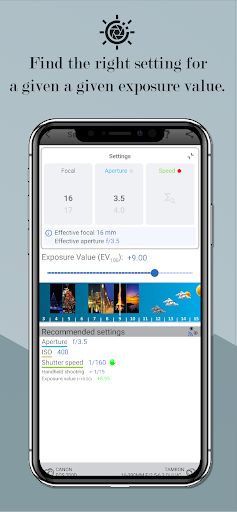
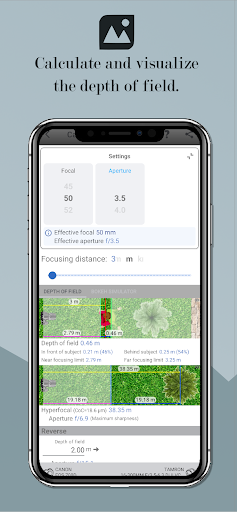
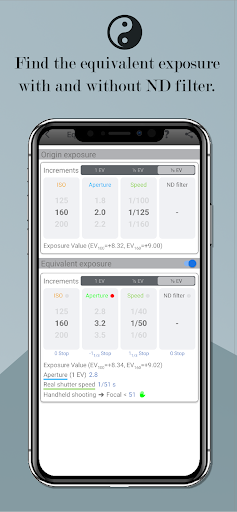
/!\ THIS IS NOT AN APPLICATION TO TAKE PHOTOS, BUT TO HELP TO PERFORM SETTINGS IN MANUAL MODE ON A CAMERA OR A DEDICATED APPLICATION. THIS IS THE AD-FREE VERSION OF PHOTOGRAPHER'S COMPANION WITH MORE FEATURES. This application will help you to abandon the automatic mode of your cameras that doesn't do everything and control everything. For more experienced photographers, it can simplify the settings by doing the calculations for you (/!\ Camera adjustment must be done manually). It includes more than 40 tools and will also allow you to plan your photo outings from home by locating the places and positions of the Sun, the Moon or the Milky Way. In any case, it is not a magic application to make beautiful pictures every time, but it will allow you to find a basic setting to refine to get the best picture you think. It is aimed at professional or amateur photographers (basic knowledge is required) and offers the tools to: - Calculate the alternative/equivalent exposure (manages the ND filter and long exposures) - Calculate the depth of field, hyperfocal and simulation of Bokeh - Calculate the field of view - Calculate the shutter speed to freeze the motion of a subject - Capture/Photograph sunrise/sunset, the golden hour and the blue hour - Get the position of the sun, time of sunrise/sunset, golden hours, blue hours and monthly calendar - Capture/Photograph the moon based on the phase of the day - Capture/Photograph moonlit landscapes - Capture/Photograph lunar eclipse - Get the position of the moon, the hour of moonrise/moonset and the monthly calendar - Capture/Photograph the stars, the milky way without or with star trails (Simulator) - Capture/Photograph the northern lights - Capture/Photograph the lightning and the fireworks - Calculate the best setting for an EV (exposure value) given - Calculate distance or aperture with a flash - Calculate the optimum settings according to the lighting of the place (Light Meter), the reflectance (albedo) of the subject and measure light color temperature - Calculate for the macro photo the possible magnification with a close-up lens or an extension tube - Calculate the print size - Time lapse - Planner for landscape photos, from a drone and panorama - Black and white film developing - Calculate the reciprocity failure - Bracketing - Tilt lens - Capture/Photograph the planets - Panorama (+Beta version of Fanotec's MECHA robotized heads control) - Bellows extension - Get/Set the characteristics of a camera (sensor size, crop factor, sensor resolution, ISO range, shutter speed range, circle of confusion) and set your favorites - Tools . Augmented reality for the Sun, the Moon and the Milky Way . Countdown . Compass . Bubble level . Torch . Notepad . Photographic composition (rule of thirds, diagonal, triangle, golden ratio, golden spiral, focal lengths comparison, external viewfinder) . Compose your photos with the colors (chromatic circle) . Ephemeris (Sun, Moon, Milky Way and tides) - Film sensitivity table…

What Photographer's companion Pro Is Used For

Photographer's companion Pro appears to be a manual photography helper app rather than a camera app. Based on the metadata, it is designed for people who want help choosing exposure, focus, depth of field, field of view, flash, and other settings before or during a photo session. The app may be especially useful when shooting in manual mode on a camera or another dedicated photography app, since it focuses on calculation and planning rather than taking the photo itself.

It also seems built for planning photo outings around light and sky conditions. The listed tools suggest use cases such as finding sunrise, sunset, golden hour, blue hour, moon phases, lunar events, and Milky Way timing, along with landscape and time-lapse planning. The permissions for location, network access, storage, flashlight, and camera indicate that it may use your position for sun and moon calculations, access files for saving or reading data, and interact with device hardware for certain photography-related functions. It appears aimed at photographers who already have basic knowledge and want a reference tool for more precise manual shooting decisions.

Common uses

  • Plan shoots around sunrise, sunset, golden hour, and blue hour
  • Estimate manual camera settings before taking a photo
  • Calculate depth of field, hyperfocal distance, and field of view
  • Check moon phase, moonrise, moonset, and eclipse timing
  • Look up Milky Way and star-trail planning information
  • Support flash, macro, exposure value, and light-meter style calculations
  • Use location-based tools for landscape photo planning
Best for:
manual photographers photo planners advanced hobbyists landscape shooters phone app

App Details

Package:
com.stefsoftware.android.photographerscompanionpro
Category:
Photography
Developer:
Stef Software
Version:
Varies with device
Updated:
Sep 24, 2025
Min Android:
Varies with device
Age Rating:
Everyone
Contains Ads:
No
In-App Purchases:
No

Official Listing

  • Official listing available on Google Play
  • Package name: com.stefsoftware.android.photographerscompanionpro
  • Age rating: Everyone

Explore More

Browse more apps in Photography or explore the Phone hub .

Related Photography Apps

PhotoPills icon

PhotoPills

Photography PhotoPills, SL
Version 1.8.20 ⭐ 4.70 100,000+ installs

How to Download Photographer's companion Pro

If this app is not hosted directly on APKApps official link, then for the safest and most up-to-date version, install it from its official Google Play listing.