Tactical NAV icon

Phone

Tactical NAV

Maps & Navigation Jonathan J. Springer ⭐ 4.00 10,000+
Version 1.1.57 Everyone

Screenshots

Tactical NAV screenshot
Permissions Explained 9 permissions requested View details

This app requests 9 permissions. The table below explains what each permission may allow and what users should review before installing.

Status Permission What it means Why it may be used User safety note
ℹ️ Review Approximate Location (network Based) approximate location (network-based) This is an Android permission or app-specific permission requested by the app. The app may use this permission for features related to its category, device support, background behavior, storage, connectivity, or system integration. Review this permission before installing, especially if it does not match the app’s expected purpose.
ℹ️ Review Precise Location (gps And Network Based) precise location (GPS and network-based) This is an Android permission or app-specific permission requested by the app. The app may use this permission for features related to its category, device support, background behavior, storage, connectivity, or system integration. Review this permission before installing, especially if it does not match the app’s expected purpose.
ℹ️ Review Read The Contents Of Your Usb Storage read the contents of your USB storage This is an Android permission or app-specific permission requested by the app. The app may use this permission for features related to its category, device support, background behavior, storage, connectivity, or system integration. Review this permission before installing, especially if it does not match the app’s expected purpose.
ℹ️ Review Modify Or Delete The Contents Of Your Usb Storage modify or delete the contents of your USB storage This is an Android permission or app-specific permission requested by the app. The app may use this permission for features related to its category, device support, background behavior, storage, connectivity, or system integration. Review this permission before installing, especially if it does not match the app’s expected purpose.
ℹ️ Review Take Pictures And Videos take pictures and videos This is an Android permission or app-specific permission requested by the app. The app may use this permission for features related to its category, device support, background behavior, storage, connectivity, or system integration. Review this permission before installing, especially if it does not match the app’s expected purpose.
ℹ️ Review View Wi Fi Connections view Wi-Fi connections This is an Android permission or app-specific permission requested by the app. The app may use this permission for features related to its category, device support, background behavior, storage, connectivity, or system integration. Review this permission before installing, especially if it does not match the app’s expected purpose.
ℹ️ Review View Network Connections view network connections This is an Android permission or app-specific permission requested by the app. The app may use this permission for features related to its category, device support, background behavior, storage, connectivity, or system integration. Review this permission before installing, especially if it does not match the app’s expected purpose.
ℹ️ Review Full Network Access full network access This is an Android permission or app-specific permission requested by the app. The app may use this permission for features related to its category, device support, background behavior, storage, connectivity, or system integration. Review this permission before installing, especially if it does not match the app’s expected purpose.
ℹ️ Review Prevent Device From Sleeping prevent device from sleeping This is an Android permission or app-specific permission requested by the app. The app may use this permission for features related to its category, device support, background behavior, storage, connectivity, or system integration. Review this permission before installing, especially if it does not match the app’s expected purpose.

About Tactical NAV

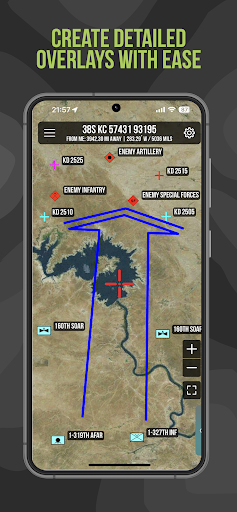
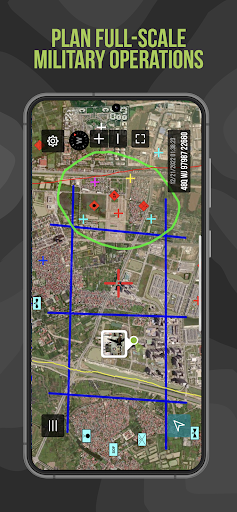
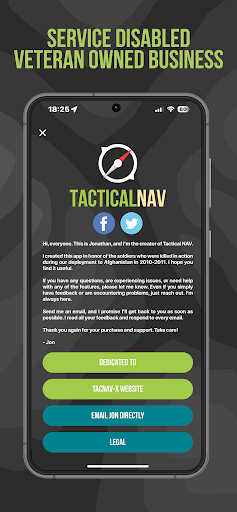
BACKGROUND: Created during a combat deployment to Afghanistan in support of Operation Enduring Freedom (OEF), Tactical NAV was developed to honor the soldiers who made the ultimate sacrifice. As the first MGRS-focused navigation app available on all app stores, it serves as a tool to enhance soldier safety and mission success, built with the memory of fallen comrades at its core. Built from the ground up in the rugged mountains of eastern Afghanistan, Tactical NAV was developed by a U.S. Army Field Artillery officer with the vision of crafting a low-cost and highly accurate mobile navigation platform tailored for the U.S. military. Tactical NAV’s journey began in the Pech River Valley in Kunar Province, Afghanistan. U.S. Army Capt. Jonathan J. Springer, a Field Artilleryman serving as a Fire Support Officer with the 101st Airborne Division (Air Assault), embarked on the development of Tactical NAV following the memorial services for Spc. Blair D. Thompson and Spc. Jared C. Plunk, who were killed in action on June 25, 2010. Despite initial rejections by the Department of Defense, Captain Springer remained steadfast in his mission to continue developing Tactical NAV — even to this day. His ultimate goals were (and still are) to make a positive difference for other soldiers and service members and to honor the men and women killed and wounded in battle. He used his life savings to fund and develop TACNAV-X, all with the ultimate hope of saving military lives, and helping his fellow service members in accomplishing their missions at home and abroad. Tactical NAV officially launched on the App Store and Google Play on February 14, 2011. BUILT FOR ACCURACY: TACNAV-X’s performance accurately matches that of the AN/PSN-13 Defense Advanced GPS Receiver (DAGR). MISSION: Empower military service members with a highly accurate and powerful mobile navigation platform. VISION: Assist and support our nation’s service members with their mobile navigational needs and enable them to operate and win in both training and combat environments. BOTTOM LINE: Tactical NAV has successfully undergone evaluation against other software platforms and devices such as Nett Warrior, ATAK, and BFT. Its accuracy is within 1mm of these officially approved systems issued by the DoD. IAPs & SUBSCRIPTIONS: Tactical NAV offers in-app purchases (IAPs) and subscriptions. Currently, tactical drawing mode is available as an in-app purchase, and offline mapping mode is also accessible to users as either a monthly or yearly subscription. All revenue generated from these features contributes to further developmental coding and updates, and a portion of the proceeds are donated to charities that specifically benefit disabled veterans. KEY FEATURES: • A military-quality precision targeting platform • Purpose-built for the individual Soldier • Offline mapping capabilities (complete usage of the app with no emission of a cellular signal) • WGS-84 standard (MGRS, UTM, BNG, and USNG coordinates) •…

What Tactical NAV Is Used For

Based on the metadata, Tactical NAV appears to be a military-focused navigation app for phones, built around map positioning and coordinate-based use. Its emphasis on MGRS suggests it may be used by service members who need to work with military grid references rather than everyday street directions.

Common uses may include planning movement, checking precise location in the field, and supporting training or operational navigation where GPS accuracy matters. The listed location permissions, network access, and ability to prevent sleep fit an app that may need ongoing position tracking and reliable map updates while in use. Storage access could indicate saving or loading map-related data, and camera access may be related to collecting visual information during navigation or field use. The app is best understood in a phone context, especially for users who need a compact navigation tool on the go.

Common uses

  • Using MGRS-based map references
  • Checking precise GPS position
  • Supporting field navigation tasks
  • Planning movement in training or operations
  • Working with map and location data offline or on-device
  • Keeping the screen active during navigation
  • Using camera and storage features for related field tasks
Best for:
military navigation field use phone app location tracking map coordinates

App Details

Package:
com.tacnav.android
Developer:
Jonathan J. Springer
Version:
1.1.57
Updated:
Mar 13, 2026
Min Android:
7.0
Age Rating:
Everyone
Contains Ads:
No
In-App Purchases:
Yes

Official Listing

  • Official listing available on Google Play
  • Package name: com.tacnav.android
  • Age rating: Everyone

Explore More

Browse more apps in Maps & Navigation or explore the Phone hub .

Related Maps & Navigation Apps

GPS, Maps, Driving Directions icon

GPS, Maps, Driving Directions

Maps & Navigation AppVerge Technologies, LLC

Navigate seamlessly with Real-Time Traffic, Offline Maps, and Voice Navigation.

Version 13.89 208.7 MB ⭐ 4.00 100,000,000+ installs
Sygic GPS Navigation & Maps icon

Sygic GPS Navigation & Maps

Maps & Navigation Sygic.

Sygic GPS Navigation with 3D offline maps is compatible with Android Auto.

Version Varies with device 103.6 MB ⭐ 4.20 50,000,000+ installs
Radarbot: Radar Detector, GPS icon

Radarbot: Radar Detector, GPS

Maps & Navigation Radarbot Company

Speedcam alerts and navigation. 100% Legal and Reliable. Never pay another fine!

Version Varies with device 61.4 MB ⭐ 4.10 50,000,000+ installs
GPS+ Maps, Navigation, Traffic icon

GPS+ Maps, Navigation, Traffic

Maps & Navigation JVSTUDIOS

GPS+ ensures you're always on track, live traffic info and offline maps included

Version 4.0.48 118.7 MB ⭐ 4.60 10,000,000+ installs

How to Download Tactical NAV

If this app is not hosted directly on APKApps official link, then for the safest and most up-to-date version, install it from its official Google Play listing.