SingUp Music: AI Cover Songs icon

Phone

SingUp Music: AI Cover Songs

Music & Audio TALENT ME TECH. ⭐ 3.10 100,000+
Version 2.12.1 Everyone

Screenshots

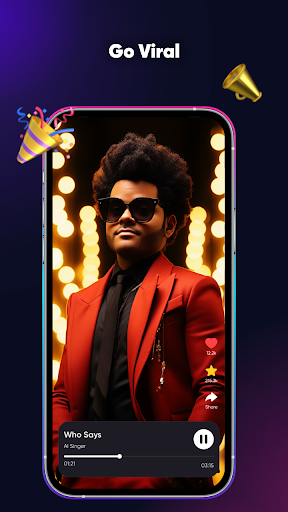
SingUp Music: AI Cover Songs screenshot
Permissions Explained 8 permissions requested View details

This app requests 8 permissions. The table below explains what each permission may allow and what users should review before installing.

Status Permission What it means Why it may be used User safety note
ℹ️ Review Read The Contents Of Your Usb Storage read the contents of your USB storage This is an Android permission or app-specific permission requested by the app. The app may use this permission for features related to its category, device support, background behavior, storage, connectivity, or system integration. Review this permission before installing, especially if it does not match the app’s expected purpose.
ℹ️ Review Modify Or Delete The Contents Of Your Usb Storage modify or delete the contents of your USB storage This is an Android permission or app-specific permission requested by the app. The app may use this permission for features related to its category, device support, background behavior, storage, connectivity, or system integration. Review this permission before installing, especially if it does not match the app’s expected purpose.
ℹ️ Review Record Audio record audio This is an Android permission or app-specific permission requested by the app. The app may use this permission for features related to its category, device support, background behavior, storage, connectivity, or system integration. Review this permission before installing, especially if it does not match the app’s expected purpose.
ℹ️ Review View Wi Fi Connections view Wi-Fi connections This is an Android permission or app-specific permission requested by the app. The app may use this permission for features related to its category, device support, background behavior, storage, connectivity, or system integration. Review this permission before installing, especially if it does not match the app’s expected purpose.
ℹ️ Review View Network Connections view network connections This is an Android permission or app-specific permission requested by the app. The app may use this permission for features related to its category, device support, background behavior, storage, connectivity, or system integration. Review this permission before installing, especially if it does not match the app’s expected purpose.
ℹ️ Review Full Network Access full network access This is an Android permission or app-specific permission requested by the app. The app may use this permission for features related to its category, device support, background behavior, storage, connectivity, or system integration. Review this permission before installing, especially if it does not match the app’s expected purpose.
ℹ️ Review Prevent Device From Sleeping prevent device from sleeping This is an Android permission or app-specific permission requested by the app. The app may use this permission for features related to its category, device support, background behavior, storage, connectivity, or system integration. Review this permission before installing, especially if it does not match the app’s expected purpose.
ℹ️ Review Receive Data From Internet receive data from Internet This is an Android permission or app-specific permission requested by the app. The app may use this permission for features related to its category, device support, background behavior, storage, connectivity, or system integration. Review this permission before installing, especially if it does not match the app’s expected purpose.

About SingUp Music: AI Cover Songs

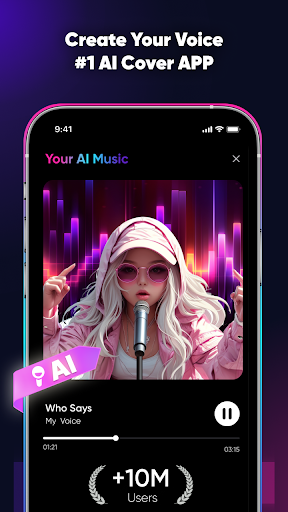
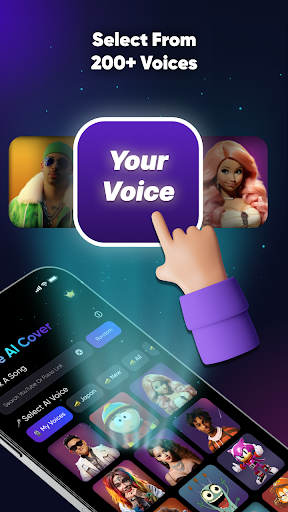
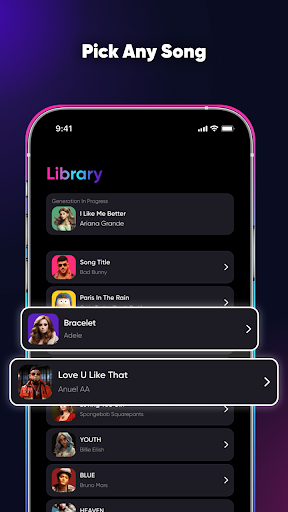
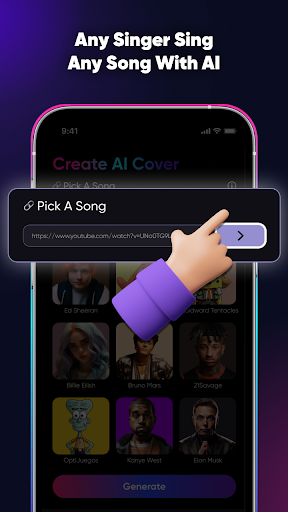
【SingUp Music: AI Cover Songs】- Bring Your Favorite Songs to Life with AI-Powered Covers! SingUp Music is a groundbreaking app that harnesses the power of AI to create extraordinary cover versions of your favorite songs. Say goodbye to ordinary karaoke and hello to a new world of musical possibilities! Unleash your creativity and transform any song into a unique masterpiece that reflects your personal style. Key Features: 1. Seamless Vocal Replacement: Our advanced AI technology seamlessly replaces the original vocals of any song, preserving the melody and rhythm to create a natural and immersive experience. It's like having your own personal studio! 2. Vast Sound Library: Discover a vast collection of singers and voices at your fingertips. Imagine hearing your favorite rock ballad sung by a legendary country artist or a romantic pop hit performed by an iconic rapper. The combinations are endless! 3. Share and Collaborate: Don't keep your incredible creations to yourself. Share your AI cover songs with friends, family, and music enthusiasts on social media, and collaborate with other talented users to create truly unique and unforgettable musical collaborations. ----- Privacy Policy: https://d1e0dtlz2jooy2.cloudfront.net/inter-web/singup/privacy.html Terms of Services: https://d1e0dtlz2jooy2.cloudfront.net/inter-web/singup/terms.html Our standard Subscription Plans with a 3-day free trial are: * 1-Week Subscription Subscription payments will be charged to your App Store account at confirmation of your purchase. Subscriptions will automatically renew and you will be charged unless auto-renew is turned off or unless you cancel at least 24 hours prior to the end of the current subscription or trial period. Any unused portion of a free trial period will be forfeited when you purchase a pro subscription during the free trial period. The cost of renewal depends on the Subscription Plan you choose. Subscriptions and auto-renewal may be managed by going to Account Settings after purchase or by contacting Customer Support. Download SingUp AI Cover Songs today and start playing like a pro musician!

What SingUp Music: AI Cover Songs Is Used For

SingUp Music: AI Cover Songs appears to be a phone app for creating AI-generated cover versions of songs. Based on the metadata, it is designed for users who want to transform existing music into alternate vocal styles, rather than simply playing tracks or doing basic karaoke. The app’s focus on AI vocal replacement suggests it may be used for experimenting with how a song sounds when performed by different voices or singer styles.

This type of app is commonly used by music hobbyists, content creators, and people who like remix-style experimentation. The permission to record audio indicates it may support capturing vocals or other sound input, while storage access may be used to save or manage created audio files. Network permissions suggest it may also connect to online services for processing, downloading, or sharing creations. Based on the metadata, it seems aimed at casual creative use on Android phones, especially for users interested in music editing, voice transformation, and sharing short audio projects with others.

Common uses

  • Create AI cover versions of songs with alternate vocal styles
  • Experiment with different singer-like voices on familiar tracks
  • Record audio inputs for music or voice-based creation
  • Save or manage generated audio files on the device
  • Share finished covers with friends or on social platforms
  • Use it as a creative music app instead of a standard karaoke tool
Best for:
music hobbyists content creators ai voice experiments phone users creative audio editing

App Details

Package:
com.talentme.singup
Category:
Music & Audio
Developer:
TALENT ME TECH.
Version:
2.12.1
Updated:
Mar 13, 2026
Min Android:
8.0
Age Rating:
Everyone
Contains Ads:
No
In-App Purchases:
Yes

Official Listing

  • Official listing available on Google Play
  • Package name: com.talentme.singup
  • Age rating: Everyone

Explore More

Browse more apps in Music & Audio or explore the Phone hub .

Related Music & Audio Apps

How to Download SingUp Music: AI Cover Songs

If this app is not hosted directly on APKApps official link, then for the safest and most up-to-date version, install it from its official Google Play listing.