HotSchedules icon

Phone

HotSchedules

Productivity Fourth Enterprises, LLC ⭐ 3.40 1,000,000+
Version 5.23.0 17.2 MB Everyone

Screenshots

HotSchedules screenshot
Permissions Explained 9 permissions requested View details

This app requests 9 permissions. The table below explains what each permission may allow and what users should review before installing.

Status Permission What it means Why it may be used User safety note
Common Internet access android.permission.INTERNET Allows the app to open network connections and communicate with online services. Commonly used for streaming, syncing, login, ads, analytics, downloads, cloud features, and app updates. Common permission. Review the app’s behavior if it does not appear to need online access.
ℹ️ Review Access Wifi State android.permission.ACCESS_WIFI_STATE This is an Android permission or app-specific permission requested by the app. The app may use this permission for features related to its category, device support, background behavior, storage, connectivity, or system integration. Review this permission before installing, especially if it does not match the app’s expected purpose.
Common View network status android.permission.ACCESS_NETWORK_STATE Allows the app to check whether the device is connected to Wi-Fi, mobile data, or another network. Often used to avoid loading content when offline or to adjust loading based on connection quality. Generally low risk by itself.
⚠️ Sensitive Modify external storage android.permission.WRITE_EXTERNAL_STORAGE Allows the app to write or modify files in shared device storage. Used for saving downloads, media files, exports, edited documents, backups, or cached content. Sensitive permission. Make sure file access matches the app’s purpose.
⚠️ Sensitive Read phone state android.permission.READ_PHONE_STATE Allows the app to access phone status and device-related information. Used for call handling, carrier services, device identification, account security, or playback interruption handling. Sensitive permission. Review whether the app has a clear phone-related reason.
ℹ️ Review Receive Boot Completed android.permission.RECEIVE_BOOT_COMPLETED This is an Android permission or app-specific permission requested by the app. The app may use this permission for features related to its category, device support, background behavior, storage, connectivity, or system integration. Review this permission before installing, especially if it does not match the app’s expected purpose.
ℹ️ Review Keep device awake android.permission.WAKE_LOCK Allows the app to prevent the device from sleeping while a task is running. Used for media playback, downloads, navigation, alarms, calls, or long-running background tasks. Review battery usage if the app keeps the device awake too often.
ℹ️ Review System Alert Window android.permission.SYSTEM_ALERT_WINDOW This is an Android permission or app-specific permission requested by the app. The app may use this permission for features related to its category, device support, background behavior, storage, connectivity, or system integration. Review this permission before installing, especially if it does not match the app’s expected purpose.
⚠️ Sensitive Read external storage android.permission.READ_EXTERNAL_STORAGE Allows the app to read files from shared device storage. Used by media players, file managers, backup apps, editors, upload tools, and document apps. Sensitive permission. Review carefully if the app does not need access to files or media.

About HotSchedules

HotSchedules is the industry's leading employee scheduling app because it’s the fastest and easiest way to manage your schedule and communicate with your team. Team members love it because they can swap, pick-up or release shifts with one click. Work-life balance is easily managed with automatic shift pick ups when you want more hours and time off requests for when you don’t. Calendar sync and notifications keep your Schedules and the roster automatically updated to your phone with any manager-approved changes. Managers appreciate the 75% time savings when building schedules and one-click approvals for shift changes. The ability to monitor business performance with sales and labor snapshots from anywhere, keeps them out of the back office. And most importantly, staying connected with broadcast and one-to-one messaging makes for a happy and productive team culture. NOTE: The HotSchedules application REQUIRES a valid HotSchedules user account through your employer. Need help? Contact Customer Care 24x7x365

What HotSchedules Is Used For

HotSchedules appears to be a workplace scheduling and team communication app for employees and managers, based on the metadata. It is commonly used in shift-based jobs where staff need to view schedules, request time off, and coordinate shift coverage from a phone. The app also indicates that access requires a valid HotSchedules account through an employer, so it is generally tied to a workplace rather than used as a standalone personal tool.

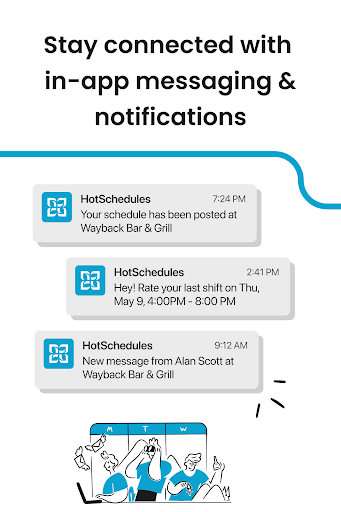
For team members, the app may be used to check upcoming shifts, swap or release shifts, and receive schedule updates and notifications when managers make changes. The metadata also mentions calendar sync and messaging, which suggests it can help users keep work plans aligned with their device calendar and stay in contact with teammates.

For managers, HotSchedules appears to support building schedules, approving shift changes, and viewing sales and labor snapshots on the go. The listed permissions, such as network access, boot completion, wake lock, and storage access, fit a phone app that stays connected, sends updates, and may store schedule-related data locally.

Common uses

  • Check work schedules and roster updates on a phone
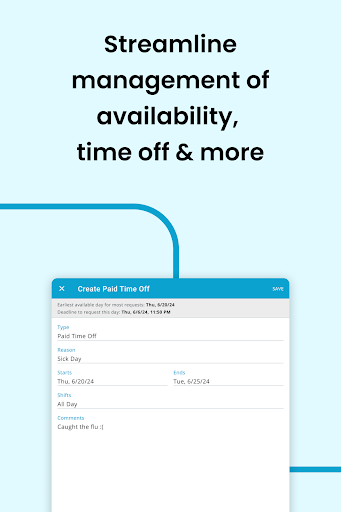
  • Request time off or manage availability
  • Swap, pick up, or release shifts when allowed by the employer
  • Receive notifications about manager-approved schedule changes
  • Use messaging to coordinate with teammates and managers
  • Review labor and sales snapshots from mobile
  • Access the app with an employer-provided HotSchedules account
Best for:
Shift workers Restaurant staff Managers Work scheduling Team communication

App Details

Package:
com.tdr3.hs.android
Category:
Productivity
Developer:
Fourth Enterprises, LLC
Version:
5.23.0
Updated:
Mar 17, 2026
Min Android:
6.0
Age Rating:
Everyone
Contains Ads:
No
In-App Purchases:
No

Official Listing

  • Official listing available on Google Play
  • Package name: com.tdr3.hs.android
  • Age rating: Everyone

Explore More

Browse more apps in Productivity or explore the Phone hub .

Related Productivity Apps

Paylocity icon

Paylocity

Business Paylocity

Access to Paylocity, empowering employees with information they need 24/7.

Version 24.4.7 60.3 MB ⭐ 4.71 5,000,000+ installs
Paychex icon

Paychex

Business Paychex, Inc

Paychex Flex - Save Time and Stay Connected

Version 7.49.0 104.6 MB ⭐ 4.68 1,000,000+ installs
Publix icon

Publix

Food & Drink Publix Super Markets Inc.

Publix Delivery, powered by Instacart. Groceries delivered to your door.

Version 4.63.0 241.7 MB ⭐ 4.62 1,000,000+ installs
PFMobile icon

PFMobile

Health & Fitness Planet Fitness

Workouts for everyone

Version 9.8.5 62.7 MB ⭐ 4.62 10,000,000+ installs
StubHub icon

StubHub

Events StubHub

Buy tickets for any event!

Version 101.12.42 150.8 MB ⭐ 3.65 10,000,000+ installs

How to Download HotSchedules

If this app is not hosted directly on APKApps official link, then for the safest and most up-to-date version, install it from its official Google Play listing.