About Json Genie PREMIUM (View/Edit)
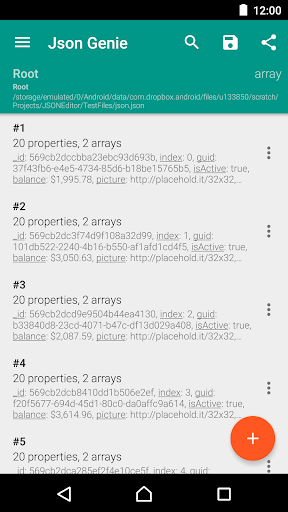
Json Genie was created by the need of a developer. Really, really fast It is ridiculously fast, which was really important while creating the app. Our tests reveal that it opens a 2 MB json file in under a second. We even did tests with files over 50 MB and Json Genie handled them without a sweat. View, edit, add, clone & remove objects/arrays/values Json Genie allows full reign over your json files. You can clone arrays/objects/values, you can add new arrays/objects/values, edit existing ones and even remove arrays/objects/values Create/open from sd, url, text, dropbox, ... Because Json Genie uses the default Android way of opening files, it can open a json file from all sources available on your Android phone (Dropbox, Drive, SD, ...). You can even copy/paste your custom json text or open a URL. Share/save your json files Powerful filter Easily find the elements you want by using the easy to use filter option. Set as default json handler Easily open json files from various applications by setting Json Genie as your default json handler. PREMIUM Unlock all themes, remove ads and have our gratitude
What Json Genie PREMIUM (View/Edit) Is Used For
Json Genie PREMIUM (View/Edit) appears to be a JSON file utility for Android phones, aimed at people who need to inspect and edit JSON data directly on a device. Based on the metadata, it is commonly used for opening JSON files, reviewing nested objects and arrays, and making changes such as adding, cloning, editing, or removing values. Its tools suggest a practical fit for developers, testers, or anyone working with structured text data.
The app also appears designed to work with multiple file sources, including local storage, URLs, pasted text, and cloud locations exposed through Android’s file picker. That makes it useful when JSON content comes from different places and needs to be viewed in one place. The listed storage permissions match this file-based workflow, while network access may support opening JSON from online sources and handling URLs. The premium title suggests it is the paid version with extra themes and no ads, based on the metadata.
Common uses
- Open and inspect JSON files on a phone
- Edit JSON objects, arrays, and values
- Add, clone, or remove JSON entries
- Load JSON from storage, URLs, or pasted text
- Use filters to find specific data in large JSON files
- Set the app as a default JSON handler
- Work with local and cloud-accessible files through Android file sharing
App Details
Package:
com.tuyware.jsongenie.premium
Developer:
Tuyware
Version:
2.5.1
Updated:
Dec 21, 2024
Min Android:
5.0
Age Rating:
Everyone
Contains Ads:
No
In-App Purchases:
No
Official Listing
-
Official listing available on
Google Play
-
Package name:
com.tuyware.jsongenie.premium
-
Age rating:
Everyone
Related Tools Apps
Communication
•
BeenVerified.com
Version 9.1.26
⭐ 4.40
1,000,000+ installs
How to Download Json Genie PREMIUM (View/Edit)
If this app is not hosted directly on APKApps official link,
then for the safest and most up-to-date version, install it from its official Google Play listing.