UNest: Investing for Your Kids icon

Phone

UNest: Investing for Your Kids

Finance UNest Holdings, Inc. ⭐ 3.80 100,000+
Version 3.1.5 Everyone

Screenshots

UNest: Investing for Your Kids screenshot
Permissions Explained 13 permissions requested View details

This app requests 13 permissions. The table below explains what each permission may allow and what users should review before installing.

Status Permission What it means Why it may be used User safety note
ℹ️ Review Read The Contents Of Your Usb Storage read the contents of your USB storage This is an Android permission or app-specific permission requested by the app. The app may use this permission for features related to its category, device support, background behavior, storage, connectivity, or system integration. Review this permission before installing, especially if it does not match the app’s expected purpose.
ℹ️ Review Modify Or Delete The Contents Of Your Usb Storage modify or delete the contents of your USB storage This is an Android permission or app-specific permission requested by the app. The app may use this permission for features related to its category, device support, background behavior, storage, connectivity, or system integration. Review this permission before installing, especially if it does not match the app’s expected purpose.
ℹ️ Review Take Pictures And Videos take pictures and videos This is an Android permission or app-specific permission requested by the app. The app may use this permission for features related to its category, device support, background behavior, storage, connectivity, or system integration. Review this permission before installing, especially if it does not match the app’s expected purpose.
ℹ️ Review Record Audio record audio This is an Android permission or app-specific permission requested by the app. The app may use this permission for features related to its category, device support, background behavior, storage, connectivity, or system integration. Review this permission before installing, especially if it does not match the app’s expected purpose.
ℹ️ Review View Wi Fi Connections view Wi-Fi connections This is an Android permission or app-specific permission requested by the app. The app may use this permission for features related to its category, device support, background behavior, storage, connectivity, or system integration. Review this permission before installing, especially if it does not match the app’s expected purpose.
ℹ️ Review View Network Connections view network connections This is an Android permission or app-specific permission requested by the app. The app may use this permission for features related to its category, device support, background behavior, storage, connectivity, or system integration. Review this permission before installing, especially if it does not match the app’s expected purpose.
ℹ️ Review Change Network Connectivity change network connectivity This is an Android permission or app-specific permission requested by the app. The app may use this permission for features related to its category, device support, background behavior, storage, connectivity, or system integration. Review this permission before installing, especially if it does not match the app’s expected purpose.
ℹ️ Review Full Network Access full network access This is an Android permission or app-specific permission requested by the app. The app may use this permission for features related to its category, device support, background behavior, storage, connectivity, or system integration. Review this permission before installing, especially if it does not match the app’s expected purpose.
ℹ️ Review Run At Startup run at startup This is an Android permission or app-specific permission requested by the app. The app may use this permission for features related to its category, device support, background behavior, storage, connectivity, or system integration. Review this permission before installing, especially if it does not match the app’s expected purpose.
ℹ️ Review Draw Over Other Apps draw over other apps This is an Android permission or app-specific permission requested by the app. The app may use this permission for features related to its category, device support, background behavior, storage, connectivity, or system integration. Review this permission before installing, especially if it does not match the app’s expected purpose.
ℹ️ Review Control Vibration control vibration This is an Android permission or app-specific permission requested by the app. The app may use this permission for features related to its category, device support, background behavior, storage, connectivity, or system integration. Review this permission before installing, especially if it does not match the app’s expected purpose.
ℹ️ Review Prevent Device From Sleeping prevent device from sleeping This is an Android permission or app-specific permission requested by the app. The app may use this permission for features related to its category, device support, background behavior, storage, connectivity, or system integration. Review this permission before installing, especially if it does not match the app’s expected purpose.
ℹ️ Review Receive Data From Internet receive data from Internet This is an Android permission or app-specific permission requested by the app. The app may use this permission for features related to its category, device support, background behavior, storage, connectivity, or system integration. Review this permission before installing, especially if it does not match the app’s expected purpose.

About UNest: Investing for Your Kids

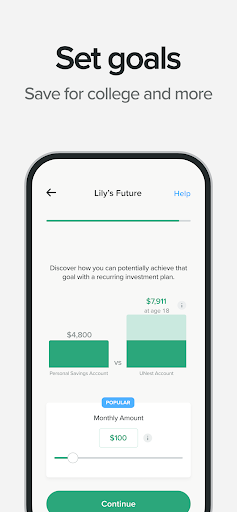
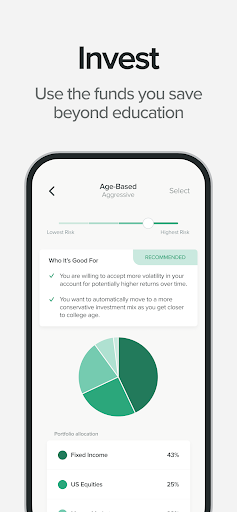
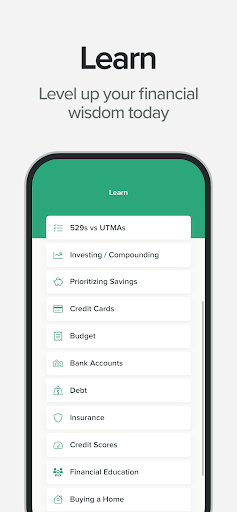
Imagine a brighter future for your kids, then take the first step in building it with UNest. Make bi-weekly or monthly contributions to your child's account and earn money from the brands you love when you shop. UNest makes it easy to build a solid financial foundation. With a custodial account, smart investing tools, and a variety of options, we help you manage your family finances effortlessly. A UTMA is the basis of every UNest account. This allows the funds you save to grow for the benefit of your child, with potential tax advantages depending on your situation. In addition, the funds you've invested can be withdrawn and used for any child-related expenses without penalty.* With our relentless dedication to building a safe and secure investment app, you can rest easy and focus on what's truly important to your family with UNest. UNEST BENEFITS: ● INVEST Make recurring contributions, track your investment growth, and choose from a simple selection of investment options. ● REWARDS Stash more cash right into your child’s account simply by shopping at the brands you love. Earn rewards & discounts when you purchase products from within the UNest app. ● SECURE Invest safely thanks to our industry-leading, bank-level encryption that helps keep your financial data secure. ● FLEXIBLE Life getting in the way? No worries. Make free withdrawals for child-related emergencies* or use funds for any child-related costs such as college tuition or a down payment. Depending on your tax situation, your account may enjoy tax benefits. ● SUBSCRIPTIONS New UNest members who join on or after November 20, 2025 will be billed under our updated pricing model of $2 per month plus a 0.25 percent annual fee on invested assets. Other fees may apply. Existing members who subscribed before this date will continue under the subscription plan they originally selected unless they choose to change plans. Full pricing details are available at https://www.unest.co/pricing Download UNest and start building your child’s financial future today! If you have any questions, don’t hesitate to reach out at [email protected] * Funds may be subject to capital gains tax DISCLOSURES INVESTING INVOLVES RISK. PAST PERFORMANCE IS NO GUARANTEE OF FUTURE RESULTS Investment advisory services are offered through UNest Advisers, LLC, an SEC-registered investment adviser. Brokerage services are provided to clients of UNest Advisers by UNest Securities, LLC, an SEC-registered broker-dealer and member of FINRA (https://finra.org) and SIPC (https://sipc.org). UNest charges a subscription fee for the services provided as part of UNest Membership, including personal use of the UNest app. UNest Holdings, Inc. charges this fee; however, it also covers any advisory services UNest Advisers, LLC provides. You can manage your subscription via the Google Play Store. Recurring billing, cancel anytime. Please refer to the Program Description for more details at https://unest.co/iaa Disclosures are available at…

What UNest: Investing for Your Kids Is Used For

UNest: Investing for Your Kids is a finance app for parents or guardians who want to set up and manage a child-focused investment account on a phone. Based on the metadata, it appears to center on custodial accounts tied to a UTMA structure, with tools for making recurring contributions and tracking how the account may grow over time. It is commonly used as a way to save and invest for future child expenses such as education or other family-related needs.

The app also appears to include shopping-related rewards that can add money or discounts to a child’s account when users buy from participating brands. That makes it useful for people who want a more automatic, family-budget-friendly way to contribute over time. The listed permissions suggest it may need network access for account syncing and transactions, storage access for app data, and startup/background behavior to support ongoing account use. Since this is a finance app with in-app purchases, it is best suited for users who are comfortable managing investment products and reviewing account terms before using it.

Common uses

  • Set up a custodial investment account for a child
  • Make recurring bi-weekly or monthly contributions
  • Track investment growth and account activity
  • Use shopping rewards to add value to the account
  • Manage funds for future child-related expenses
  • Review account options and pricing within the app
  • Use on a phone for ongoing family finance management
Best for:
parents guardians child savings family finance phone app

App Details

Package:
com.unest.android
Category:
Finance
Developer:
UNest Holdings, Inc.
Version:
3.1.5
Updated:
Mar 21, 2026
Min Android:
7.0
Age Rating:
Everyone
Contains Ads:
No
In-App Purchases:
Yes

Official Listing

  • Official listing available on Google Play
  • Package name: com.unest.android
  • Age rating: Everyone

Explore More

Browse more apps in Finance or explore the Phone hub .

Related Finance Apps

Investing.com: Stock Market icon

Investing.com: Stock Market

Finance INVESTING.com

Get real-time stock market alerts & investment ideas. Track your stocks & ETFs.

Version 6.47.1 104.3 MB ⭐ 4.60 50,000,000+ installs
TradingView: Track All Markets icon

TradingView: Track All Markets

Finance TradingView Inc.

From stocks to crypto. Technical analysis, Trading ideas and Financial news.

Version Varies with device 54.1 MB ⭐ 4.70 50,000,000+ installs
Splitwise icon

Splitwise

Finance Splitwise

Split expenses with friends, roommates, group trips, and more

Version 26.3.1 69.5 MB ⭐ 4.20 10,000,000+ installs
Yahoo Finance: Stocks & News icon

Yahoo Finance: Stocks & News

Finance Yahoo

Breaking Financial News about the market, Stocks, Crypto & Portfolio Tracking

Version Varies with device 40.4 MB ⭐ 4.60 10,000,000+ installs
Experian® icon

Experian®

Finance Experian

Your Big Financial Friend

Version 4.2.15 117.5 MB ⭐ 4.70 10,000,000+ installs
Webull: Investing & Trading icon

Webull: Investing & Trading

Finance Webull Technologies Pte. Ltd.

Stocks, Options, Crypto, Futures, and ETFs

Version 11.8.0.38 90.3 MB ⭐ 4.60 10,000,000+ installs

How to Download UNest: Investing for Your Kids

If this app is not hosted directly on APKApps official link, then for the safest and most up-to-date version, install it from its official Google Play listing.