iCut: Video Editor & Maker icon

Phone

iCut: Video Editor & Maker

Video Players & Editors iCut -Video Editor & Video Maker App ⭐ 3.70 500,000+
Version 1.9.6 Everyone

Screenshots

iCut: Video Editor & Maker screenshot
Permissions Explained 14 permissions requested View details

This app requests 14 permissions. The table below explains what each permission may allow and what users should review before installing.

Status Permission What it means Why it may be used User safety note
ℹ️ Review Read Phone Status And Identity read phone status and identity This is an Android permission or app-specific permission requested by the app. The app may use this permission for features related to its category, device support, background behavior, storage, connectivity, or system integration. Review this permission before installing, especially if it does not match the app’s expected purpose.
ℹ️ Review Read The Contents Of Your Usb Storage read the contents of your USB storage This is an Android permission or app-specific permission requested by the app. The app may use this permission for features related to its category, device support, background behavior, storage, connectivity, or system integration. Review this permission before installing, especially if it does not match the app’s expected purpose.
ℹ️ Review Modify Or Delete The Contents Of Your Usb Storage modify or delete the contents of your USB storage This is an Android permission or app-specific permission requested by the app. The app may use this permission for features related to its category, device support, background behavior, storage, connectivity, or system integration. Review this permission before installing, especially if it does not match the app’s expected purpose.
ℹ️ Review Take Pictures And Videos take pictures and videos This is an Android permission or app-specific permission requested by the app. The app may use this permission for features related to its category, device support, background behavior, storage, connectivity, or system integration. Review this permission before installing, especially if it does not match the app’s expected purpose.
ℹ️ Review Record Audio record audio This is an Android permission or app-specific permission requested by the app. The app may use this permission for features related to its category, device support, background behavior, storage, connectivity, or system integration. Review this permission before installing, especially if it does not match the app’s expected purpose.
ℹ️ Review View Wi Fi Connections view Wi-Fi connections This is an Android permission or app-specific permission requested by the app. The app may use this permission for features related to its category, device support, background behavior, storage, connectivity, or system integration. Review this permission before installing, especially if it does not match the app’s expected purpose.
ℹ️ Review View Network Connections view network connections This is an Android permission or app-specific permission requested by the app. The app may use this permission for features related to its category, device support, background behavior, storage, connectivity, or system integration. Review this permission before installing, especially if it does not match the app’s expected purpose.
ℹ️ Review Change Network Connectivity change network connectivity This is an Android permission or app-specific permission requested by the app. The app may use this permission for features related to its category, device support, background behavior, storage, connectivity, or system integration. Review this permission before installing, especially if it does not match the app’s expected purpose.
ℹ️ Review Connect And Disconnect From Wi Fi connect and disconnect from Wi-Fi This is an Android permission or app-specific permission requested by the app. The app may use this permission for features related to its category, device support, background behavior, storage, connectivity, or system integration. Review this permission before installing, especially if it does not match the app’s expected purpose.
ℹ️ Review Full Network Access full network access This is an Android permission or app-specific permission requested by the app. The app may use this permission for features related to its category, device support, background behavior, storage, connectivity, or system integration. Review this permission before installing, especially if it does not match the app’s expected purpose.
ℹ️ Review Reorder Running Apps reorder running apps This is an Android permission or app-specific permission requested by the app. The app may use this permission for features related to its category, device support, background behavior, storage, connectivity, or system integration. Review this permission before installing, especially if it does not match the app’s expected purpose.
ℹ️ Review Draw Over Other Apps draw over other apps This is an Android permission or app-specific permission requested by the app. The app may use this permission for features related to its category, device support, background behavior, storage, connectivity, or system integration. Review this permission before installing, especially if it does not match the app’s expected purpose.
ℹ️ Review Control Vibration control vibration This is an Android permission or app-specific permission requested by the app. The app may use this permission for features related to its category, device support, background behavior, storage, connectivity, or system integration. Review this permission before installing, especially if it does not match the app’s expected purpose.
ℹ️ Review Prevent Device From Sleeping prevent device from sleeping This is an Android permission or app-specific permission requested by the app. The app may use this permission for features related to its category, device support, background behavior, storage, connectivity, or system integration. Review this permission before installing, especially if it does not match the app’s expected purpose.

About iCut: Video Editor & Maker

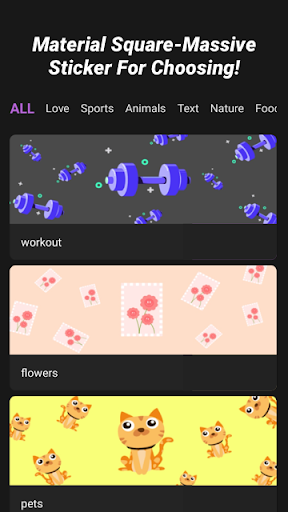
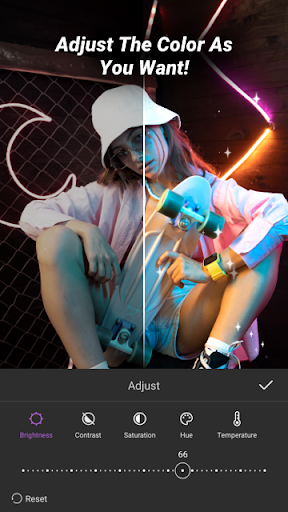
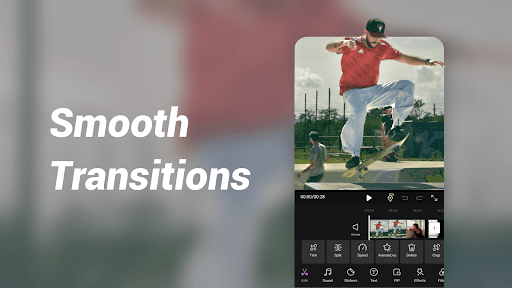
iCut--A Video Editor & maker provides powerful video editing features, allowing you to create stunning videos effortlessly. iCut is an all-in-one editing tool for both video and photo. iCut allows you to cut, crop, rotate, merge, split, and add transitions, filters, stickers, texts, music, voice extraction, and more. With iCut, you can easily merge multiple clips, add video effects, and adjust video speed. Additionally, you can fine-tune the brightness, contrast, saturation, speed, volume, and other parameters of your videos and photos. iCut enables you to export your videos in various formats and resolutions, and share them on social media platforms like YouTube, Instagram, and TikTok. Features: --Video Editing •Split/Trim video. •Cut Video: Precisely cut video clips as desired. Simply drag the timeline to remove the unwanted segments. •Merge Videos: Combine multiple clips into a seamless, high-quality video. •Adjust Video Ratio: Fit your video and photo in any aspect ratio for Youtube, TikTok, Instagram, and whatsapp. •Speed: Video Speed up/ slow. Make slow motion and make the video speed more smooth. •Add Custom Watermark: Protect your work with personalized watermarks. Essential for any video maker and movie maker. •Custom Backgrounds: Easily remove background --Advanced Movie Maker •Picture-in-Picture(PIP): Overlay a smaller video or image on top of a larger one. Adjust size, position, and opacity for dynamic effects. •Keyframe: Make video pro: video camera movement, sticker movement, subtitle scrolling, closing effects, etc. •Reverse: Play the video backwards. Can choose to reverse one clip or the whole video. •Mask: Hide or reveal parts of the video. You can choose from different shapes, such as circle, square, star, etc, and adjust the size, position, and feather of the mask. You can also animate the mask with keyframes. •Video Template: Import your local videos into iCut, and then quickly generate to hot style videos. --Music&Voice-over •Add sound effect to your video. •Extract audio from video. •Music-synced video •Video Dubbing and voice-over in iCut. •Adjust volume and make the music fade in /out. --Sticker&Text •Multiple and all kinds of stickers and text fonts are available.Add fun and cute elements to your video, such as emojis, animals, flowers, or birthdays stickers. •Add styles and animations to the subtitle text of your vlog. •adjust the text animation with key frame. Filters&Effects •Change the color, tone, mood, or style of your video, use the preset filters such as black and white, sepia, vintage, or cartoon.or customize your own filter settings. •Add some magic or drama to your video, such as fire,, snow, or glitch. You can choose from different types of effects and adjust their duration. iCut is a useful and easy-to-use video editor which has various of video template to use and makes the video editing become fast, and reliable.A powerful video editing tool for video creator and collage maker. Contact us: If you have any…

What iCut: Video Editor & Maker Is Used For

iCut: Video Editor & Maker appears to be a phone-based video editing app for creating and refining short-form or social media videos. Based on the metadata, it is commonly used to trim, cut, merge, split, crop, and rotate video clips, as well as add transitions, filters, stickers, text, and music. The app also mentions photo editing tools, so it may be used for simple mixed media projects rather than video-only workflows.

The permission set suggests the app needs access to local media storage, network connectivity, audio recording, and possibly camera-related functions for creating or importing content. That fits a workflow where users edit clips on the device, add voice-over or extracted audio, and then export finished videos in different formats or resolutions. The app also references aspect-ratio adjustment and sharing to platforms like YouTube, Instagram, and TikTok, so it appears suited for making videos sized for common social formats.

In practice, people may use iCut for quick mobile edits, basic content creation, and light post-production tasks such as changing speed, adjusting brightness or contrast, adding watermarks, or layering picture-in-picture effects. Because it is listed as a video editor and maker, it seems aimed at users who want an all-in-one editing tool on Android phones without using a desktop editor.

Common uses

  • Trim, cut, split, and merge clips on a phone
  • Add text, stickers, filters, transitions, and music
  • Create social media videos in common aspect ratios
  • Record voice-over or extract audio from a video
  • Adjust speed, volume, brightness, contrast, and saturation
  • Use picture-in-picture, reverse, mask, or keyframe effects
  • Export edited videos in different formats and resolutions
Best for:
mobile editors social media creators quick video edits short-form content phone app

App Details

Package:
com.videocreator.android
Developer:
iCut -Video Editor & Video Maker App
Version:
1.9.6
Updated:
Mar 21, 2025
Min Android:
7.0
Age Rating:
Everyone
Contains Ads:
Yes
In-App Purchases:
Yes

Official Listing

  • Official listing available on Google Play
  • Package name: com.videocreator.android
  • Age rating: Everyone

Explore More

Browse more apps in Video Players & Editors or explore the Phone hub .

Related Video Players & Editors Apps

AI Video Editor - Vidma Cut AI icon

AI Video Editor - Vidma Cut AI

Video Players & Editors Vidma Video Studio

AI video editor & video maker: edit videos with music, Ghibli art style images!

Version 2.25.2 91.6 MB ⭐ 4.60 50,000,000+ installs
GoPro Quik: Video Editor icon

GoPro Quik: Video Editor

Video Players & Editors GoPro

Auto video maker with music & exclusive filters. Video editing made simple.

Version Varies with device 296.3 MB ⭐ 4.50 50,000,000+ installs
Splice - Video Editor & Maker icon

Splice - Video Editor & Maker

Video Players & Editors Bending Spoons

Easy to use and with all the tools you need to edit: slowmo, music, text & more

Version Varies with device 80.5 MB ⭐ 3.70 5,000,000+ installs
LightCut icon

LightCut

Video Players & Editors LightCut Inc.

Pro video editor & vlog maker, video templates: edit videos in minutes

Version 4.87.6 104.7 MB ⭐ 4.71 1,000,000+ installs
GoCut icon

GoCut

Video Players & Editors Like GoCut

AI Video Maker & Editor, easy Music &Video cut : 1000+ effect templates

Version 3.0.4 84.6 MB ⭐ 4.55 10,000,000+ installs
Motion Ninja icon

Motion Ninja

Video Players & Editors changpeng

Video After Effects & Motion Editor with keyframe, 3D effect, smooth slow motion

Version 4.1.6 148.8 MB ⭐ 4.54 10,000,000+ installs

How to Download iCut: Video Editor & Maker

If this app is not hosted directly on APKApps official link, then for the safest and most up-to-date version, install it from its official Google Play listing.