My Face Shape Meter and frames icon

Phone

My Face Shape Meter and frames

Lifestyle vistech.projects ⭐ 3.90 50,000+
Version Varies with device Everyone

Screenshots

My Face Shape Meter and frames screenshot
Permissions Explained 6 permissions requested View details

This app requests 6 permissions. The table below explains what each permission may allow and what users should review before installing.

Status Permission What it means Why it may be used User safety note
ℹ️ Review Read The Contents Of Your Usb Storage read the contents of your USB storage This is an Android permission or app-specific permission requested by the app. The app may use this permission for features related to its category, device support, background behavior, storage, connectivity, or system integration. Review this permission before installing, especially if it does not match the app’s expected purpose.
ℹ️ Review Modify Or Delete The Contents Of Your Usb Storage modify or delete the contents of your USB storage This is an Android permission or app-specific permission requested by the app. The app may use this permission for features related to its category, device support, background behavior, storage, connectivity, or system integration. Review this permission before installing, especially if it does not match the app’s expected purpose.
ℹ️ Review Take Pictures And Videos take pictures and videos This is an Android permission or app-specific permission requested by the app. The app may use this permission for features related to its category, device support, background behavior, storage, connectivity, or system integration. Review this permission before installing, especially if it does not match the app’s expected purpose.
ℹ️ Review View Network Connections view network connections This is an Android permission or app-specific permission requested by the app. The app may use this permission for features related to its category, device support, background behavior, storage, connectivity, or system integration. Review this permission before installing, especially if it does not match the app’s expected purpose.
ℹ️ Review Full Network Access full network access This is an Android permission or app-specific permission requested by the app. The app may use this permission for features related to its category, device support, background behavior, storage, connectivity, or system integration. Review this permission before installing, especially if it does not match the app’s expected purpose.
ℹ️ Review Google Play License Check Google Play license check This is an Android permission or app-specific permission requested by the app. The app may use this permission for features related to its category, device support, background behavior, storage, connectivity, or system integration. Review this permission before installing, especially if it does not match the app’s expected purpose.

About My Face Shape Meter and frames

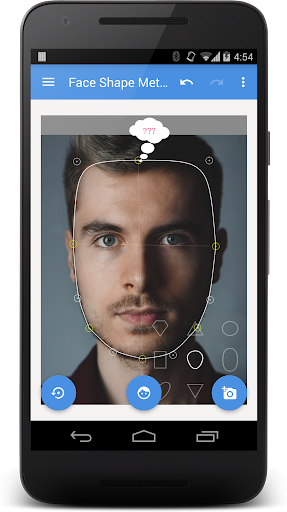
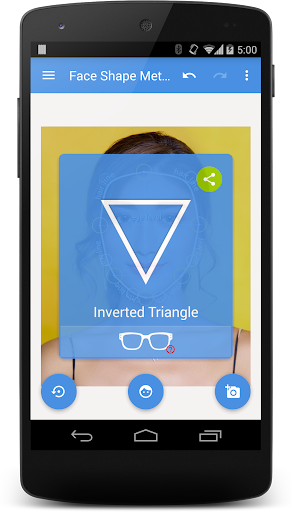
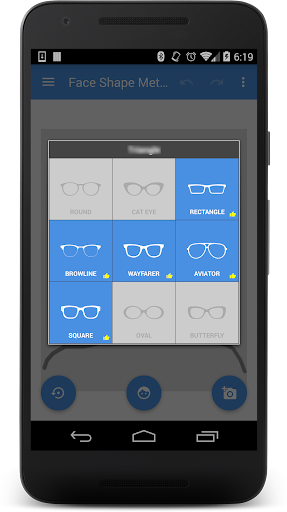
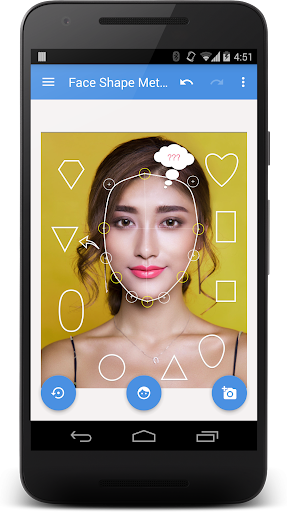
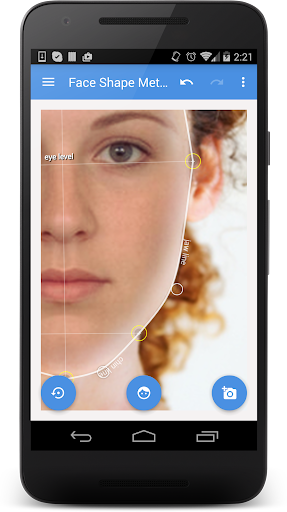
FACE SHAPE METER is a simple and easy to use tool for identifying your face shape from your picture. Knowing your face shape can be useful in many different areas. For example, you would need to check your shape of face for finding “the right” haircut or hairstyle, sun glasses that fit you well the best makeup or contouring for your face, or even wig or hat that suits you best. http://goo.gl/uooH28 To determine your face shape you would need to do 3 simple steps: 1. make or upload picture 2. outline your face with special contour as shown on screenshots 3. press the button and see the result for your face Tips: - For best result use a picture with neutral face expression, where your head is directed straight to the camera. Turning your head might affect the final result. - Before measurements make sure your hairline is visible You can also check what popular eyeglass or sun-glass frames suit your face shape best and try them on ☎ If you have any problem with the app on your device or with getting face shape result, if you need assistance or want to cancel your order, please contact [email protected] and we will try to help you. Thank you and enjoy the app! VisTech.Projects Team.

What My Face Shape Meter and frames Is Used For

My Face Shape Meter and frames appears to be a lifestyle app for estimating a person’s face shape from a photo. Based on the metadata, it may be used when someone wants guidance on style choices that depend on face shape, such as haircuts, makeup, contouring, hats, wigs, or eyeglasses. The app’s workflow seems to center on taking or uploading a picture, outlining the face, and then viewing a result.

The permission set also suggests photo-based use: camera access is needed to take pictures, while storage access may be used to read or save images on the device. Network permissions indicate it may connect online for app functions such as licensing or related content. Since this is a phone app, it appears designed for everyday personal use on a mobile device rather than a desktop or large-screen setup. The eyewear frame feature suggests it may also be used to explore which frame styles could suit a user’s face shape, but the metadata does not support broader fashion or medical claims.

Common uses

  • Estimate face shape from a photo
  • Use a photo for hairstyle planning
  • Explore glasses or frame style matching
  • Compare makeup or contouring ideas by face shape
  • Check hat or wig style fit by face shape
  • Take or upload images from a phone
  • Works as a mobile lifestyle reference tool
Best for:
Photo-based face shape checks Style planning Glasses frame selection Haircut ideas Phone users

App Details

Package:
com.vistechprojects.faceshapemeterpro
Category:
Lifestyle
Developer:
vistech.projects
Version:
Varies with device
Updated:
Dec 12, 2024
Min Android:
Varies with device
Age Rating:
Everyone
Contains Ads:
No
In-App Purchases:
No

Official Listing

  • Official listing available on Google Play
  • Package name: com.vistechprojects.faceshapemeterpro
  • Age rating: Everyone

Explore More

Browse more apps in Lifestyle or explore the Phone hub .

Related Lifestyle Apps

How to Download My Face Shape Meter and frames

If this app is not hosted directly on APKApps official link, then for the safest and most up-to-date version, install it from its official Google Play listing.