Contraction Timer & Counter icon

Phone

Contraction Timer & Counter

Parenting Wachanga ⭐ 4.00 1,000,000+

Contraction tracker for labor. Track labor and monitor progress!

Version 1.27.0 11.4 MB Everyone

Screenshots

Contraction Timer & Counter screenshot
Permissions Explained 12 permissions requested View details

This app requests 12 permissions. The table below explains what each permission may allow and what users should review before installing.

Status Permission What it means Why it may be used User safety note
ℹ️ Review Schedule Exact Alarm android.permission.SCHEDULE_EXACT_ALARM This is an Android permission or app-specific permission requested by the app. The app may use this permission for features related to its category, device support, background behavior, storage, connectivity, or system integration. Review this permission before installing, especially if it does not match the app’s expected purpose.
ℹ️ Review Send notifications android.permission.POST_NOTIFICATIONS Allows the app to send notifications to the device. Used for alerts, reminders, messages, account activity, updates, or media controls. Review notification settings if the app sends too many alerts.
ℹ️ Review Receive Boot Completed android.permission.RECEIVE_BOOT_COMPLETED This is an Android permission or app-specific permission requested by the app. The app may use this permission for features related to its category, device support, background behavior, storage, connectivity, or system integration. Review this permission before installing, especially if it does not match the app’s expected purpose.
ℹ️ Review Quickboot Poweron android.permission.QUICKBOOT_POWERON This is an Android permission or app-specific permission requested by the app. The app may use this permission for features related to its category, device support, background behavior, storage, connectivity, or system integration. Review this permission before installing, especially if it does not match the app’s expected purpose.
Common Internet access android.permission.INTERNET Allows the app to open network connections and communicate with online services. Commonly used for streaming, syncing, login, ads, analytics, downloads, cloud features, and app updates. Common permission. Review the app’s behavior if it does not appear to need online access.
ℹ️ Review Gms Permission Ad Id com.google.android.gms.permission.AD_ID This is an Android permission or app-specific permission requested by the app. The app may use this permission for features related to its category, device support, background behavior, storage, connectivity, or system integration. Review this permission before installing, especially if it does not match the app’s expected purpose.
Common Vibration control android.permission.VIBRATE Allows the app to control device vibration. Used for notifications, alerts, haptic feedback, timers, alarms, or game feedback. Generally low risk by itself.
Common View network status android.permission.ACCESS_NETWORK_STATE Allows the app to check whether the device is connected to Wi-Fi, mobile data, or another network. Often used to avoid loading content when offline or to adjust loading based on connection quality. Generally low risk by itself.
ℹ️ Review Keep device awake android.permission.WAKE_LOCK Allows the app to prevent the device from sleeping while a task is running. Used for media playback, downloads, navigation, alarms, calls, or long-running background tasks. Review battery usage if the app keeps the device awake too often.
ℹ️ Review Finsky Permission Bind Get Install Referrer Service com.google.android.finsky.permission.BIND_GET_INSTALL_REFERRER_SERVICE This is an Android permission or app-specific permission requested by the app. The app may use this permission for features related to its category, device support, background behavior, storage, connectivity, or system integration. Review this permission before installing, especially if it does not match the app’s expected purpose.
ℹ️ Review Foreground Service android.permission.FOREGROUND_SERVICE This is an Android permission or app-specific permission requested by the app. The app may use this permission for features related to its category, device support, background behavior, storage, connectivity, or system integration. Review this permission before installing, especially if it does not match the app’s expected purpose.
ℹ️ Review Vending Billing com.android.vending.BILLING This is an Android permission or app-specific permission requested by the app. The app may use this permission for features related to its category, device support, background behavior, storage, connectivity, or system integration. Review this permission before installing, especially if it does not match the app’s expected purpose.

About Contraction Timer & Counter

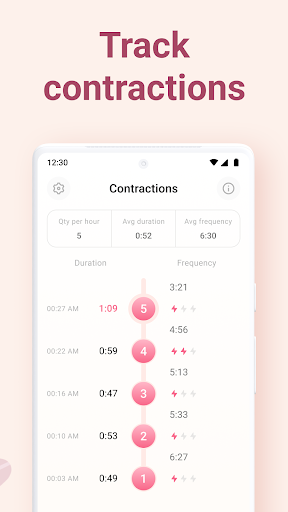
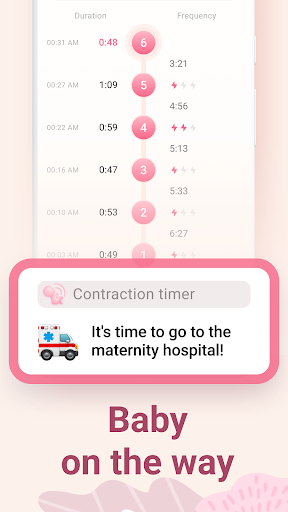
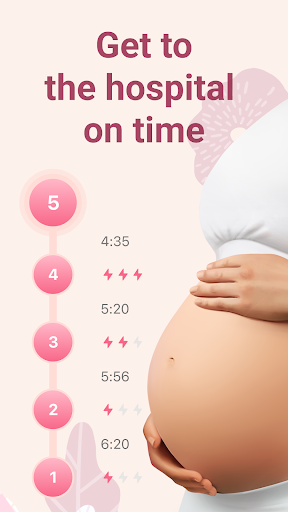
This pregnancy contraction timer is designed for the final phase of your pregnancy. The Сontraction Timer & Counter app helps you track labor contractions and monitor your labor progress for a positive birth experience. This app is ideal for mothers in childbirth to time contractions effortlessly. By timing multiple contractions, including Braxton Hicks contractions, the app will inform you of the labor stage you're in. Collect all necessary data in one convenient report for your doctor. The app generates a PDF report that can be emailed or shown directly from your phone. How to Use the App: Track Contractions: Easily start and stop the timer to monitor each contraction. This feature is especially helpful for tracking Braxton Hicks contractions and real labor contractions. Monitor Progress: The app will analyze your data and provide insights into your labor stage. Whether you are experiencing Braxton Hicks or true labor contractions, the app offers valuable information. Generate Reports: Compile all your contraction data into a report for your healthcare provider. This includes tracking your contractions through various stages, from early labor to full term. Benefits: Contraction Timer: Accurately time your contractions, including Braxton Hicks contractions. Labor Signs Tracking: Monitor labor signs and know when it's time to head to the hospital. The app helps distinguish between Braxton Hicks and actual labor contractions. Positive Birth Experience: Utilize the app for a calm and gentle birth. Data Reports: Keep all your contraction data in one place for easy sharing with your doctor. This includes data on Braxton Hicks and true labor contractions. May the last phase of your pregnancy be pleasant and wonderful! Our app will support you through your entire journey to becoming a new mom, whether you're dealing with Braxton Hicks contractions or real labor. Millions of pregnant women around the world have used our apps to track their contractions and monitor their labor progress. IMPORTANT: This app does not provide medical advice. Our recommendations are based on standard indicators. Your labor may occur differently. Always consult your doctor regarding contraction frequency and duration. We welcome your feedback and questions. Please contact us at [email protected] or reach out to support within the app.

What Contraction Timer & Counter Is Used For

Contraction Timer & Counter appears to be a pregnancy and labor tracking app for phones. Based on the metadata, it is commonly used during the final stage of pregnancy to time contractions, including Braxton Hicks contractions, and help users watch how labor may be progressing. The app is positioned as a simple tracking tool rather than a medical device, and the description notes that its guidance is based on standard indicators, so it may be used as a reference point alongside advice from a healthcare provider.

The app also appears to be useful for organizing contraction history into a report that can be emailed or shown directly from the phone. That makes it practical for people who want a record they can share with a doctor or midwife. Permissions such as notifications, alarms, vibration, and foreground service support suggest it may be designed to keep timing reminders and tracking active during labor. Because it is a phone app in the Parenting category, it seems intended for quick, one-handed use when monitoring contractions at home or while deciding whether it may be time to seek care.

Common uses

  • Time and log labor contractions on a phone
  • Track Braxton Hicks contractions and compare them with possible labor patterns
  • Review contraction timing to help estimate labor stage
  • Create a PDF report for sharing with a doctor or midwife
  • Use during late pregnancy when monitoring signs of labor
  • Receive alerts or reminders through notifications and vibration
Best for:
Expecting parents Labor tracking Pregnancy monitoring Phone use

App Details

Package:
com.wachanga.contractions
Category:
Parenting
Developer:
Wachanga
Version:
1.27.0
Updated:
Nov 26, 2025
Min Android:
9
Age Rating:
Everyone
Contains Ads:
Yes
In-App Purchases:
Yes

Official Listing

  • Official listing available on Google Play
  • Package name: com.wachanga.contractions
  • Age rating: Everyone

Explore More

Browse more apps in Parenting or explore the Phone hub .

Related Parenting Apps

What to Expect icon

What to Expect

Parenting What to Expect

All-In-One Pregnancy Tracker, Your Baby's Milestones, Growth Stages & Parenting.

Version 7.56.1 45.2 MB ⭐ 4.90 5,000,000+ installs
BabyCenter icon

BabyCenter

Parenting BabyCenter

Track baby’s development & growth week by week with BabyCenter’s pregnancy app!

Version 5.07.0 50.0 MB ⭐ 4.88 10,000,000+ installs
Pregnancy icon

Pregnancy

Parenting Wachanga

All-in-one pregnancy app, contraction timer, kick counter & due date calculator

Version 1.4.13 23.0 MB ⭐ 4.37 10,000,000+ installs
Baby+ icon

Baby+

Parenting 株式会社ハーゼスト

About the body of a hungry baby or mom, pregnancy food and anxious money. We will deliver the correct information of obstetrics and gynecologist supervision.

Version 2.13.1 198.8 MB 100,000+ installs

How to Download Contraction Timer & Counter

If this app is not hosted directly on APKApps official link, then for the safest and most up-to-date version, install it from its official Google Play listing.