Luxury Prime Blue Watch Face icon

Phone

Luxury Prime Blue Watch Face

Personalization Metacorp ⭐ 0.00 100+
Version Varies with device Everyone

Screenshots

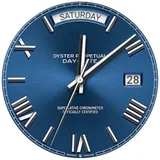
Luxury Prime Blue Watch Face screenshot
Permissions Explained 6 permissions requested View details

This app requests 6 permissions. The table below explains what each permission may allow and what users should review before installing.

Status Permission What it means Why it may be used User safety note
ℹ️ Review View Network Connections view network connections This is an Android permission or app-specific permission requested by the app. The app may use this permission for features related to its category, device support, background behavior, storage, connectivity, or system integration. Review this permission before installing, especially if it does not match the app’s expected purpose.
ℹ️ Review Full Network Access full network access This is an Android permission or app-specific permission requested by the app. The app may use this permission for features related to its category, device support, background behavior, storage, connectivity, or system integration. Review this permission before installing, especially if it does not match the app’s expected purpose.
ℹ️ Review Run At Startup run at startup This is an Android permission or app-specific permission requested by the app. The app may use this permission for features related to its category, device support, background behavior, storage, connectivity, or system integration. Review this permission before installing, especially if it does not match the app’s expected purpose.
ℹ️ Review Control Vibration control vibration This is an Android permission or app-specific permission requested by the app. The app may use this permission for features related to its category, device support, background behavior, storage, connectivity, or system integration. Review this permission before installing, especially if it does not match the app’s expected purpose.
ℹ️ Review Prevent Device From Sleeping prevent device from sleeping This is an Android permission or app-specific permission requested by the app. The app may use this permission for features related to its category, device support, background behavior, storage, connectivity, or system integration. Review this permission before installing, especially if it does not match the app’s expected purpose.
ℹ️ Review Receive Data From Internet receive data from Internet This is an Android permission or app-specific permission requested by the app. The app may use this permission for features related to its category, device support, background behavior, storage, connectivity, or system integration. Review this permission before installing, especially if it does not match the app’s expected purpose.

About Luxury Prime Blue Watch Face

pgrade your smartwatch with the Luxury Prime Blue Watch Face—a premium blue dial with a sunburst effect, simple Roman numerals, and a clean, classic layout. The deep blue hue with a radiant texture creates a premium look and truly shines in the light, while the neat day and date windows make the design not only beautiful but also practical. Optimized for clear readability on modern round Wear OS displays, the watch face looks great in both casual and professional settings. Watch Face Features and Elements: Time (hours and minutes) Always-On Display (AOD) Supported Devices: Wear OS only (round Wear OS smartwatches) Note: Day of the week display and localization may vary depending on the device language and specific watch model. Disclaimer: This is a standalone watch face, created as a designer's interpretation of a classic style. This is not an official product of any brand and is not affiliated with or endorsed by them. All possible trademarks belong to their respective owners.

What Luxury Prime Blue Watch Face Is Used For

Luxury Prime Blue Watch Face appears to be a customization app for Wear OS smartwatches, specifically round watch faces. Based on the metadata, it is used to change the look of a compatible watch with a blue, classic-style analog design featuring Roman numerals, a sunburst texture, and day/date windows. It is mainly for users who want their smartwatch face to look more refined or more readable in everyday use.

The app may also be chosen by people who want a watch face that works in both casual and professional settings. The description mentions Always-On Display support, so it seems intended for users who want the watch face to remain visible in a low-power display mode. The permissions listed, such as network access and run at startup, suggest it may connect to the internet or load needed data, though the metadata does not explain those functions in detail. It is described as a standalone watch face for round Wear OS devices, so it is not meant for phones as a primary app experience.

Common uses

  • Customize the appearance of a compatible Wear OS watch.
  • Display time in a classic analog style with Roman numerals.
  • Show day and date information on the watch face.
  • Use a blue, premium-looking design for everyday wear.
  • Keep the face visible with Always-On Display support.
  • Match a smartwatch face to formal or casual outfits.
  • Works on round Wear OS smartwatches rather than phones.
Best for:
Wear OS users Round smartwatch owners Watch face customization Classic style fans Large-screen watch displays

App Details

Package:
com.watchfacestudio.fghHRgh4h43
Developer:
Metacorp
Version:
Varies with device
Min Android:
Varies with device
Age Rating:
Everyone
Contains Ads:
No
In-App Purchases:
No

Official Listing

  • Official listing available on Google Play
  • Package name: com.watchfacestudio.fghHRgh4h43
  • Age rating: Everyone

Explore More

Browse more apps in Personalization or explore the Phone hub .

Related Personalization Apps

Zedge™ Wallpapers & Ringtones icon

Zedge™ Wallpapers & Ringtones

Personalization Zedge

Discover millions of background wallpapers & ringtones or make your own with AI.

Version 9.14.2 55.5 MB ⭐ 4.70 500,000,000+ installs
Parallel Space - app cloning icon

Parallel Space - app cloning

Personalization LBE Tech

Run multiple accounts of the same app on a single device

Version 4.0.9557 34.4 MB ⭐ 4.10 100,000,000+ installs
Facemoji AI Emoji Keyboard icon

Facemoji AI Emoji Keyboard

Personalization Nexileap

6000+ Emojis, Custom Keyboard, Fonts, Themes, Genmoji AI Generator,Stickers,GIFs

Version 3.6.3.1 36.7 MB ⭐ 4.70 100,000,000+ installs
Wallpaper 4K HD – Wallcraft icon

Wallpaper 4K HD – Wallcraft

Personalization Nebuchadnezzar DOO

Check Wallcraft Live 4D Wallpaper - 4k HD wallpapers & stunning 3D backgrounds!

Version Varies with device 29.6 MB ⭐ 4.60 100,000,000+ installs
Neon Love Theme icon

Neon Love Theme

Personalization Delicate theme for Android App

Install our stylish keyboard with Neon Love Theme now!

Version 10.7.2.0323 33.2 MB ⭐ 4.60 100,000,000+ installs
Photo Lock App - Hide Pictures icon

Photo Lock App - Hide Pictures

Personalization Battery Stats Saver

Ultimate Gallery Lock App - Hide Pictures, Videos and Lock Apps Instantly!

Version 2.1.12 24.6 MB ⭐ 4.60 100,000,000+ installs

How to Download Luxury Prime Blue Watch Face

If this app is not hosted directly on APKApps official link, then for the safest and most up-to-date version, install it from its official Google Play listing.