Seasons | Floral Spring icon

Phone

Seasons | Floral Spring

Personalization ChronoHarvest ⭐ 3.40 5,000+
Version Varies with device Everyone

Screenshots

Seasons | Floral Spring screenshot
Permissions Explained 5 permissions requested View details

This app requests 5 permissions. The table below explains what each permission may allow and what users should review before installing.

Status Permission What it means Why it may be used User safety note
ℹ️ Review Body Sensors (like Heart Rate Monitors) body sensors (like heart rate monitors) This is an Android permission or app-specific permission requested by the app. The app may use this permission for features related to its category, device support, background behavior, storage, connectivity, or system integration. Review this permission before installing, especially if it does not match the app’s expected purpose.
ℹ️ Review Reorder Running Apps reorder running apps This is an Android permission or app-specific permission requested by the app. The app may use this permission for features related to its category, device support, background behavior, storage, connectivity, or system integration. Review this permission before installing, especially if it does not match the app’s expected purpose.
ℹ️ Review Control Vibration control vibration This is an Android permission or app-specific permission requested by the app. The app may use this permission for features related to its category, device support, background behavior, storage, connectivity, or system integration. Review this permission before installing, especially if it does not match the app’s expected purpose.
ℹ️ Review Prevent Device From Sleeping prevent device from sleeping This is an Android permission or app-specific permission requested by the app. The app may use this permission for features related to its category, device support, background behavior, storage, connectivity, or system integration. Review this permission before installing, especially if it does not match the app’s expected purpose.
ℹ️ Review Set An Alarm set an alarm This is an Android permission or app-specific permission requested by the app. The app may use this permission for features related to its category, device support, background behavior, storage, connectivity, or system integration. Review this permission before installing, especially if it does not match the app’s expected purpose.

About Seasons | Floral Spring

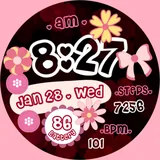
📍INSTALLATION NOTES ⭐️Note for Galaxy Watch Users: The watch face editor in the Samsung Wearable app often fails to sync and load complex watch faces. This is not an issue with the watch face. It is recommended to customize the watch face directly on the watch until Samsung resolves this issue. 📍This watch face supports all Wear OS devices with API Level 34+ | Wear OS 4 and later versions (Some features may not be available on some watches) 📍FEATURES: -Digital Clock (12/24 HR) -Date, Steps, Heart Rate, Battery -Always-On (AOD) -Preset App Shortcuts -Custom App Shortcuts -Pre-set App Shortcuts -Color palette and different Flower Styles 📍Some features may not be available on some watches. TAKE NOTE❗️❗️❗️ 1️⃣ Watch faces automatically install on WEAR OS watch. 2️⃣ MAKE SURE THE WATCH IS SYNCED TO YOUR PHONE USING THE SAME EMAIL ADDRESS FOR SEAMLESS INSTALLATION. 3️⃣ After download, WAIT for a few minutes for the watch face to be transferred on watch. (There will be a notification on your watch if the watch face was successfully transferred.) 4️⃣ If incase there is no notification, Go to PLAYSTORE ON YOUR WATCH and type on the SEARCH BOX "Seasons | Floral Spring" ⭐️ Watch faces don't automatically display/change after successful installation. Go back to home display. Tap and hold display, swipe until the end and tap + to add the watch face. Rotate Bezel or scroll to find the watch face. 📍ALLOW / ENABLE all permissions from settings -> applications -> permissions. ⚠️⚠️⚠️ Refund is ONLY allowed within 24 hours. Contact us at: [email protected] Youtube Installation Tutorial: https://www.youtube.com/watch?v=vMM4Q2-rqoM

What Seasons | Floral Spring Is Used For

Seasons | Floral Spring appears to be a Wear OS watch face app designed for personalizing a smartwatch display with a floral spring theme. Based on the metadata, it is mainly used to change the look of the watch face rather than to serve as a standalone utility app on a phone. It supports Wear OS devices with API level 34+ and appears aimed at users who want a decorative, customizable home screen for their watch.

The listed features suggest common uses such as checking the time, date, steps, heart rate, and battery status at a glance. It also includes always-on display support and preset or custom app shortcuts, so it may help users access selected apps faster from the watch face. The permission list, including body sensors, vibration control, and preventing sleep, matches typical watch face functions that need health data display, haptic response, and screen behavior control. Some setup notes indicate that installation and customization are meant to happen on the paired Wear OS watch, with some Samsung Wearable syncing limitations mentioned in the description.

Common uses

  • Customize a Wear OS watch with a floral spring design
  • Show time, date, steps, heart rate, and battery on the watch face
  • Use always-on display support for a constant low-power watch look
  • Set preset or custom shortcuts for quick access to apps
  • Adjust colors and flower styles to match personal preference
  • Display health-related data from supported watch sensors
  • Manage the watch face directly on the watch if phone syncing is limited
Best for:
Wear OS users watch face customization floral theme fans fitness data at a glance smartwatch personalization

App Details

Package:
com.watchfacestudio.h11
Developer:
ChronoHarvest
Version:
Varies with device
Updated:
Jan 21, 2026
Min Android:
Varies with device
Age Rating:
Everyone
Contains Ads:
No
In-App Purchases:
No

Official Listing

  • Official listing available on Google Play
  • Package name: com.watchfacestudio.h11
  • Age rating: Everyone

Explore More

Browse more apps in Personalization or explore the Phone hub .

Related Personalization Apps

Zedge™ Wallpapers & Ringtones icon

Zedge™ Wallpapers & Ringtones

Personalization Zedge

Discover millions of background wallpapers & ringtones or make your own with AI.

Version 9.14.2 55.5 MB ⭐ 4.70 500,000,000+ installs
Parallel Space - app cloning icon

Parallel Space - app cloning

Personalization LBE Tech

Run multiple accounts of the same app on a single device

Version 4.0.9557 34.4 MB ⭐ 4.10 100,000,000+ installs
Facemoji AI Emoji Keyboard icon

Facemoji AI Emoji Keyboard

Personalization Nexileap

6000+ Emojis, Custom Keyboard, Fonts, Themes, Genmoji AI Generator,Stickers,GIFs

Version 3.6.3.1 36.7 MB ⭐ 4.70 100,000,000+ installs
Wallpaper 4K HD – Wallcraft icon

Wallpaper 4K HD – Wallcraft

Personalization Nebuchadnezzar DOO

Check Wallcraft Live 4D Wallpaper - 4k HD wallpapers & stunning 3D backgrounds!

Version Varies with device 29.6 MB ⭐ 4.60 100,000,000+ installs
Neon Love Theme icon

Neon Love Theme

Personalization Delicate theme for Android App

Install our stylish keyboard with Neon Love Theme now!

Version 10.7.2.0323 33.2 MB ⭐ 4.60 100,000,000+ installs
Photo Lock App - Hide Pictures icon

Photo Lock App - Hide Pictures

Personalization Battery Stats Saver

Ultimate Gallery Lock App - Hide Pictures, Videos and Lock Apps Instantly!

Version 2.1.12 24.6 MB ⭐ 4.60 100,000,000+ installs

How to Download Seasons | Floral Spring

If this app is not hosted directly on APKApps official link, then for the safest and most up-to-date version, install it from its official Google Play listing.