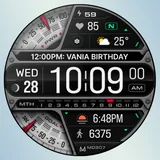
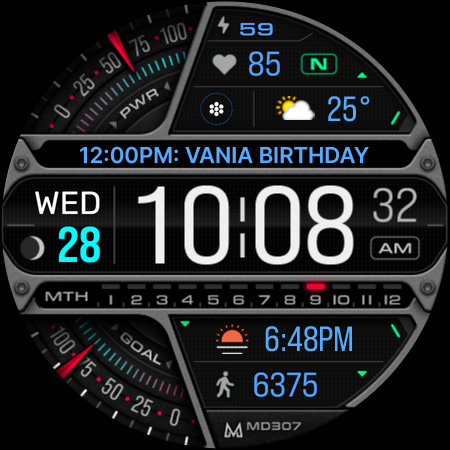
About MD307 Digital watch face
New watch face format. Note for Galaxy Watch Users: The watch face editor in the Samsung Wearable app often fails to load complex watch faces like this one. This is not an issue with the watch face itself. It is recommended to customize the watch face directly on the watch until Samsung resolves this issue. TAP AND HOLD SCREEN ON WATCH AND SELECT CUSTOMIZE. It contains 3 Preset App shortcuts, 1 customizable shortcut, moon phase, steps, daily goals, heart rate + intervals*, 3 customizable complications where you can have the data you prefer such as weather (etc), changeable colors and more. INSTALLATION NOTES: Please check this link for installation and troubleshooting guide: https://www.matteodinimd.com/watchface-installation/ This watch face supports all Wear OS devices with API Level 33+ (Wear OS 4 and later versions) like Samsung Galaxy Watch 4-8, Ultra, Pixel Watch etc. Features: - 12/24hr Digital Time - Date - Moon phase - Battery - Heart rate + Intervals - Steps - Daily steps goal - 3 Preset app shortcuts - 1 customizable shortcut - 3 customizable complications - Always ON Display supported with changeable colors and minimal style - Changeable colors of time, date, day, seconds, foreground, bars, goal and battery gauges and general colors. Customization: 1 - Touch and hold screen 2 - Tap on customize option Preset APP Shortcuts: - Calendar - Battery - Measure HR Complications: you can customize with the any data you want. For example, you can select weather, time zone, sunset/sunrise, barometer etc. **some features may not be available on some watches. Let's keep in touch ! Newsletter: Sign up to stay updated with new watch faces and promotions! http://eepurl.com/hlRcvf FACEBOOK: https://www.facebook.com/matteodiniwatchfaces INSTAGRAM: https://www.instagram.com/mdwatchfaces/ TELEGRAM: https://t.me/mdwatchfaces WEB: https://www.matteodinimd.com - Thank you !
What MD307 Digital watch face Is Used For
MD307 Digital watch face appears to be a Wear OS watch face app for customizing the look and on-watch information layout of a compatible smartwatch. Based on the metadata, it is meant for users who want a digital watch face with adjustable colors, always-on display support, and a clean layout that can show time, date, battery, moon phase, steps, and heart rate data.
It may be used as a daily watch face on supported Wear OS devices, especially for people who prefer quick access to fitness and status information on the wrist. The metadata also indicates shortcut and complication support, so users can place app shortcuts and selected data fields like weather, sunrise/sunset, or time zone directly on the watch face. For Galaxy Watch users, the description notes that customization may work better directly on the watch rather than through the Samsung Wearable app editor.
Common uses
- Displays digital time in 12/24-hour format
- Shows date, battery, moon phase, steps, and heart rate info
- Includes 3 preset app shortcuts and 1 customizable shortcut
- Supports 3 customizable complications for extra data fields
- Lets users change colors for several watch face elements
- Supports always-on display on compatible watches
- Designed for Wear OS 4+ and similar supported smartwatch devices
App Details
Package:
com.watchfacestudio.md307digital
Developer:
Matteo Dini MD ® Watch Faces
Version:
Varies with device
Updated:
Mar 2, 2026
Min Android:
Varies with device
Age Rating:
Everyone
Contains Ads:
No
In-App Purchases:
No
Official Listing
-
Official listing available on
Google Play
-
Package name:
com.watchfacestudio.md307digital
-
Age rating:
Everyone
Related Personalization Apps
Personalization
•
Zedge
Discover millions of background wallpapers & ringtones or make your own with AI.
Version 9.14.2
55.5 MB
⭐ 4.70
500,000,000+ installs
Personalization
•
LBE Tech
Run multiple accounts of the same app on a single device
Version 4.0.9557
34.4 MB
⭐ 4.10
100,000,000+ installs
Personalization
•
Nexileap
6000+ Emojis, Custom Keyboard, Fonts, Themes, Genmoji AI Generator,Stickers,GIFs
Version 3.6.3.1
36.7 MB
⭐ 4.70
100,000,000+ installs
Personalization
•
Nebuchadnezzar DOO
Check Wallcraft Live 4D Wallpaper - 4k HD wallpapers & stunning 3D backgrounds!
Version Varies with device
29.6 MB
⭐ 4.60
100,000,000+ installs
Personalization
•
Delicate theme for Android App
Install our stylish keyboard with Neon Love Theme now!
Version 10.7.2.0323
33.2 MB
⭐ 4.60
100,000,000+ installs
Personalization
•
Battery Stats Saver
Ultimate Gallery Lock App - Hide Pictures, Videos and Lock Apps Instantly!
Version 2.1.12
24.6 MB
⭐ 4.60
100,000,000+ installs
How to Download MD307 Digital watch face
If this app is not hosted directly on APKApps official link,
then for the safest and most up-to-date version, install it from its official Google Play listing.