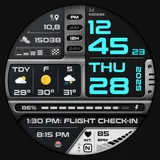
About MD339 Digital watch face
New watch face format. This advanced watch face adheres to the latest watch face format required by Google Play. Note: If you own an older Galaxy Watch 4 or 5, you may experience customization issues due to less recent hardware. We do not recommend downloading this watch face on these models. If you have already installed it and encounter problems, please contact us at
[email protected] Key Features: - 6 Preset App Shortcuts and 1 Customizable Shortcut. - 3 Customizable Complications: Display your preferred data such as barometer, distance walked, calories, UV index, chance of rain, and more. -Current weather conditions with the option to display hourly or daily forecasts Device Compatibility: This watch face uses advanced weather features, allowing you to choose between daily or hourly forecasts based on your preference. It support all Wear OS devices with API Level 34+ (Wear OS 5 and later versions) like Samsung Galaxy Watch 4-8, Ultra, Pixel Watch etc. Features at a Glance: - 12/24hr Format: Syncs with your phone settings. - Digital watch face - Date - Day - Year - Heart Rate Monitoring + Intervals - Steps + Daily Goals - Battery meter - 6 Preset App Shortcuts: - Calendar - Battery - Measure Heart Rate - Set Alarm - Steps - Weather* - 1 Customizable Shortcut - 3 Customizable Complications - Full customization: independently change time/date colors, complication fonts, battery indicator color, heart rate LCD color, plus light/dark theme - Always On Display Mode: Minimal and full modes available. Customization: 1. Touch and hold the screen on your watch. 2. Tap on the 'customize' option to personalize your watch face. Weather & Forecasts: This watch face uses your watch’s built-in weather provider — no internal weather app is included. Weather data may occasionally be unavailable due to provider limitations. You can choose between: Daily forecasts (next 2 days) Hourly forecasts (+6h / +12h) These options can be set from the customization menu. The temperature is displayed in either Celsius or Fahrenheit, depending on your phone settings. Daily weather forecasts may not show data between 00:00 and 07:00 due to a bug in the weather provider. This issue cannot be fixed on our side but has already been reported to Samsung and Google. During this time, you can switch to hourly forecasts instead. *On Galaxy Watches, the weather shortcut links to Samsung’s default Weather app. On other devices (e.g., Pixel Watch), this shortcut may not be available, but forecasts will still display on the watch face without limitations. Watch Face Complications: Customize up to 3 complications with data such health metrics (calories, distance walked), world clock, barometer, and more. To obtain data from "complications" such as distance, bitcoin and more, it will be necessary to install additional complications if they are not already available on your watch. Note: Complications are external apps, and we have no control over them. Support: For support or to…
What MD339 Digital watch face Is Used For
MD339 Digital watch face appears to be a Wear OS personalization app for adding a digital watch face to a compatible smartwatch. Based on the metadata, it is mainly used to change how the watch looks while also showing practical information such as the time, date, day, year, heart rate, steps, battery level, and weather details. It may suit users who want a data-rich watch face with configurable colors, themes, and shortcut access from the watch screen.
The watch face also appears designed for everyday glance use on supported Wear OS devices, including newer models that run Wear OS 5 or later. Its customization options may be useful for people who want to tailor complications and shortcuts to common tasks like checking weather, setting an alarm, viewing steps, or starting heart rate measurement. The metadata also notes weather forecast options and always-on display modes, which suggests it is meant for regular smartwatch use rather than phone-centered use. Older Galaxy Watch 4 and 5 devices may have customization limitations based on the developer note.
Common uses
- Customize the look of a Wear OS watch face
- Check time, date, day, year, and battery at a glance
- View health and activity data such as heart rate and steps
- Open preset shortcuts for common watch tasks
- Add one custom shortcut and configurable complications
- Show weather conditions and forecast details on supported devices
- Use always-on display options for low-glance viewing
How to Download MD339 Digital watch face
If this app is not hosted directly on APKApps official link,
then for the safest and most up-to-date version, install it from its official Google Play listing.