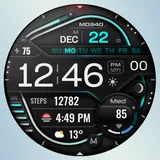
About MD340 Digital watch face
New watch face format. This advanced watch face adheres to the latest watch face format required by Google Play. Key Features: - 3 Preset App Shortcuts and 3 Customizable Shortcut. - 3 Customizable Complications: Display your preferred data such as barometer, distance walked, calories, UV index, chance of rain, and more. - Month+ Day Multilanguage Device Compatibility: It support all Wear OS devices with API Level 34+ (Wear OS 4 and later versions) like Samsung Galaxy Watch 4-8, Ultra, Pixel Watch etc. NO Tizen devices (Samsung Galaxy Watch 3 and older). Features at a Glance: - 12/24hr Format: Syncs with your phone settings - Digital watch face - Date - Day with selectable languages in the customizations menu: - English - Spanish - Italian - Polish - Dutch - Portuguese - Russian - Slovak - French - German - Month - Heart Rate Monitoring + Intervals - Steps (editable) + Daily Goals - Battery data & meter - Moon phases - 3 Preset App Shortcuts: - Calendar - Battery - Measure Heart Rate - 3 Customizable Shortcuts - 3 Customizable Complications - Full customization: independently change hour/minute/date colors, background styles, day languages, LED seconds. - Always On Display Mode: Minimal and full modes available. Customization: 1. Touch and hold the screen on your watch. 2. Tap on the 'CUSTOMIZE' option to personalize your watch face. Watch Face Complications: Customize up to 3 complications with data such health metrics (calories, distance walked), world clock, barometer, and more. To obtain data from "complications" such as distance, bitcoin and more, it will be necessary to install additional complications if they are not already available on your watch. Note: Complications are external apps, and we have no control over them. Support: For support or to learn how to install additional complications, contact us at:
[email protected] or visit us at https://www.matteodinimd.com/customizationwatchface/ Some features may not be available on all watches. Stay Connected: Newsletter: Sign up to stay updated with new watchfaces and promotions. http://eepurl.com/hlRcvf FACEBOOK: https://www.facebook.com/matteodiniwatchfaces INSTAGRAM: https://www.instagram.com/mdwatchfaces/ TELEGRAM: https://t.me/mdwatchfaces WEB: https://www.matteodinimd.com Thank you!
What MD340 Digital watch face Is Used For
Based on the metadata, MD340 Digital watch face appears to be a customization app for Wear OS watches rather than a general phone app. It is used to apply a digital watch face that shows the time, date, day, battery level, steps, heart rate, moon phases, and other selected data on a compatible smartwatch.
It may be most useful for Wear OS users who want to personalize the look and layout of their watch face and quickly access information from the wrist. The app also supports preset and customizable shortcuts, so users can place actions such as calendar, battery, or heart-rate measurement on the watch face. Since the description mentions complications and health-related indicators, it seems designed for users who already use smartwatch data and want it displayed in a more customizable format. Compatibility is limited to Wear OS devices with API level 34+ and later, and it does not support older Tizen-based Galaxy Watch models.
Common uses
- Used to install and customize a digital Wear OS watch face
- Displays time, date, day, battery, steps, and heart rate data
- Lets users assign preset and custom shortcuts on the watch face
- Supports up to 3 customizable complications for extra data
- Offers language options for the day display and other visual settings
- Includes always-on display modes for minimal or full-screen viewing
- Appears intended for newer Wear OS watches, not older Tizen models
How to Download MD340 Digital watch face
If this app is not hosted directly on APKApps official link,
then for the safest and most up-to-date version, install it from its official Google Play listing.