About ORB-12 The Planets
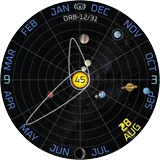
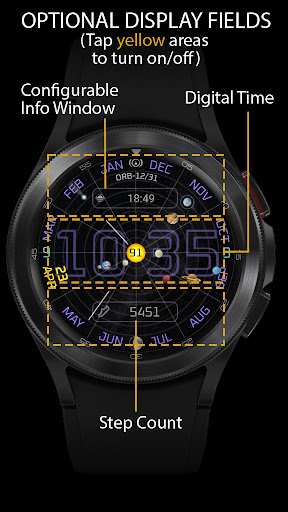
ORB-12 provides a view of the 8 planets in our Solar System as they orbit the Sun. The watch face shows the approximate current angular position of each planet. The background is split into 12 segments representing the months of an Earth year. The Earth makes one rotation around the face per year. The Moon also orbits the Earth according to the lunar cycle. The moon-phase is shown at the bottom of the watch face. Note: Items marked with ‘*’ have additional info in the “Functionality Notes” section. *** New in v31: The user has a choice of 10 hand styles*. The background starscape has been made slightly more visible *** Features: Planets: - Colourful representations of the 8 planets and the Sun which are (from closest to the Sun): Mercury, Venus, Earth, Mars, Jupiter, Saturn, Uranus and Neptune. Lunar Eclipse Indicator*: - In the hours before a partial or total lunar eclipse is due and when the moon is full, the moon-phase is outlined with a red ring. When the partial eclipse is underway it is half-shaded red, and turns fully red during a total lunar eclipse, signifying the appearance of the so-called ‘blood moon’. Date Display: - Months (in English) displayed around the rim of the face. - The current date is highlighted in yellow in the appropriate month segment on the face. Time: - The hour and minute hands are stylised elliptical orbital paths around the Sun. - The second hand is an orbiting comet Customisations (from the Customise menu): - ‘Colour’: There are 10 colour options for the month names and digital time. - ‘Show position on Earth’: The wearer’s approx longitudinal position on Earth (displayed as a red dot) can be disabled/enabled. - ‘Hands’: 10 available hand styles - ‘Complication’ and tap on the blue box: The data displayed in this window can include sunrise/sunset (default), weather and so on. Occasional display fields: For those who may require additional at-a-glance data, there are hidden fields that can be made visible and are displayed beneath the planets: - A large digital time display can be shown/hidden by tapping the central third of the screen, This can display 12/24h formats according to the phone setting. - Step count can be shown/hidden by tapping the lower third of the screen. The steps icon turns green when the steps goal* is met. - The customisable information window can be shown/hidden by tapping the upper third of the screen. - Both the step count and the customisable field move slightly along the vertical (y) axis when the wrist is twisted, so that the wearer can still see the data if partially obscured by a passing planet. Battery Status: - The centre of the Sun displays the percentage of battery charge - Turns red below 15%. Always on Display: - The 9 and 3 markings are red in AoD mode. Functionality Notes: - Step Goal: For Wear OS 4.x or later devices, the step goal is sync’d with the wearer’s health app. For earlier versions of Wear OS, step goal is fixed at 6,000 steps. - Lunar Eclipse Indicator: Total and…
What ORB-12 The Planets Is Used For
ORB-12 The Planets appears to be a watch face app focused on displaying the Solar System in a stylized, time-based layout. Based on the metadata, it is used to show the positions of the eight planets around the Sun, along with the Moon’s cycle and the current moon phase. The design also includes month segments, a highlighted date, and orbit-themed hour, minute, and second hands, so it is mainly for users who want an astronomical or space-themed watch face rather than a plain clock.
Because it is listed as a phone app for a watch face studio product, it may be used as a customization layer for a compatible watch or wearable interface. The metadata also mentions optional complication data such as sunrise/sunset and weather, plus hidden fields like a digital time display and step count. That suggests it can serve as both a decorative face and a quick glance information screen, depending on the wearer’s setup. The mention of position-on-Earth display and lunar eclipse indication shows it is aimed at people who like astronomy-inspired timekeeping and extra at-a-glance context.
Common uses
- Shows a Solar System themed watch face
- Displays the approximate positions of the eight planets
- Shows the Moon’s orbit and current moon phase
- Highlights the current date within the month layout
- Can present a digital time readout in addition to analog-style hands
- May show complication data such as sunrise, sunset, or weather
- Includes customization options for colors and hand styles
App Details
Package:
com.watchfacestudio.orb12
Developer:
Orburis Watch
Version:
Varies with device
Updated:
Sep 27, 2025
Min Android:
Varies with device
Age Rating:
Everyone
Contains Ads:
No
In-App Purchases:
No
Official Listing
-
Official listing available on
Google Play
-
Package name:
com.watchfacestudio.orb12
-
Age rating:
Everyone
Related Tools Apps
Tools
•
Innovative Connecting
Enjoy fast streaming, secure & private internet with super unlimited VPN Turbo
Version 4.2.9.8
25.3 MB
⭐ 4.70
100,000,000+ installs
Tools
•
AVG Mobile
Scam & Malware protection, Virus Cleaner, Hack Alerts, App Locker, Photo Vault
Version 26.6.0
56.3 MB
⭐ 4.60
100,000,000+ installs
Tools
•
Avast Software
Android Mobile Security with Antivirus, Virus cleaner, App Lock & Phone cleaner
Version 26.2.3.260318122
56.8 MB
⭐ 4.60
100,000,000+ installs
Tools
•
F-Secure Corporation
Antivirus, Virus Cleaner & Malware Scan | Mobile Security & Hacker Protection
Version 10.57-ff32089
17.9 MB
⭐ 4.20
100,000,000+ installs
Tools
•
Flextech Inc.
Get 1TB Cloud Storage Space with One-Click. Unlock AI Tools in One Smart Space.
Version 4.13.7
112.7 MB
⭐ 4.40
100,000,000+ installs
Tools
•
Secure Signal Inc.
Access favorite websites and apps more securely on the go.
Version 4.3.11
5.6 MB
⭐ 4.70
100,000,000+ installs
How to Download ORB-12 The Planets
If this app is not hosted directly on APKApps official link,
then for the safest and most up-to-date version, install it from its official Google Play listing.