PER23 Digital Watch Face icon

Phone

PER23 Digital Watch Face

Personalization PERSONA Watch Face ⭐ 4.30 10,000+
Version Varies with device Everyone

Screenshots

PER23 Digital Watch Face screenshot
Permissions Explained 8 permissions requested View details

This app requests 8 permissions. The table below explains what each permission may allow and what users should review before installing.

Status Permission What it means Why it may be used User safety note
ℹ️ Review Body Sensors (like Heart Rate Monitors) body sensors (like heart rate monitors) This is an Android permission or app-specific permission requested by the app. The app may use this permission for features related to its category, device support, background behavior, storage, connectivity, or system integration. Review this permission before installing, especially if it does not match the app’s expected purpose.
ℹ️ Review View Network Connections view network connections This is an Android permission or app-specific permission requested by the app. The app may use this permission for features related to its category, device support, background behavior, storage, connectivity, or system integration. Review this permission before installing, especially if it does not match the app’s expected purpose.
ℹ️ Review Full Network Access full network access This is an Android permission or app-specific permission requested by the app. The app may use this permission for features related to its category, device support, background behavior, storage, connectivity, or system integration. Review this permission before installing, especially if it does not match the app’s expected purpose.
ℹ️ Review Run At Startup run at startup This is an Android permission or app-specific permission requested by the app. The app may use this permission for features related to its category, device support, background behavior, storage, connectivity, or system integration. Review this permission before installing, especially if it does not match the app’s expected purpose.
ℹ️ Review Reorder Running Apps reorder running apps This is an Android permission or app-specific permission requested by the app. The app may use this permission for features related to its category, device support, background behavior, storage, connectivity, or system integration. Review this permission before installing, especially if it does not match the app’s expected purpose.
ℹ️ Review Control Vibration control vibration This is an Android permission or app-specific permission requested by the app. The app may use this permission for features related to its category, device support, background behavior, storage, connectivity, or system integration. Review this permission before installing, especially if it does not match the app’s expected purpose.
ℹ️ Review Prevent Device From Sleeping prevent device from sleeping This is an Android permission or app-specific permission requested by the app. The app may use this permission for features related to its category, device support, background behavior, storage, connectivity, or system integration. Review this permission before installing, especially if it does not match the app’s expected purpose.
ℹ️ Review Receive Data From Internet receive data from Internet This is an Android permission or app-specific permission requested by the app. The app may use this permission for features related to its category, device support, background behavior, storage, connectivity, or system integration. Review this permission before installing, especially if it does not match the app’s expected purpose.

About PER23 Digital Watch Face

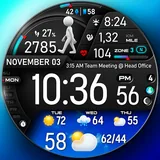
🚀PER23 Digital Watch Face is an advanced digital watch face designed for Wear OS smartwatches. It offers changeable font styles, 3D realistic animated weather, stunning visuals, and forecast weather data. 🏃‍♂️ Step to See the Dancer! We designed an interactive watch face to keep you motivated and moving. With every step, watch the runner animation change as you progress toward your goal. Hit 100% of your step goal to see the ultimate dancer animation and celebrate your success! 🎥 Check out the animations in action: https://www.youtube.com/watch?v=MYEzKs-xxAA 🎨 Endless Customization 10 font styles for time 10 backgrounds 10 bar colors 6 sky animations 25 color combinations 6 custom complications 10 AOD Dims 🔹 Key Features of PER23 Digital Watch Face Digital Weather type and temperature (°F / °C) High & Low temperature (°F / °C) Next 3 days' weather type Next 3 days' temperature (°F / °C) Steps, daily goal & distance (KM / Miles) Phone & watch battery level Active burned calories, floors Heart rate monitor UV index, rain possibility Moon phase, sunset/sunrise Time zone, barometer Next appointment reminder Always-On display with adjustable colors 🛠️ Easy Customization Mode Simply touch and hold to personalize what data you see — weather, sunrise/sunset, time zone, and more. 🔋 For extra complications and widgets like phone battery, calories, or floors, please check the setup guide here: 👉 https://persona-wf.com/installation/ ❓ Weather Not Updating? Seeing a “❓” icon? That means your watch can’t get weather data. Check your internet connection and refresh the watch face. 🌙 Always-On Display (AOD) The watch face has an always-active display. You can change the brightness level in the customization menu. There are 10 levels in total. The colors are synchronized with the normal view. With the new option “AOD Dim” in the customization menu, you can now change the AOD layout. 🌐 More Details: https://persona-wf.com/portfolios/platinum/ 📖 Installation Guide Before leaving a review, make sure to check the installation guide and FAQ for a smooth experience: 👉 https://persona-wf.com/installation/ ⌚ Supported Devices Compatible with all Wear OS devices (API Level 34+), including: SAMSUNG: Galaxy Watch8 Classic, Galaxy Watch Ultra, Watch8, 7, 6, 5, 4 GOOGLE: Pixel Watch 1, 2, 3, 4 FOSSIL: Gen 7, Gen 6, Gen 5e series MOBVOI: TicWatch Pro 5, Pro 3, E3, C2 🚀 Exceptional Support Need assistance? We’re here for you 📩 [email protected] 💜 Join Our Community Get the latest designs & exclusive offers 🌐 https://persona-wf.com 📩 Newsletter https://persona-wf.com/register 👍 Facebook https://www.facebook.com/Persona-Watch-Face 📸 Instagram https://www.instagram.com/persona_watch_face 💬 Telegram https://t.me/persona_watchface ▶️ YouTube https://www.youtube.com/c/PersonaWatchFace 💖💖💖 Thank You for Choosing PERSONA! We hope our design brightens your day and your wrist 😊 Designed with love by Ayla GOKMEN

What PER23 Digital Watch Face Is Used For

Based on the metadata, PER23 Digital Watch Face appears to be a customizable Wear OS watch face for people who want both style and at-a-glance information on their smartwatch. It is mainly used to change the look of the watch display, show digital time in different font styles, and present useful data such as weather, steps, battery levels, heart rate, and calendar reminders.

The app also seems designed for active use on a smartwatch, with step-based animations that change as your step count increases. That makes it useful for users who want a more interactive watch face during workouts or daily activity tracking. The weather features, forecast views, and always-on display options suggest it is meant for checking conditions and time quickly without opening separate apps.

Because it uses permissions such as body sensors, network access, and startup behavior, the watch face may rely on sensor data and internet connectivity to update health, weather, and other complications. It appears to be a phone app that supports Wear OS setup and customization rather than a general phone utility.

Common uses

  • Customize the look of a Wear OS watch face with different fonts, backgrounds, colors, and layouts.
  • Check time, date, and always-on display information directly from the smartwatch screen.
  • View weather details such as current conditions, forecast, temperature, and related indicators.
  • Track activity data like steps, distance, calories, floors, and heart rate on the watch face.
  • Use step-based animations that change as daily step goals are reached.
  • Show additional widgets or complications such as phone battery, sunrise/sunset, moon phase, and appointments.
  • Adjust display and complication settings through the watch face’s customization options.
Best for:
Wear OS users smartwatch customization fitness tracking weather at a glance always-on display

App Details

Package:
com.watchfacestudio.per023pro
Developer:
PERSONA Watch Face
Version:
Varies with device
Updated:
Mar 18, 2026
Min Android:
Varies with device
Age Rating:
Everyone
Contains Ads:
No
In-App Purchases:
No

Official Listing

  • Official listing available on Google Play
  • Package name: com.watchfacestudio.per023pro
  • Age rating: Everyone

Explore More

Browse more apps in Personalization or explore the Phone hub .

Related Personalization Apps

Zedge™ Wallpapers & Ringtones icon

Zedge™ Wallpapers & Ringtones

Personalization Zedge

Discover millions of background wallpapers & ringtones or make your own with AI.

Version 9.14.2 55.5 MB ⭐ 4.70 500,000,000+ installs
Parallel Space - app cloning icon

Parallel Space - app cloning

Personalization LBE Tech

Run multiple accounts of the same app on a single device

Version 4.0.9557 34.4 MB ⭐ 4.10 100,000,000+ installs
Facemoji AI Emoji Keyboard icon

Facemoji AI Emoji Keyboard

Personalization Nexileap

6000+ Emojis, Custom Keyboard, Fonts, Themes, Genmoji AI Generator,Stickers,GIFs

Version 3.6.3.1 36.7 MB ⭐ 4.70 100,000,000+ installs
Wallpaper 4K HD – Wallcraft icon

Wallpaper 4K HD – Wallcraft

Personalization Nebuchadnezzar DOO

Check Wallcraft Live 4D Wallpaper - 4k HD wallpapers & stunning 3D backgrounds!

Version Varies with device 29.6 MB ⭐ 4.60 100,000,000+ installs
Neon Love Theme icon

Neon Love Theme

Personalization Delicate theme for Android App

Install our stylish keyboard with Neon Love Theme now!

Version 10.7.2.0323 33.2 MB ⭐ 4.60 100,000,000+ installs
Photo Lock App - Hide Pictures icon

Photo Lock App - Hide Pictures

Personalization Battery Stats Saver

Ultimate Gallery Lock App - Hide Pictures, Videos and Lock Apps Instantly!

Version 2.1.12 24.6 MB ⭐ 4.60 100,000,000+ installs

How to Download PER23 Digital Watch Face

If this app is not hosted directly on APKApps official link, then for the safest and most up-to-date version, install it from its official Google Play listing.