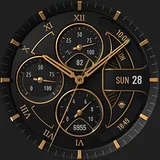
About S4U Obsidian analog watch face
Experience realistic luxury with S4U Obsidian. A classic analog watch face with deep customization. Discover the perfect blend of luxury and functionality. This realistic, classic analog watch face offers a huge range of customization options to suit your style. The dial features 4 editable complications and distinct Always-On Display layouts. ━━━━━━━━━━━━━━━━━━ ⚠️ IMPORTANT: Compatibility & Installation This app is optimized for the new Watch Face Format regarding Wear OS 5 (API 34+). Compatible devices include: - Samsung Galaxy Watch 8, Ultra, 7, 6 , 5, 4 (Wear OS 5 update required) - Google Pixel Watch Series - Other Wear OS 5+ smartwatches (Note: Only devices running Wear OS 5 or higher are supported!) If you experience any issues with installation or downloading: 1. Ensure your watch is updated to the latest Wear OS version. 2. Open the companion app provided with your purchase. 3. Follow the steps in the Install/Issues section. Still need help? Email me at
[email protected]. ━━━━━━━━━━━━━━━━━━ ✨ Key Features: - Realistic Design: A classic analog watch face with timeless elegance. - Color Customization: Personalize your watch with countless color combinations. - 4 Editable Values: Display user-defined data (e.g., weather, battery, heart rate). - 3 Shortcuts: Quickly access your favorite widgets/apps. - Always-On Display: 3 distinctive layouts for optimal AOD functionality. 🕒 Data Displayed: - Analog Time - Analog Steps (Daily goal progress) - Analog Battery Level - Analog Heart Rate - Weekday & Day of the Month - 4 Custom Complications (editable values) ━━━━━━━━━━━━━━━━━━ 🎨 CUSTOMIZATION Personalize your S4U Obsidian in just a few steps: 1. Press and hold the center of the watch display. 2. Tap the "Customize" button. 3. Swipe left/right to navigate options, up/down to change them. Available Options: - Main color: 9 options - Main Hand color: 9 options - Seconds Hand color: 9 options - Color Layout: 8 options - Background shading: 4 options - Neutral outside index: 3 options - Index numbers: 6 variations - AOD Layout: 4 options ━━━━━━━━━━━━━━━━━━ 🌙 Always-On Display (AOD) The watch face features an Always-On Display for continuous timekeeping. Colors automatically adapt to your chosen design. 3 AOD Layout Options: Full, Full (Shaded), Minimal. Note: Using AOD affects battery life. AOD brightness depends on your device's specific algorithm. ━━━━━━━━━━━━━━━━━━ ⚙️ SHORTCUTS & COMPLICATIONS - App Shortcuts: Link to your favorite apps for quick access. - Editable Values: Display exactly the data you need. How to Set Up: 1. Long-press the watch display > Customize. 2. Swipe to the "Complications" section. 3. Tap the highlighted areas to select your preferred data or app. ━━━━━━━━━━━━━━━━━━ 📬 Stay Connected Enjoying the design? Check out my other creations! I’m constantly crafting new watch faces for Wear OS. 🌐 https://www.s4u-watches.com Feedback & Support I’d love to hear your thoughts! Suggestions and feedback help me improve. 📧 Email…
What S4U Obsidian analog watch face Is Used For
S4U Obsidian analog watch face appears to be a personalization app for Wear OS smartwatches, used to install and customize a classic analog-style watch face. Based on the metadata, it is meant for users who want a more traditional, luxury-inspired look on their watch while still showing practical information like time, steps, battery level, heart rate, and date details. The app is described as supporting multiple color and layout options, along with several editable complication slots and shortcut areas, so it may be useful for people who like tailoring their watch display to match their style or daily routine.
The permission list includes network access and a Play license check, which suggests the app may connect online for licensing or related app communication. The metadata also indicates it is optimized for Wear OS 5 and newer, so it seems intended for compatible smartwatches rather than phones or tablets. In everyday use, this kind of app is commonly chosen to change the appearance of a smartwatch face, adjust what information is visible at a glance, and set up quick access to selected apps or widgets.
Common uses
- Customize the look of a Wear OS watch face
- Display time in a classic analog style
- Show daily data such as steps, battery, and heart rate
- Add custom complications for selected information
- Set shortcut areas for quick access to apps or widgets
- Adjust colors, hands, and layout options
- Use the always-on display layouts for low-power viewing
How to Download S4U Obsidian analog watch face
If this app is not hosted directly on APKApps official link,
then for the safest and most up-to-date version, install it from its official Google Play listing.