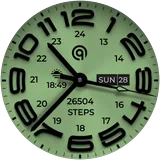
About W6 Field Watch Face Wear OS 5+
======================================================= NOTICE: READ THIS ALWAYS BEFORE AND AFTER DOWNLOADING OUR WATCH FACE TO AVOID ANY SITUATION YOU DON'T LIKE. ======================================================= a. This watch face contains a lot of options in customization menu.If for some reason it takes time to load customization options in Wearable app wait for at least 8 secs to let load up all customization menu options while opening on Galaxy wearable app.if for some reason it takes time to open change to another face and change back to this one and it will work or go to task manager of phone close wearable app by swiping it and open it again. Blame Samsung for this. b. DO NOT PAY TWICE FROM WATCH PLAY STORE . READ The Install Guide Image again. See 3 x methods 100 percent working to install both phone app and watch app . The install guide clearly says tap to open connected on connected watch is when you are installing it for the first time. ======================================================= FEATURES AND FUNCTIONS ====================================================== This watch face for WEAR OS has following features:- 1. Tap on 6 o clock hour number to open watch Google Maps app. 2. Tap on 12 o clock hour number to open watch Google Play Store App. 3. Tap on 10 o clock hour number to open watch Battery app. 4. Tap on Date or Day Text to open watch Calendar app. 5. Tap on 2 o clock hour number to open watch Alarm app. 6. Tap on 4 o clock hour number to open watch settings app. 7. Different logos are available via customization menu. 8. Backgrounds:- a. Non Gradient:- This is set by default . Non gradient backgrounds will change color with main theme color styles you select. Option is available in customization menu. b. Gradient Backgrounds:- when selected from the customization menu option these will be selected and they don't change color with main color styles. It is important to turn them back to 1st to 0 setting in customization menu. To use non gradient backgrounds again. c. AoD Background:- Is fixed to pure black Background. and is not affected by above selections. 9. Hour & Minutes Hands Color for Main Display can be switched off from customization Menu to make them full black. 10. Dim Modes are added as customization options for both Main and AoD separately in Customization menu.
What W6 Field Watch Face Wear OS 5+ Is Used For
W6 Field Watch Face Wear OS 5+ appears to be a customizable watch face for Wear OS watches rather than a general-purpose phone app. Based on the metadata, people would mainly use it to change the look of their smartwatch, choose different visual styles, and display time and date information on the watch screen.
It also seems designed for quick access to a few watch functions. The metadata mentions touch points on the watch face that may open apps such as Maps, the Play Store, Battery, Calendar, Alarm, and Settings. This makes it most relevant for Wear OS users who want both personalization and shortcut-style controls on a small screen. The app description also references customization options for backgrounds, logos, and hand colors, which suggests it may be used to tailor the watch face appearance to different preferences or themes.
Common uses
- Customizing the look of a Wear OS watch face
- Accessing watch apps through tap shortcuts
- Viewing time, date, and day on the watch screen
- Changing backgrounds and theme-related styling
- Selecting different logo or display options
- Using quick links to common watch tools like calendar and alarms
- Personalizing an Android smartwatch interface
App Details
Package:
com.watchfacestudio.w6f
Developer:
OQ Watchfaces
Version:
Varies with device
Updated:
Sep 17, 2025
Min Android:
Varies with device
Age Rating:
Everyone
Contains Ads:
No
In-App Purchases:
No
Official Listing
-
Official listing available on
Google Play
-
Package name:
com.watchfacestudio.w6f
-
Age rating:
Everyone
Related Personalization Apps
Personalization
•
Zedge
Discover millions of background wallpapers & ringtones or make your own with AI.
Version 9.14.2
55.5 MB
⭐ 4.70
500,000,000+ installs
Personalization
•
LBE Tech
Run multiple accounts of the same app on a single device
Version 4.0.9557
34.4 MB
⭐ 4.10
100,000,000+ installs
Personalization
•
Nexileap
6000+ Emojis, Custom Keyboard, Fonts, Themes, Genmoji AI Generator,Stickers,GIFs
Version 3.6.3.1
36.7 MB
⭐ 4.70
100,000,000+ installs
Personalization
•
Nebuchadnezzar DOO
Check Wallcraft Live 4D Wallpaper - 4k HD wallpapers & stunning 3D backgrounds!
Version Varies with device
29.6 MB
⭐ 4.60
100,000,000+ installs
Personalization
•
Delicate theme for Android App
Install our stylish keyboard with Neon Love Theme now!
Version 10.7.2.0323
33.2 MB
⭐ 4.60
100,000,000+ installs
Personalization
•
Battery Stats Saver
Ultimate Gallery Lock App - Hide Pictures, Videos and Lock Apps Instantly!
Version 2.1.12
24.6 MB
⭐ 4.60
100,000,000+ installs
How to Download W6 Field Watch Face Wear OS 5+
If this app is not hosted directly on APKApps official link,
then for the safest and most up-to-date version, install it from its official Google Play listing.