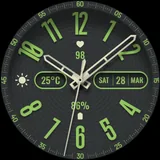
About Watch face 10h08.com #147
⌚️ Watch face 10h08.com #147 User manual: 1. The watch face only works for devices running Wear OS 5 or later Check in Watch settings - Watch info - Software info - Wear OS version 2. Your weather shows "?". Open Galaxy Wearable app - Watch settings - Apps - Find Weather app and open it - Settings - Enable location, local, adjust units,... * With Wear OS 6 and One UI 8 or later, please open the Weather app on your watch, then tap settings to configure. 3. How to turn on Simple AOD mode? Customize watch face and select menu: - AOD simple background: select option 2 to enable black background - AOD simple hands style: select option 2 or 3 to choose the hand style - AOD simple index style: select option 2 or 3 to choose the index ring 🟥 Information: - High resolution, sharp images - Classic and elegant design - Analog time - Day & date - Weather information - Heart rate - Battery level - 2 editable complications: battery level, heart rate - Top shadow can turn on/off - Background image can turn on/off - Full AOD or 4 minimalist AOD styles (please read the user manual) - 30 themes color palette (video available on Google Play Store) 🟨 How to custom this watch face? 1. Press and hold watch face screen 2. Tap “Customize” button 3. Swipe left or right, up or down to customize watch face 🟦 How to install watch face on your watch? 1. Install watch face from Google Play store 2. Press and hold watch face screen 3. Swipe right to left and tap “Add watch face” 4. Scroll to the bottom of the page and selectwatch face in the “downloaded” section 🟧 Compatible with smart watches running Wear OS 5+ SDK 34+ For example: Galaxy Watch 6, Galaxy Watch 7 Ultra, Ticwatch Pro 5, Pixcel Watch 2, Watch 2 Pro,... 🟩 See all my watch faces: https://play.google.com/store/apps/dev?id=5487081600241990978 🟪 Follow my social media pages for the latest watch face updates: https://10h08.com https://facebook.com/10h08 https://www.youtube.com/@10h08com/shorts
What Watch face 10h08.com #147 Is Used For
Watch face 10h08.com #147 appears to be a customization app for Wear OS smartwatches, based on the metadata and user manual text. It is used to install and apply a watch face that changes how the clock looks on the watch screen, with an analog style, date display, weather info, heart rate, battery level, and editable complications. The listing also mentions multiple color themes and different always-on display options, which suggests it is meant for users who want to personalize the look and information shown on their watch.
This app seems most relevant for people using compatible Wear OS 5 or later devices, such as supported Galaxy Watch, Pixel Watch, and other Wear OS models. Because it is a watch-face app rather than a general phone tool, the main use is on the smartwatch itself, with the phone likely serving as part of the installation or companion setup process. The metadata also references weather configuration through the Wearable and Weather apps, so users may need to adjust watch settings to make all displayed data work as expected. Since no permissions are listed, the app’s practical use appears centered on visual customization and watch-face management rather than broader device access.
Common uses
- Install and apply a custom Wear OS watch face
- Show time in an analog layout on the watch screen
- Display date, weather, heart rate, and battery info
- Customize colors, hands, background, and AOD styles
- Use editable complications for selected watch data
- Fit users who want a classic or elegant watch display
- Works with Wear OS 5+ compatible smartwatches
App Details
Package:
com.watchfacestudio.wf10h08com147
Developer:
10h08.com - Wear Os Watch Face
Version:
Varies with device
Min Android:
Varies with device
Age Rating:
Everyone
Contains Ads:
No
In-App Purchases:
No
Official Listing
-
Official listing available on
Google Play
-
Package name:
com.watchfacestudio.wf10h08com147
-
Age rating:
Everyone
Related Personalization Apps
Personalization
•
Zedge
Discover millions of background wallpapers & ringtones or make your own with AI.
Version 9.14.2
55.5 MB
⭐ 4.70
500,000,000+ installs
Personalization
•
LBE Tech
Run multiple accounts of the same app on a single device
Version 4.0.9557
34.4 MB
⭐ 4.10
100,000,000+ installs
Personalization
•
Nexileap
6000+ Emojis, Custom Keyboard, Fonts, Themes, Genmoji AI Generator,Stickers,GIFs
Version 3.6.3.1
36.7 MB
⭐ 4.70
100,000,000+ installs
Personalization
•
Nebuchadnezzar DOO
Check Wallcraft Live 4D Wallpaper - 4k HD wallpapers & stunning 3D backgrounds!
Version Varies with device
29.6 MB
⭐ 4.60
100,000,000+ installs
Personalization
•
Delicate theme for Android App
Install our stylish keyboard with Neon Love Theme now!
Version 10.7.2.0323
33.2 MB
⭐ 4.60
100,000,000+ installs
Personalization
•
Battery Stats Saver
Ultimate Gallery Lock App - Hide Pictures, Videos and Lock Apps Instantly!
Version 2.1.12
24.6 MB
⭐ 4.60
100,000,000+ installs
How to Download Watch face 10h08.com #147
If this app is not hosted directly on APKApps official link,
then for the safest and most up-to-date version, install it from its official Google Play listing.