Wave: Small Business Software icon

Phone

Wave: Small Business Software

Business Wave HQ ⭐ 3.30 500,000+
Version 4.13.0 Everyone

Screenshots

Wave: Small Business Software screenshot
Permissions Explained 15 permissions requested View details

This app requests 15 permissions. The table below explains what each permission may allow and what users should review before installing.

Status Permission What it means Why it may be used User safety note
ℹ️ Review Read Your Contacts read your contacts This is an Android permission or app-specific permission requested by the app. The app may use this permission for features related to its category, device support, background behavior, storage, connectivity, or system integration. Review this permission before installing, especially if it does not match the app’s expected purpose.
ℹ️ Review Approximate Location (network Based) approximate location (network-based) This is an Android permission or app-specific permission requested by the app. The app may use this permission for features related to its category, device support, background behavior, storage, connectivity, or system integration. Review this permission before installing, especially if it does not match the app’s expected purpose.
ℹ️ Review Precise Location (gps And Network Based) precise location (GPS and network-based) This is an Android permission or app-specific permission requested by the app. The app may use this permission for features related to its category, device support, background behavior, storage, connectivity, or system integration. Review this permission before installing, especially if it does not match the app’s expected purpose.
ℹ️ Review Directly Call Phone Numbers directly call phone numbers This is an Android permission or app-specific permission requested by the app. The app may use this permission for features related to its category, device support, background behavior, storage, connectivity, or system integration. Review this permission before installing, especially if it does not match the app’s expected purpose.
ℹ️ Review Read The Contents Of Your Usb Storage read the contents of your USB storage This is an Android permission or app-specific permission requested by the app. The app may use this permission for features related to its category, device support, background behavior, storage, connectivity, or system integration. Review this permission before installing, especially if it does not match the app’s expected purpose.
ℹ️ Review Modify Or Delete The Contents Of Your Usb Storage modify or delete the contents of your USB storage This is an Android permission or app-specific permission requested by the app. The app may use this permission for features related to its category, device support, background behavior, storage, connectivity, or system integration. Review this permission before installing, especially if it does not match the app’s expected purpose.
ℹ️ Review Take Pictures And Videos take pictures and videos This is an Android permission or app-specific permission requested by the app. The app may use this permission for features related to its category, device support, background behavior, storage, connectivity, or system integration. Review this permission before installing, especially if it does not match the app’s expected purpose.
ℹ️ Review View Wi Fi Connections view Wi-Fi connections This is an Android permission or app-specific permission requested by the app. The app may use this permission for features related to its category, device support, background behavior, storage, connectivity, or system integration. Review this permission before installing, especially if it does not match the app’s expected purpose.
ℹ️ Review View Network Connections view network connections This is an Android permission or app-specific permission requested by the app. The app may use this permission for features related to its category, device support, background behavior, storage, connectivity, or system integration. Review this permission before installing, especially if it does not match the app’s expected purpose.
ℹ️ Review Full Network Access full network access This is an Android permission or app-specific permission requested by the app. The app may use this permission for features related to its category, device support, background behavior, storage, connectivity, or system integration. Review this permission before installing, especially if it does not match the app’s expected purpose.
ℹ️ Review Run At Startup run at startup This is an Android permission or app-specific permission requested by the app. The app may use this permission for features related to its category, device support, background behavior, storage, connectivity, or system integration. Review this permission before installing, especially if it does not match the app’s expected purpose.
ℹ️ Review Control Vibration control vibration This is an Android permission or app-specific permission requested by the app. The app may use this permission for features related to its category, device support, background behavior, storage, connectivity, or system integration. Review this permission before installing, especially if it does not match the app’s expected purpose.
ℹ️ Review Prevent Device From Sleeping prevent device from sleeping This is an Android permission or app-specific permission requested by the app. The app may use this permission for features related to its category, device support, background behavior, storage, connectivity, or system integration. Review this permission before installing, especially if it does not match the app’s expected purpose.
ℹ️ Review Download Files Without Notification download files without notification This is an Android permission or app-specific permission requested by the app. The app may use this permission for features related to its category, device support, background behavior, storage, connectivity, or system integration. Review this permission before installing, especially if it does not match the app’s expected purpose.
ℹ️ Review Receive Data From Internet receive data from Internet This is an Android permission or app-specific permission requested by the app. The app may use this permission for features related to its category, device support, background behavior, storage, connectivity, or system integration. Review this permission before installing, especially if it does not match the app’s expected purpose.

About Wave: Small Business Software

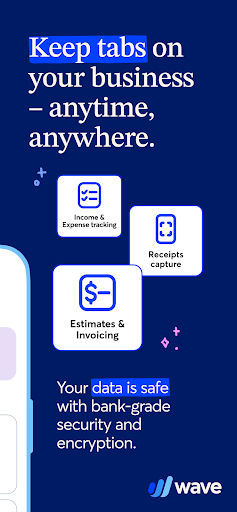
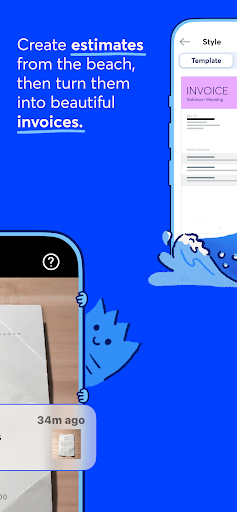
For small business owners, creators, freelancers, consultants, and contractors in the US and Canada, Wave’s mobile app is the perfect companion to our desktop experience. Over 300,000 small businesses use Wave's small business software, so you know we’ve got your back. Once you’ve signed up for Wave online, download and use the app as your on-the-go counterpart for some of your favorite Wave features, specifically: Invoicing Estimates Receipts scanning (with any receipts or Pro Plan subscription) Dashboard access Accounting (with any receipts or Pro Plan subscription) 1. Mobile invoicing Create professional, customized invoices with your logo Receive notifications when you've been paid Check invoice status (sent, viewed, overdue, paid) Record payments Send invoice reminders and payment receipts Synchronize instantly with the desktop version of your Wave account 2. Mobile estimates Instantly create estimates and land that dream customer quicker Convert an estimate into an invoice in seconds Customize estimates with your brand colors and logo Access your estimates from anywhere, anytime 3. Receipt scanning (with any receipts or Pro Plan subscription) Our mobile receipts feature is included in Wave’s Pro Plan or easy to add-on to the Starter Plan. You can digitally capture unlimited receipts with optical character recognition to track your expenses. Manage your receipts in your Wave account and always be organized Save time by digitally capturing receipt details in seconds using OCR technology Breeze through tax season with always up-to-date books and reports, because our receipts and accounting features are synced Manage and categorize transactions on-the-go or on desktop—everything stays synced! 4. Dashboard At-a-glance business insights, like profit and loss statements Quick access to invoicing metrics, like amounts overdue and upcoming payments Access to accounting reports for understanding your business, filing taxes, and more 5. Accounting (with any receipts or Pro Plan subscription) With any paid subscription, users can now view, add, edit, delete, and categorize all accounting transactions on-the-go—previously only possible on desktop! If you add, edit, delete, or categorize transactions on the mobile app, the changes will automatically sync with desktop, and vice versa. Capture unlimited receipts and track expenses at no additional cost Option to accept online payments* at a discounted rate Auto-import bank transactions** Auto-merge and categorize bank transactions Add additional users to your account Automate late payment reminders Access live-person chat and email support Accept online payments, fast Wave’s invoicing software works seamlessly to accept online payments via direct integration with our online payments feature: Getting started is as easy as a few clicks*. You’ll be able to select the invoices where you want to accept all major credit cards (Visa®, MasterCard®, American Express®, Discover®) for a competitive, per transaction…

What Wave: Small Business Software Is Used For

Wave: Small Business Software appears to be a mobile companion app for Wave’s desktop accounting and business tools. Based on the metadata, it is designed for small business owners, freelancers, consultants, creators, and contractors who want to handle everyday business tasks from a phone while keeping data in sync with a desktop account.

Common uses include creating and sending invoices, preparing estimates, scanning receipts, and checking a business dashboard for payment and accounting updates. The app also appears to support recording and managing transactions, which may help users stay organized for bookkeeping and tax reporting. Because the app requests access to contacts, camera, location, storage, and network features, it likely supports tasks such as adding customer information, capturing receipts or documents, and syncing data online. It may be most useful for people who need to manage invoicing and basic accounting while away from their computer.

Common uses

  • Create and send invoices from a phone
  • Make estimates and convert them into invoices
  • Scan receipts to track expenses and organize records
  • View dashboard summaries for payments and accounting
  • Manage or review transactions on the go
  • Stay synced with a Wave desktop account
  • Access business tools for small business bookkeeping
Best for:
small business owners freelancers consultants contractors phone app

App Details

Package:
com.waveapps.sales
Category:
Business
Developer:
Wave HQ
Version:
4.13.0
Updated:
Mar 30, 2026
Min Android:
9
Age Rating:
Everyone
Contains Ads:
No
In-App Purchases:
Yes

Official Listing

  • Official listing available on Google Play
  • Package name: com.waveapps.sales
  • Age rating: Everyone

Explore More

Browse more apps in Business or explore the Phone hub .

Related Business Apps

LinkedIn: Community & Network icon

LinkedIn: Community & Network

Business LinkedIn

Smarter career moves start here. AI job alerts, insights & the right tools.

Version 4.1.1185.1 90.3 MB ⭐ 4.10 1,000,000,000+ installs
Zoom Workplace icon

Zoom Workplace

Business zoom.com
Version Varies with device 181.9 MB ⭐ 4.10 1,000,000,000+ installs
Microsoft Teams icon

Microsoft Teams

Business Microsoft Corporation

Chat, meet, and collaborate to achieve more together, all in one place on Teams

Version 1416/1.0.0.2026044202 346.8 MB ⭐ 4.70 500,000,000+ installs
Adobe Scan AI PDF Scanner, OCR icon

Adobe Scan AI PDF Scanner, OCR

Business Adobe

Scan and save to multiple files types like PDF, Microsoft Word, JPEG and more.

Version Varies with device 79.3 MB ⭐ 4.70 100,000,000+ installs
File Commander Manager & Vault icon

File Commander Manager & Vault

Business MobiSystems

File manager | Explorer for cloud storage files & folders | Hide private photos.

Version Varies with device 23.1 MB ⭐ 4.20 100,000,000+ installs

How to Download Wave: Small Business Software

If this app is not hosted directly on APKApps official link, then for the safest and most up-to-date version, install it from its official Google Play listing.