Storm Shield icon

Phone

Storm Shield

Weather Mosaic Srl ⭐ 3.20 100,000+

NOAA Severe Weather Alerts For Your Exact Location

Version 6.0.0 42.3 MB Everyone

Screenshots

Storm Shield screenshot
Permissions Explained 10 permissions requested View details

This app requests 10 permissions. The table below explains what each permission may allow and what users should review before installing.

Status Permission What it means Why it may be used User safety note
⚠️ Sensitive Approximate location android.permission.ACCESS_COARSE_LOCATION Allows the app to access an approximate device location. Used for weather, local content, regional features, nearby services, or location-based settings. Sensitive permission. Review whether the app needs location access.
⚠️ Sensitive Precise location android.permission.ACCESS_FINE_LOCATION Allows the app to access the device’s precise location when granted by the user. Used for maps, navigation, local recommendations, weather, rideshare, nearby devices, or location-based content. Sensitive permission. Grant only when location access matches the app’s purpose.
Common Internet access android.permission.INTERNET Allows the app to open network connections and communicate with online services. Commonly used for streaming, syncing, login, ads, analytics, downloads, cloud features, and app updates. Common permission. Review the app’s behavior if it does not appear to need online access.
ℹ️ Review Vending Billing com.android.vending.BILLING This is an Android permission or app-specific permission requested by the app. The app may use this permission for features related to its category, device support, background behavior, storage, connectivity, or system integration. Review this permission before installing, especially if it does not match the app’s expected purpose.
ℹ️ Review Send notifications android.permission.POST_NOTIFICATIONS Allows the app to send notifications to the device. Used for alerts, reminders, messages, account activity, updates, or media controls. Review notification settings if the app sends too many alerts.
Common View network status android.permission.ACCESS_NETWORK_STATE Allows the app to check whether the device is connected to Wi-Fi, mobile data, or another network. Often used to avoid loading content when offline or to adjust loading based on connection quality. Generally low risk by itself.
ℹ️ Review Keep device awake android.permission.WAKE_LOCK Allows the app to prevent the device from sleeping while a task is running. Used for media playback, downloads, navigation, alarms, calls, or long-running background tasks. Review battery usage if the app keeps the device awake too often.
ℹ️ Review C2dm Permission Receive com.google.android.c2dm.permission.RECEIVE This is an Android permission or app-specific permission requested by the app. The app may use this permission for features related to its category, device support, background behavior, storage, connectivity, or system integration. Review this permission before installing, especially if it does not match the app’s expected purpose.
ℹ️ Review Finsky Permission Bind Get Install Referrer Service com.google.android.finsky.permission.BIND_GET_INSTALL_REFERRER_SERVICE This is an Android permission or app-specific permission requested by the app. The app may use this permission for features related to its category, device support, background behavior, storage, connectivity, or system integration. Review this permission before installing, especially if it does not match the app’s expected purpose.
ℹ️ Review Access Wifi State android.permission.ACCESS_WIFI_STATE This is an Android permission or app-specific permission requested by the app. The app may use this permission for features related to its category, device support, background behavior, storage, connectivity, or system integration. Review this permission before installing, especially if it does not match the app’s expected purpose.

About Storm Shield

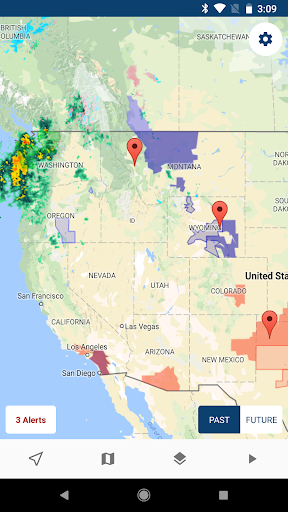
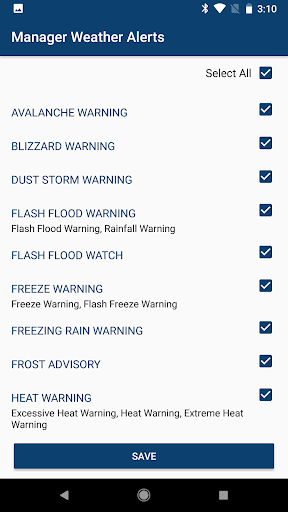
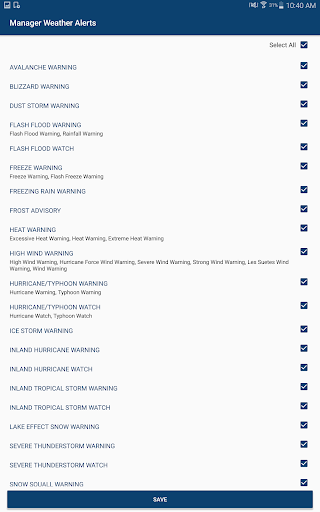
Severe weather alerts for your exact location. Storm Shield gives you storm-based alerts for tornado, hurricane, flood, thunderstorm, winter storms and other life-threatening weather events via voice and push notification. Storm-based alerts help reduce false alarms by alerting you to severe weather based on your exact location within a county. County-based alerts can result in false alarms, warning you when your location in the county is not within the threatened area. These features come with your app download: Benefits: • Get voice alerts just like a NOAA weather radio via push notification anywhere in the United States. • Hi-Def radar map is your home screen so you can quickly see what's going on at your locations. • View current conditions, hourly and daily forecasts. • Save additional locations to ensure family members stay safe. View NOAA severe weather alerts on the map to see where dangerous weather is happening: • Tap alerts to view info • Show multiple severe weather layers on the map at the same time • Flood watches & warnings • Tornadoes & Thunderstorms • Hurricane & Tropical Storm forecast tracks • Winter storms • Marine & Coastal alerts • Radar & Clouds • Wind Speed • Snow Fall • Road Weather Enhance your app with auto-renewing subscriptions: • Buy Premium Weather ($0.99 per month) to unlock these 3 features: 1) Future Radar - See forecasted radar imagery. 2) Future Temperature Map - See forecasted temperature map. 3) Storm Tracks - See how fast storms are moving and where in the next few minutes. • Buy Lightning ($0.99 per month) to unlock these 2 features: 1) Get push notifications for lightning strikes near your locations. 2) See lightning on the map within 100 miles of a selected location. Note: • Payment will be charged to your Google Play Account at confirmation of your purchase. • Subscription automatically renews unless auto-renew is turned off before the end of the current period. • Subscriptions may be managed by the user and auto-renewal may be turned off by going to the Google Play Store menu and selecting 'Subscriptions' after purchase. • After a free trial ends (if offered), your subscription will automatically convert to a paid subscription. You may cancel your subscription before your free trial is up to avoid being charged. • Privacy Policy: https://www.stormshieldapp.com/privacy_stormshield_wxs.html • Terms of Use: https://www.stormshieldapp.com/terms_stormshield_wxs.html Storm Shield is made possible by The E.W. Scripps Company. View help and tips at support.stormshieldapp.com.

What Storm Shield Is Used For

Storm Shield appears to be a weather app focused on severe weather monitoring and alerts for a user’s exact location. Based on the metadata, it is commonly used to receive NOAA-style warnings for events such as tornadoes, hurricanes, floods, thunderstorms, winter storms, and other hazardous conditions. The app’s phone form factor suggests it is meant for everyday mobile use when checking conditions at home, work, or while traveling.

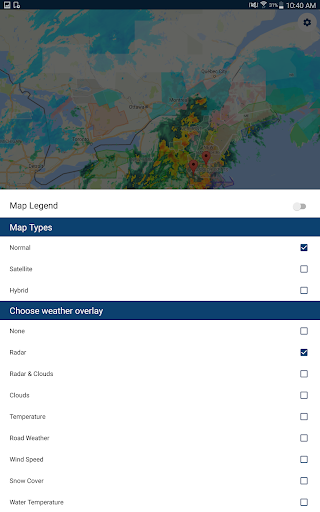
It also appears designed for situational awareness through maps, radar, and forecast views. Users may open it to review current conditions, hourly and daily forecasts, and weather layers that show alerts, clouds, wind, snow, road weather, and storm tracks. The location permissions and notification support suggest the app relies on precise location to send localized alerts and push notifications, which can be useful for people who want warnings that are tied to where they actually are rather than broad county-level coverage.

Common uses

  • Receive severe weather alerts for a precise location
  • Check radar and weather maps before travel or outdoor plans
  • Review hourly and daily forecasts in one place
  • Track tornado, hurricane, flood, and winter storm warnings
  • Save extra locations to monitor family or other places
  • Get push and voice-style alerts when weather conditions change
  • Use optional subscription features for forecast radar, temperature maps, or lightning alerts
Best for:
Severe weather alerts Daily weather checks Location-based monitoring Phone app use Travel planning

App Details

Package:
com.wdtinc.android.stormshield
Category:
Weather
Developer:
Mosaic Srl
Version:
6.0.0
Updated:
Mar 16, 2026
Min Android:
9
Age Rating:
Everyone
Contains Ads:
No
In-App Purchases:
Yes

Official Listing

  • Official listing available on Google Play
  • Package name: com.wdtinc.android.stormshield
  • Age rating: Everyone

Explore More

Browse more apps in Weather or explore the Phone hub .

Related Weather Apps

How to Download Storm Shield

If this app is not hosted directly on APKApps official link, then for the safest and most up-to-date version, install it from its official Google Play listing.