WiFi Signal Strength Meter Pro icon

Phone

WiFi Signal Strength Meter Pro

Tools Network Scanner - WiFi Scanner & Network Monitor ⭐ 4.80 10,000+
Version 1.0.11 Everyone

Screenshots

WiFi Signal Strength Meter Pro screenshot
Permissions Explained 7 permissions requested View details

This app requests 7 permissions. The table below explains what each permission may allow and what users should review before installing.

Status Permission What it means Why it may be used User safety note
ℹ️ Review Precise Location (gps And Network Based) precise location (GPS and network-based) This is an Android permission or app-specific permission requested by the app. The app may use this permission for features related to its category, device support, background behavior, storage, connectivity, or system integration. Review this permission before installing, especially if it does not match the app’s expected purpose.
ℹ️ Review Read The Contents Of Your Usb Storage read the contents of your USB storage This is an Android permission or app-specific permission requested by the app. The app may use this permission for features related to its category, device support, background behavior, storage, connectivity, or system integration. Review this permission before installing, especially if it does not match the app’s expected purpose.
ℹ️ Review Modify Or Delete The Contents Of Your Usb Storage modify or delete the contents of your USB storage This is an Android permission or app-specific permission requested by the app. The app may use this permission for features related to its category, device support, background behavior, storage, connectivity, or system integration. Review this permission before installing, especially if it does not match the app’s expected purpose.
ℹ️ Review View Wi Fi Connections view Wi-Fi connections This is an Android permission or app-specific permission requested by the app. The app may use this permission for features related to its category, device support, background behavior, storage, connectivity, or system integration. Review this permission before installing, especially if it does not match the app’s expected purpose.
ℹ️ Review View Network Connections view network connections This is an Android permission or app-specific permission requested by the app. The app may use this permission for features related to its category, device support, background behavior, storage, connectivity, or system integration. Review this permission before installing, especially if it does not match the app’s expected purpose.
ℹ️ Review Connect And Disconnect From Wi Fi connect and disconnect from Wi-Fi This is an Android permission or app-specific permission requested by the app. The app may use this permission for features related to its category, device support, background behavior, storage, connectivity, or system integration. Review this permission before installing, especially if it does not match the app’s expected purpose.
ℹ️ Review Full Network Access full network access This is an Android permission or app-specific permission requested by the app. The app may use this permission for features related to its category, device support, background behavior, storage, connectivity, or system integration. Review this permission before installing, especially if it does not match the app’s expected purpose.

About WiFi Signal Strength Meter Pro

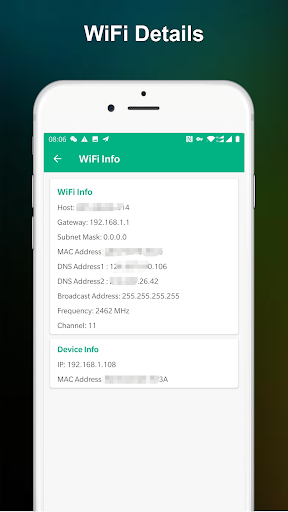
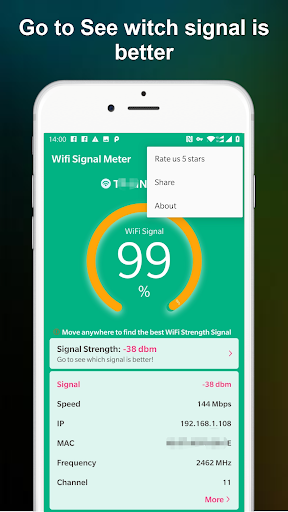
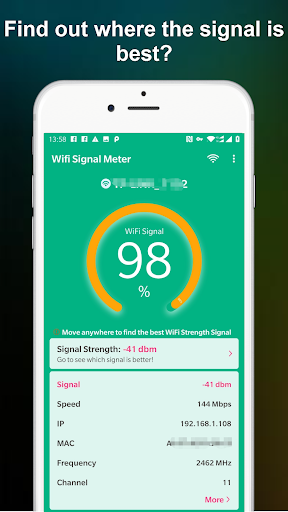
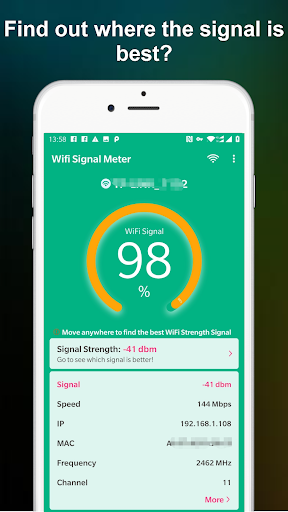
WiFi Signal Strength Meter Pro can help you Find the sweet spots in your WiFi network. Network Monitor & WiFi Monitor can view your current WiFi signal strength and detect WiFi Signal Strength around you in real time. The app is a simple tool that allows you to view your current WiFi signal strength. It can quickly check your WiFi strength to find the best location. The WiFi Signal Strength Meter Pro app is constantly updating the signal strength so you can walk around your house, work, or anywhere to find the best WiFi signal. Note: WiFi Signal strength below 50% can cause disconnection issues. Its better to have WiFi signal strength above 60%.

What WiFi Signal Strength Meter Pro Is Used For

WiFi Signal Strength Meter Pro appears to be a simple utility for checking Wi‑Fi signal levels on an Android phone. Based on the metadata, people may use it to see how strong their current connection is, move around a room or building, and identify locations where the signal is stronger or weaker.

The app seems especially relevant when you want to compare Wi‑Fi reception in different spots at home, at work, or in another indoor space. Its permissions suggest it can view Wi‑Fi and network connections, access precise location, and connect or disconnect from Wi‑Fi, which fits a tool that monitors network status and helps users assess signal strength in real time. It may be useful for troubleshooting weak coverage, dropped connections, or deciding where to place a router or where to stand for a better signal.

Common uses

  • Check current Wi‑Fi signal strength on a phone
  • Compare signal quality in different rooms or locations
  • Look for stronger spots in a home or office network
  • Monitor connection changes in real time while moving around
  • Help troubleshoot weak Wi‑Fi coverage or frequent disconnects
  • Support router placement decisions based on signal readings
Best for:
Phone users Wi‑Fi troubleshooting Signal checking Home network monitoring Indoor coverage testing

App Details

Package:
com.wifi.signal.wifisignalmeter.wifisignal.pro
Category:
Tools
Developer:
Network Scanner - WiFi Scanner & Network Monitor
Version:
1.0.11
Updated:
Jan 24, 2026
Min Android:
6.0
Age Rating:
Everyone
Contains Ads:
No
In-App Purchases:
No

Official Listing

  • Official listing available on Google Play
  • Package name: com.wifi.signal.wifisignalmeter.wifisignal.pro
  • Age rating: Everyone

Explore More

Browse more apps in Tools or explore the Phone hub .

Related Tools Apps

Opensignal icon

Opensignal

Tools Opensignal.com

Network coverage map, Internet & WiFi, signal & video streaming speed test

Version 7.66.4-1 9.6 MB ⭐ 4.20 10,000,000+ installs

How to Download WiFi Signal Strength Meter Pro

If this app is not hosted directly on APKApps official link, then for the safest and most up-to-date version, install it from its official Google Play listing.