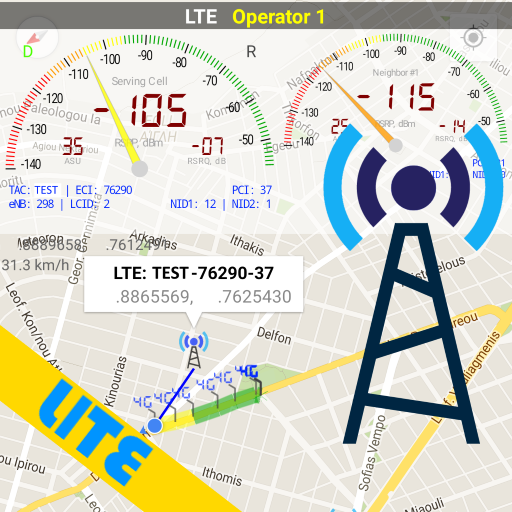
Network Cell Info Lite & Wifi
com.wilysis.cellinfolite
by M2Catalyst, LLC.
Screenshots
Ad slot: Top Leaderboard
About this app
Network Cell Info Lite is an extensive mobile network and Wi-Fi monitoring app with measurement and diagnostic tools (5G, LTE+, LTE, CDMA, WCDMA, GSM). Network Cell Info can help troubleshoot your reception and connectivity problems while keeping you in the know about your local cellular coverage.
Network Cell Info Lite is for anyone looking to improve their mobile experience and achieve their strongest cellular and Wi-Fi signal strength. This app also shows users which cellular tower they're connected to along with stats on the history of their signal strength. Users also report when they experience bad signals via the key feature below.
Key Feature: The Bad Signal Reporter
Wouldn’t it be terrific if every bad mobile signal you encountered was automatically reported to your mobile network operator? How much better would our mobile networks be if the operators had access to this information and then acted upon it?
The good news is that such access is available today through Network Cell Info Lite. This powerful app collects bad signal (either no signal or fringe coverage) data from the mobile devices of app users who have consented to such collection, and then generates a Bad Signal Report that we make available for FREE to every MNO in the world.
📡Main features📡:
☆Almost Real-Time (1 sec.) monitoring of cellular carrier and WiFi signals in Gauge/Raw Tabs
☆5G, LTE+, LTE, IWLAN, UMTS, GSM, CDMA support
☆One-tap WiFi/mobile internet performance speed test (download, upload, ping, and jitter)
☆Dual-SIM support
☆2-3 Signal-meter gauges for both SIMs and WiFi
☆Signal Plots, up to 2 cells
☆Band number
☆SIM# preference option, for other than Gauge tab
☆Map with network cellular info and signal-meter gauges
☆History Logs, Measurements of cellular signals (in the Map tab)
☆Readings Tab reporting the number of bad signals
☆Indication of cell locations (not carrier cell towers) in the Map from Mozilla Location Service (MLS), excl. CDMA
☆Personal Best Signal Finder map layer shows your signal strength history by location
☆Crowdsourced Best Signal Finder shows your carrier's nearest best signals
☆Personal Best Signal Finder history graphs your signal strength over time
☆Measurement settings (minimum distance, minimum accuracy, motion sensor, etc.)
☆Database export history measurements
☆Network information in Status Bar
☆Raw view of carrier network cellular info
☆Connection statistics (2G/3G/4G/5G)
☆SIM and device info
Want to remove ads, access more gauges and other features?
View the comparison chart here:
https://m2catalyst.com/apps/network-cell-info/features
Check out the Paid Version and Pro Subscription Plan.
https://play.google.com/store/apps/details?id=com.wilysis.cellinfo
Network Cell Info Lite is for anyone looking to improve their mobile experience and achieve their strongest cellular and Wi-Fi signal strength. This app also shows users which cellular tower they're connected to along with stats on the history of their signal strength. Users also report when they experience bad signals via the key feature below.
Key Feature: The Bad Signal Reporter
Wouldn’t it be terrific if every bad mobile signal you encountered was automatically reported to your mobile network operator? How much better would our mobile networks be if the operators had access to this information and then acted upon it?
The good news is that such access is available today through Network Cell Info Lite. This powerful app collects bad signal (either no signal or fringe coverage) data from the mobile devices of app users who have consented to such collection, and then generates a Bad Signal Report that we make available for FREE to every MNO in the world.
📡Main features📡:
☆Almost Real-Time (1 sec.) monitoring of cellular carrier and WiFi signals in Gauge/Raw Tabs
☆5G, LTE+, LTE, IWLAN, UMTS, GSM, CDMA support
☆One-tap WiFi/mobile internet performance speed test (download, upload, ping, and jitter)
☆Dual-SIM support
☆2-3 Signal-meter gauges for both SIMs and WiFi
☆Signal Plots, up to 2 cells
☆Band number
☆SIM# preference option, for other than Gauge tab
☆Map with network cellular info and signal-meter gauges
☆History Logs, Measurements of cellular signals (in the Map tab)
☆Readings Tab reporting the number of bad signals
☆Indication of cell locations (not carrier cell towers) in the Map from Mozilla Location Service (MLS), excl. CDMA
☆Personal Best Signal Finder map layer shows your signal strength history by location
☆Crowdsourced Best Signal Finder shows your carrier's nearest best signals
☆Personal Best Signal Finder history graphs your signal strength over time
☆Measurement settings (minimum distance, minimum accuracy, motion sensor, etc.)
☆Database export history measurements
☆Network information in Status Bar
☆Raw view of carrier network cellular info
☆Connection statistics (2G/3G/4G/5G)
☆SIM and device info
Want to remove ads, access more gauges and other features?
View the comparison chart here:
https://m2catalyst.com/apps/network-cell-info/features
Check out the Paid Version and Pro Subscription Plan.
https://play.google.com/store/apps/details?id=com.wilysis.cellinfo
What's New
* Targeting API 35
* Bug fixes
* Bug fixes
App Information
Version Name
3.11.2
Version Code
75
File Size
2.5 MB
Minimum OS
Android 7.0+
Target SDK
Android 23
Developer
M2Catalyst, LLC.
Contact
Website
Content Rating
Everyone
Package Name
com.wilysis.cellinfolitePermissions Required
This app may request the following permissions:
Recent Reviews
Dean Tucker
1.0★
I've used this app for seven years and even purchased the "pro" version, which I used for a few years. I discontinued using the upgrade and went back to the free version. It worked just as well and wasn't as "busy" screen wise. This new update just doesn't work as well, and when I changed the location setting to all the time and precise, my phone warned that the app using too much power and repeatedly crashing even when the app wasn't running. Might have to delete.
Deb
3.0★
I have used both paid and free options since 2017. It started out as a five-star app, but the latest version is lacking in services and basic features. I have tested on at least two phones and the results are the same. It does not find my cell location, which means the databases are useles - ZERO byte files. I am using Samsung and Motorola phones, with LTE service. The addition of the time stamp is helpful.
Ran Wiz
5.0★
I've used a few - but this app really gives me a lot of data, and tools to examine data. Downloaded when I was desperate for a signal in a remote area, but now use it all the time to check tower locations, etc for me and friends I'm with. GREAT TOOL even the free version. Ads are minimal, and less of a distraction than most free app advertising. LOVE IT !
A Google user
5.0★
I was always frustrated trying to read the "Bars" at the top of my screen. This was great because it shows a simple Signal meter (LTE and a WiFi too), and a screen with maps of towers that I am utilizing, that's all I wanted! I didn't need all of the other extemporaneous data that he other apps had (I tried some other apps)..... So if you are looking for an extremely easy to read/interpret visuals this is a great app. P.S. It has additional signal info for those who are looking for more detailed data, that just wasn't my requirement.
T Wright
2.0★
This used the be a great little app, showing not only your own connection, but neighbouring cells & connections. Now it doesn't. The speed tester doesn't work either. Don't know what changed, but have no option but to uninstall as it doesn't really fulfill any function when that data is freely available within my phone. Shame. 8(( Used to be good! 2 stars of for the memories
Jeff Kunce
3.0★
It's kind of a cool app, but you can't shut it down. You can force stop or reboot your phone, but it starts sending notifications again. I understand there is value to constantly collecting data, but I want to be able to decide when that happens. Uninstalled for now. "to exit the app, simply swipe close" - I said I want to shut it down. If it is still sending notifications, it has not been shut down. I want to be able to stop it from running (and collecting information) without rebooting.
Ad slot: In-Content