Ghostalker icon

Phone

Ghostalker

Lifestyle WorldByDesign.com ⭐ 4.10 5,000+
Version 0.7 Everyone

Screenshots

Ghostalker screenshot
Permissions Explained 8 permissions requested View details

This app requests 8 permissions. The table below explains what each permission may allow and what users should review before installing.

Status Permission What it means Why it may be used User safety note
ℹ️ Review Approximate Location (network Based) approximate location (network-based) This is an Android permission or app-specific permission requested by the app. The app may use this permission for features related to its category, device support, background behavior, storage, connectivity, or system integration. Review this permission before installing, especially if it does not match the app’s expected purpose.
ℹ️ Review Precise Location (gps And Network Based) precise location (GPS and network-based) This is an Android permission or app-specific permission requested by the app. The app may use this permission for features related to its category, device support, background behavior, storage, connectivity, or system integration. Review this permission before installing, especially if it does not match the app’s expected purpose.
ℹ️ Review Read The Contents Of Your Usb Storage read the contents of your USB storage This is an Android permission or app-specific permission requested by the app. The app may use this permission for features related to its category, device support, background behavior, storage, connectivity, or system integration. Review this permission before installing, especially if it does not match the app’s expected purpose.
ℹ️ Review Modify Or Delete The Contents Of Your Usb Storage modify or delete the contents of your USB storage This is an Android permission or app-specific permission requested by the app. The app may use this permission for features related to its category, device support, background behavior, storage, connectivity, or system integration. Review this permission before installing, especially if it does not match the app’s expected purpose.
ℹ️ Review View Wi Fi Connections view Wi-Fi connections This is an Android permission or app-specific permission requested by the app. The app may use this permission for features related to its category, device support, background behavior, storage, connectivity, or system integration. Review this permission before installing, especially if it does not match the app’s expected purpose.
ℹ️ Review View Network Connections view network connections This is an Android permission or app-specific permission requested by the app. The app may use this permission for features related to its category, device support, background behavior, storage, connectivity, or system integration. Review this permission before installing, especially if it does not match the app’s expected purpose.
ℹ️ Review Full Network Access full network access This is an Android permission or app-specific permission requested by the app. The app may use this permission for features related to its category, device support, background behavior, storage, connectivity, or system integration. Review this permission before installing, especially if it does not match the app’s expected purpose.
ℹ️ Review Prevent Device From Sleeping prevent device from sleeping This is an Android permission or app-specific permission requested by the app. The app may use this permission for features related to its category, device support, background behavior, storage, connectivity, or system integration. Review this permission before installing, especially if it does not match the app’s expected purpose.

About Ghostalker

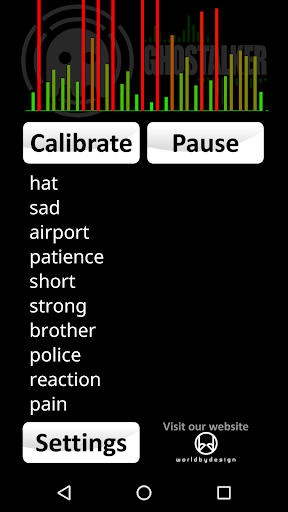
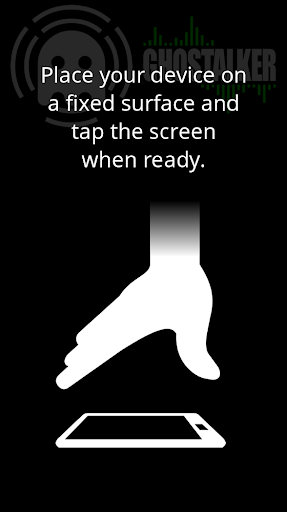
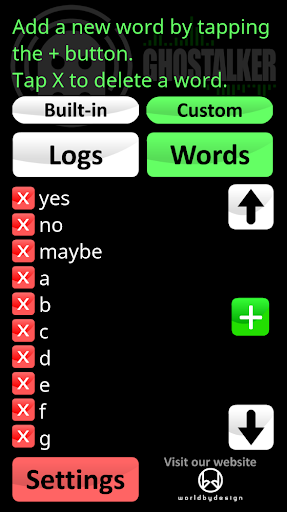
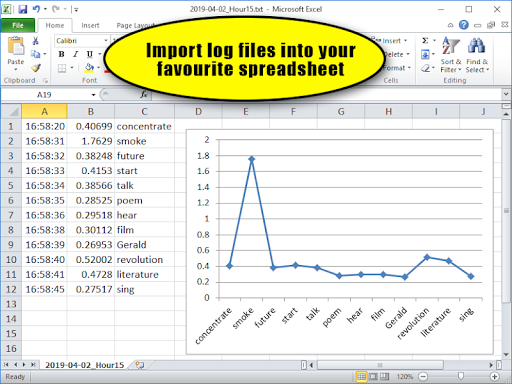
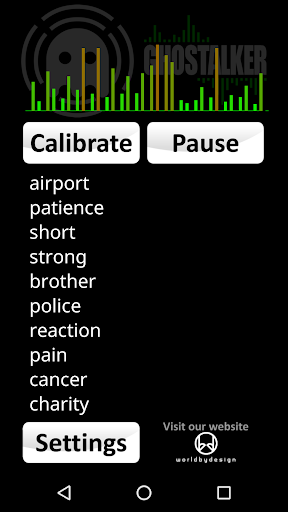
Whether you are a professional Paranormal Investigator, a hobbyist or just want to have some fun, this app works like a "Spirit Box" which converts energy into spoken words. INSTRUCTIONS: Do NOT hold your device and do NOT tap or shake your device while running Ghostalker. It is designed to detect the smallest of movements and vibration, as well as many other sensor readings. With a database of over a thousand commonly used words, Ghostalker will use all of the sensors it can find in your device to pick up changes in energy. This includes sensors for the tiniest amount of vibration, rotation, GPS, gyroscope, light, magnetic fields, proximity etc. and convert them to words which it will display and speak. This app uses the actual raw data from the sensors to determine what to say, rather than picking words at random like some other apps. LOGGING: This is the full version of the app so it logs the words spoken for you to view, save, email, delete etc. at a later time. There is also a built-in log viewer. The date and time is logged, along with the combined change in sensor readings (so you can see how much energy was picked up) and the word. The log files are in CSV format so you can import them into your favourite spreadsheet (e.g. MS Excel or Google Sheets). DICTIONARY: You can also manage your own custom dictionary of up to 10,000 words so you can make your own special list of replies. You can flick between the in-built dictionary, your own custom dictionary or both combined (from v0.5) at any time. SENSORS: Occasionally interference can cause individual sensors to trigger constantly. This can also be caused by faulty or overly sensitive sensors. From v0.2 you can enable and disable individual sensors to prevent such issues. This app is not designed to form complete sentences so it is up to you to interpret what it says in your own way. Top end phones and tablets tend to have more sensors than low end ones but the app is designed to work with whatever it can find. The sensitivity of sensors will also vary between devices. TIP 1: Using the custom dictionary you can have it reply with special limited words, for example 'yes', 'no' and 'maybe' when you ask it questions. Or add a series of digits and get the spirits to pick your lottery numbers. Or add the letters of the alphabet so it can work like a Ouija board. TIP 2: Paranormal investigators believe that leaving such devices running for as long as possible will allow spirits to learn what energy is required to trigger certain words. TIP 3: If it starts to trigger words constantly you may be getting interference from something close by. Try moving the device somewhere else or tap the 'Calibrate' button to get it to tune out background variance (although you will lose some sensitivity). If it persists you can click on 'Sensors' under 'Settings' to see which sensor is triggering and disable/enable it. TIP4: NEW - Keep word lists in text files (each word on a new line or separated with a space) or…

What Ghostalker Is Used For

Based on the metadata, Ghostalker appears to be a lifestyle app for people interested in paranormal-style experimentation or sensor-based novelty use. It is described as working like a “spirit box,” using motion and environmental sensor readings to generate and speak words from a built-in dictionary. That means it may be used during ghost-hunting sessions, informal investigations, or for users who simply want to experiment with how device sensors influence the app’s output.

The app also appears to include logging and dictionary management tools, which suggests a more hands-on setup than a simple entertainment app. Users may view, save, email, or delete word logs later, and the CSV format could be useful for reviewing sessions in a spreadsheet. The metadata also mentions options to enable or disable specific sensors, which may help reduce interference on devices with sensitive hardware. Location, Wi‑Fi, network, storage, and sleep-related permissions suggest it may need access to sensors, saved files, and continuous operation while running.

Common uses

  • May be used for paranormal-themed sessions or ghost-hunting experiments
  • Displays and speaks words based on device sensor readings
  • Includes log viewing and CSV export for later review
  • Lets users manage a custom dictionary of words
  • May help adjust or disable specific sensors if readings are noisy
  • Appears designed for phone use with continuous sensor monitoring
Best for:
paranormal hobbyists sensor experimenters log review users custom dictionary setup phone app

App Details

Package:
com.worldbydesign.ghostalker
Category:
Lifestyle
Developer:
WorldByDesign.com
Version:
0.7
Updated:
Aug 8, 2024
Min Android:
4.1
Age Rating:
Everyone
Contains Ads:
No
In-App Purchases:
No

Official Listing

  • Official listing available on Google Play
  • Package name: com.worldbydesign.ghostalker
  • Age rating: Everyone

Explore More

Browse more apps in Lifestyle or explore the Phone hub .

Related Lifestyle Apps

Life360: Stay Connected & Safe icon

Life360: Stay Connected & Safe

Lifestyle Life360

All-in-one family safety: location sharing, crash alerts, driver reports & more

Version 26.11.1 37.5 MB ⭐ 4.40 100,000,000+ installs
Muslim Pro: Quran Athan Prayer icon

Muslim Pro: Quran Athan Prayer

Lifestyle Bitsmedia

Duas, Qibla, Azan & Islamic tools to support your daily worship & prayer.

Version Varies with device 61.2 MB ⭐ 4.00 100,000,000+ installs
Xiaomi Home icon

Xiaomi Home

Lifestyle Beijing Xiaomi Mobile Software Co.,Ltd

Xiaomi Home is the official Android app for Xiaomi Home.

Version 11.3.702 126.5 MB ⭐ 4.50 50,000,000+ installs
AT&T Secure Family® parent app icon

AT&T Secure Family® parent app

Lifestyle AT&T Services, Inc.

Family location tracker & parental controls to limit screen time & block apps.

Version 11.5.1 80.9 MB ⭐ 4.50 10,000,000+ installs
TP-Link Tapo icon

TP-Link Tapo

Lifestyle TP-LINK SYSTEMS INC.

Control your Tapo smart devices from anywhere.

Version 3.17.512 338.1 MB ⭐ 4.70 10,000,000+ installs

How to Download Ghostalker

If this app is not hosted directly on APKApps official link, then for the safest and most up-to-date version, install it from its official Google Play listing.