Mgrs & Utm Map Pro icon

Phone

Mgrs & Utm Map Pro

Maps & Navigation DakikTech ⭐ 4.70 10,000+
Version Varies with device Everyone

Screenshots

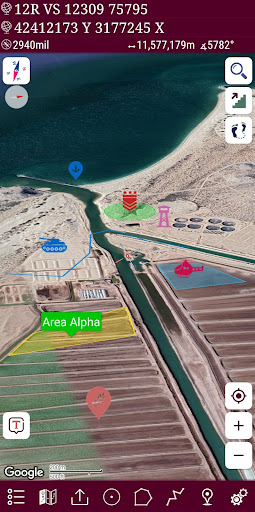
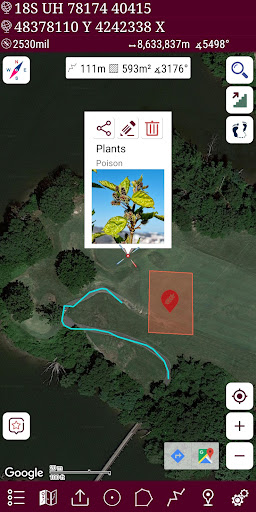
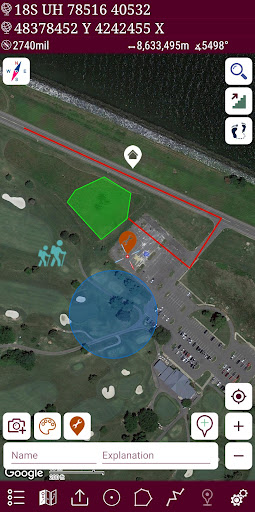
Mgrs & Utm Map Pro screenshot
Permissions Explained 10 permissions requested View details

This app requests 10 permissions. The table below explains what each permission may allow and what users should review before installing.

Status Permission What it means Why it may be used User safety note
ℹ️ Review Approximate Location (network Based) approximate location (network-based) This is an Android permission or app-specific permission requested by the app. The app may use this permission for features related to its category, device support, background behavior, storage, connectivity, or system integration. Review this permission before installing, especially if it does not match the app’s expected purpose.
ℹ️ Review Precise Location (gps And Network Based) precise location (GPS and network-based) This is an Android permission or app-specific permission requested by the app. The app may use this permission for features related to its category, device support, background behavior, storage, connectivity, or system integration. Review this permission before installing, especially if it does not match the app’s expected purpose.
ℹ️ Review Read The Contents Of Your Usb Storage read the contents of your USB storage This is an Android permission or app-specific permission requested by the app. The app may use this permission for features related to its category, device support, background behavior, storage, connectivity, or system integration. Review this permission before installing, especially if it does not match the app’s expected purpose.
ℹ️ Review Modify Or Delete The Contents Of Your Usb Storage modify or delete the contents of your USB storage This is an Android permission or app-specific permission requested by the app. The app may use this permission for features related to its category, device support, background behavior, storage, connectivity, or system integration. Review this permission before installing, especially if it does not match the app’s expected purpose.
ℹ️ Review View Wi Fi Connections view Wi-Fi connections This is an Android permission or app-specific permission requested by the app. The app may use this permission for features related to its category, device support, background behavior, storage, connectivity, or system integration. Review this permission before installing, especially if it does not match the app’s expected purpose.
ℹ️ Review View Network Connections view network connections This is an Android permission or app-specific permission requested by the app. The app may use this permission for features related to its category, device support, background behavior, storage, connectivity, or system integration. Review this permission before installing, especially if it does not match the app’s expected purpose.
ℹ️ Review Full Network Access full network access This is an Android permission or app-specific permission requested by the app. The app may use this permission for features related to its category, device support, background behavior, storage, connectivity, or system integration. Review this permission before installing, especially if it does not match the app’s expected purpose.
ℹ️ Review Run At Startup run at startup This is an Android permission or app-specific permission requested by the app. The app may use this permission for features related to its category, device support, background behavior, storage, connectivity, or system integration. Review this permission before installing, especially if it does not match the app’s expected purpose.
ℹ️ Review Prevent Device From Sleeping prevent device from sleeping This is an Android permission or app-specific permission requested by the app. The app may use this permission for features related to its category, device support, background behavior, storage, connectivity, or system integration. Review this permission before installing, especially if it does not match the app’s expected purpose.
ℹ️ Review Google Play License Check Google Play license check This is an Android permission or app-specific permission requested by the app. The app may use this permission for features related to its category, device support, background behavior, storage, connectivity, or system integration. Review this permission before installing, especially if it does not match the app’s expected purpose.

About Mgrs & Utm Map Pro

Special features at pro version: 👉 More maps (Bicycle, Topographic, Neighborhood, Atlas etc.) 👉 You can see the altitude profile of your route on the chart 👉 You can search for locations by address 👉 You can create different layers for your different activities 👉 List view for markers, routes, areas and KML 👉 You can draw multiple routes and areas, and change their colors 👉 More and colorful pointer icons 👉 Name or icon display options for markers 👉 Multiple routes can be recorded with the GPS recorder 👉 And no ads This application is GPS and coordinate systems helper especially for military personnel. It is also a complete helper for mountaineering, trekking and hiking, cross running, scouting, hunting, fishing, geocaching, off-road navigation and all other outdoor activities and sports. With satellite navigation systems such as GPS, GALILEO and GLONASS (GNSS) supported by your device and your sensors, you can see your most accurate position on different map layers. Features: * Easy and Faster * Compass. => Compass on map (on the map that shows your direction) => Compass only (shows physical directions) => Angular units for compass (degrees, grad and mil) * Follow Mode => The center of the map follows your location while on the move. * You can add and removing markers. * Distance measure. (You can add custom route and calculate total distance) * Area measure.(You can select an area on the map and calculate the area in square meters) * You can see the altitude of your location. * You can find the location according to Address, Degree/Minute/Second , MGRS, UTM or Latitude/Longitude formats. * Location (Coordinate) unit options. => MGRS / U.S. National Grid (USNG) (WGS84/NAD83) => D°M'S" (WGS84) => Latitude/Longitude (WGS84) => UTM (WGS84/NAD83) => SK42(Gauss Kruger) => British National Grid(OSNG) => Irish Grid Reference => ED50 => ITRF * Map type options (Road,Terrain,Satellite,Night Mode,Hybrid) * You can share location coordinate. * Distance unit options. (meter and feet). * KML viewer. (Export and import KML layers).

What Mgrs & Utm Map Pro Is Used For

Mgrs & Utm Map Pro appears to be a GPS and coordinate-focused mapping app for Android phones. Based on the metadata, it is commonly used to view position on different map layers, work with coordinate formats such as MGRS, UTM, latitude/longitude, and address lookup, and support outdoor navigation tasks that need more detail than a basic map view.

The app also seems geared toward planning and field use. Its features include compass tools, route and area measurement, marker management, KML import/export, altitude profile viewing, and the ability to create multiple layers for different activities. The permission set suggests it may need precise or approximate location, network access, storage access for saving or loading map or KML data, and startup/background behavior for navigation use. Based on the metadata, it may be useful for hiking, trekking, geocaching, off-road navigation, and similar phone-based navigation workflows.

Common uses

  • View your location on map layers such as road, terrain, satellite, hybrid, or night mode
  • Convert or search coordinates in formats like MGRS, UTM, and latitude/longitude
  • Measure distance and area for routes, boundaries, or planned paths
  • Use compass and follow mode during movement or field navigation
  • Save, organize, and view markers, routes, areas, and KML layers
  • Record multiple GPS tracks and review altitude profiles
  • Share coordinates or location details from the device
Best for:
Field navigation Coordinate lookup Outdoor planning Hiking and trekking Phone app

App Details

Package:
com.zahidcataltas.mgrsutmmappro
Developer:
DakikTech
Version:
Varies with device
Min Android:
Varies with device
Age Rating:
Everyone
Contains Ads:
No
In-App Purchases:
No

Official Listing

  • Official listing available on Google Play
  • Package name: com.zahidcataltas.mgrsutmmappro
  • Age rating: Everyone

Explore More

Browse more apps in Maps & Navigation or explore the Phone hub .

Related Maps & Navigation Apps

VesselFinder icon

VesselFinder

Maps & Navigation VT Explorer Ltd

Real time AIS ship tracking of marine traffic, vessel database, ship photos.

Version 5.6.5 28.2 MB ⭐ 3.99 1,000,000+ installs

How to Download Mgrs & Utm Map Pro

If this app is not hosted directly on APKApps official link, then for the safest and most up-to-date version, install it from its official Google Play listing.