Tools & Amazfit icon

Phone

Tools & Amazfit

Health & Fitness Tools & Wearables ⭐ 2.40 100,000+
Version 8.9.0 Everyone

Screenshots

Tools & Amazfit screenshot
Permissions Explained 14 permissions requested View details

This app requests 14 permissions. The table below explains what each permission may allow and what users should review before installing.

Status Permission What it means Why it may be used User safety note
ℹ️ Review Read Your Contacts read your contacts This is an Android permission or app-specific permission requested by the app. The app may use this permission for features related to its category, device support, background behavior, storage, connectivity, or system integration. Review this permission before installing, especially if it does not match the app’s expected purpose.
ℹ️ Review Send Sms Messages send SMS messages This is an Android permission or app-specific permission requested by the app. The app may use this permission for features related to its category, device support, background behavior, storage, connectivity, or system integration. Review this permission before installing, especially if it does not match the app’s expected purpose.
ℹ️ Review Directly Call Phone Numbers directly call phone numbers This is an Android permission or app-specific permission requested by the app. The app may use this permission for features related to its category, device support, background behavior, storage, connectivity, or system integration. Review this permission before installing, especially if it does not match the app’s expected purpose.
ℹ️ Review Read Call Log read call log This is an Android permission or app-specific permission requested by the app. The app may use this permission for features related to its category, device support, background behavior, storage, connectivity, or system integration. Review this permission before installing, especially if it does not match the app’s expected purpose.
ℹ️ Review Read Phone Status And Identity read phone status and identity This is an Android permission or app-specific permission requested by the app. The app may use this permission for features related to its category, device support, background behavior, storage, connectivity, or system integration. Review this permission before installing, especially if it does not match the app’s expected purpose.
ℹ️ Review Body Sensors (like Heart Rate Monitors) body sensors (like heart rate monitors) This is an Android permission or app-specific permission requested by the app. The app may use this permission for features related to its category, device support, background behavior, storage, connectivity, or system integration. Review this permission before installing, especially if it does not match the app’s expected purpose.
ℹ️ Review View Network Connections view network connections This is an Android permission or app-specific permission requested by the app. The app may use this permission for features related to its category, device support, background behavior, storage, connectivity, or system integration. Review this permission before installing, especially if it does not match the app’s expected purpose.
ℹ️ Review Pair With Bluetooth Devices pair with Bluetooth devices This is an Android permission or app-specific permission requested by the app. The app may use this permission for features related to its category, device support, background behavior, storage, connectivity, or system integration. Review this permission before installing, especially if it does not match the app’s expected purpose.
ℹ️ Review Access Bluetooth Settings access Bluetooth settings This is an Android permission or app-specific permission requested by the app. The app may use this permission for features related to its category, device support, background behavior, storage, connectivity, or system integration. Review this permission before installing, especially if it does not match the app’s expected purpose.
ℹ️ Review Full Network Access full network access This is an Android permission or app-specific permission requested by the app. The app may use this permission for features related to its category, device support, background behavior, storage, connectivity, or system integration. Review this permission before installing, especially if it does not match the app’s expected purpose.
ℹ️ Review Run At Startup run at startup This is an Android permission or app-specific permission requested by the app. The app may use this permission for features related to its category, device support, background behavior, storage, connectivity, or system integration. Review this permission before installing, especially if it does not match the app’s expected purpose.
ℹ️ Review Control Vibration control vibration This is an Android permission or app-specific permission requested by the app. The app may use this permission for features related to its category, device support, background behavior, storage, connectivity, or system integration. Review this permission before installing, especially if it does not match the app’s expected purpose.
ℹ️ Review Prevent Device From Sleeping prevent device from sleeping This is an Android permission or app-specific permission requested by the app. The app may use this permission for features related to its category, device support, background behavior, storage, connectivity, or system integration. Review this permission before installing, especially if it does not match the app’s expected purpose.
ℹ️ Review Google Play License Check Google Play license check This is an Android permission or app-specific permission requested by the app. The app may use this permission for features related to its category, device support, background behavior, storage, connectivity, or system integration. Review this permission before installing, especially if it does not match the app’s expected purpose.

About Tools & Amazfit

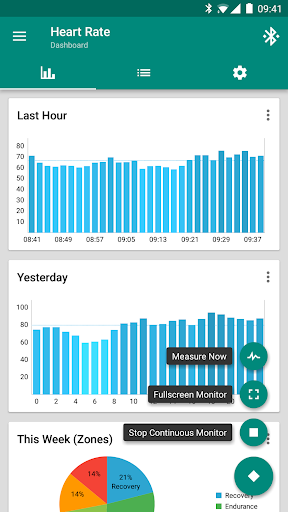
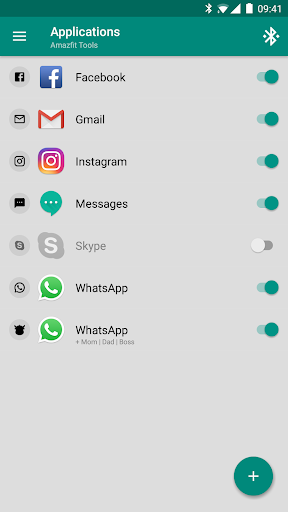
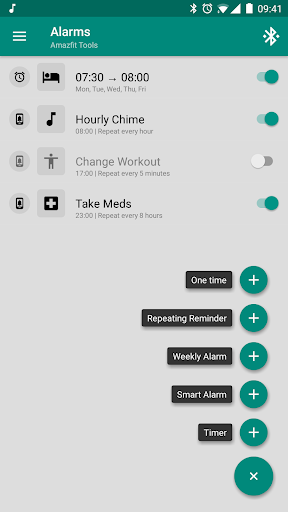
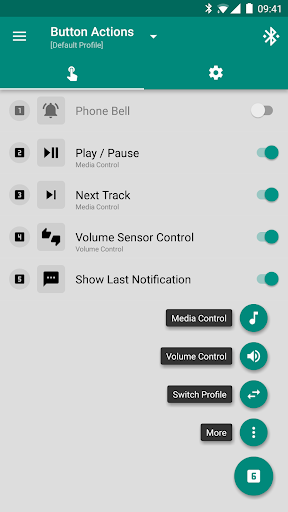
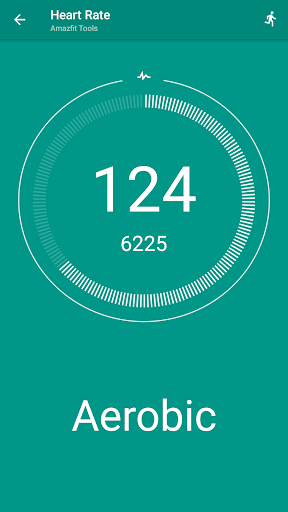
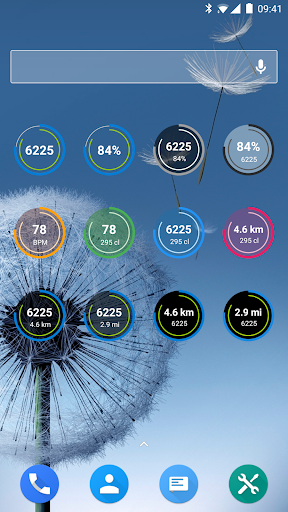
Get the most out of your Amazfit smart bracelet with Amazfit Tools! Set up your own, individual and fully customizable notifications for incoming calls and applications. Energize your brain during a hard day using the power nap feature, configure custom patterns for each single notification, fine-tune custom content filters and a lot more! This application works very well with original Zepp / Mi Fit application (but is no way associated with Xiaomi). This means that you can always have the latest Zepp / Mi Fit version and the latest Amazfit firmware in addition to great and powerful advanced features. Features: • Display Text Support (see caller contact names & full contents of notifications on your Amazfit) • Button Control & Sensor Control (assign actions to button presses, control media with movements of your hand) • Button Control Profiles (create your own virtual menu to perform any number of your custom actions: control music, volume, phone vibrations & more) • Continuous heart rate monitoring & notifying, configurable heart rate dashboard charts • Sleep as Android Integration (Amazfit GTS 4, 3, 2, 1, Amazfit GTR 4, 3, 3 Pro, 2, 1, Amazfit T-Rex 2, Pro, 1, Amazfit Bip, Arc, Cor, X, Band 7, Band 6, Band 5) • Notifications for application & incoming calls (highly configurable times, conditions or even custom vibration patterns) • Alarm notifications (including safety sound alarm - vibrations won't wake you up? safety sound alarm will trigger after few minutes) • Custom repeating notifications (you can set anything you like, for example: hourly chimes, change workout reminder, take a pill reminders and more) • Notification content filters (only interested in SMS notifications for certain people? not a problem for Amazfit Tools) • Multiple notifications (you can for example ignore WhatsApp groups or set different icons, vibration patterns or notification times for different people) • Power Nap feature (need a short nap? Just activate this and Amazfit will wake you up by vibrations when you're done resting) • Idle Alerts (you can set an alert so the band will buzz you if you've been inactive for some time). You can also control the interval, time frame and inactivity threshold • Missed notifications (notification is not lost when you are out of reach of your phone, you will get the last missed notification on reconnect) • Advanced settings (disable non-interactive notifications, shake to dismiss power nap, disable in silence mode, disable while screen is on, …) • Fully customizable widgets (daily fitness goal progress, bracelet battery, heart rate, etc) • Export/Import Settings (to your storage or to the cloud) • Tasker, Automagic, Automate and Locale support (advanced and fully customizable action and event plugins) • Fully supports Amazfit GTS 4, Amazfit GTR 4, Amazfit GTS 3, Amazfit GTR 3 (GTR3, GTR 3 Pro), Amazfit T-Rex 2 (T-Rex 2, T-Rex Pro, T-Rex), Amazfit GTS 2 (GTS2, 2E, 2 Mini), Amazfit GTR 2 (GTR2, 2E), Amazfit GTS, Amazfit GTR…

What Tools & Amazfit Is Used For

Tools & Amazfit appears to be a companion app for Amazfit smart bracelets and watches, focused on extending notification and device-control options beyond the default setup. Based on the metadata, people commonly use it to customize call and app alerts, adjust vibration patterns, filter which notifications reach the wearable, and show more detailed notification text on supported devices.

It also seems useful for fitness and routine tracking features such as continuous heart-rate monitoring, idle reminders, alarm handling, and sleep-related integration with supported apps. The listed permissions suggest it may need access to contacts, call status, Bluetooth, sensors, and vibration control so it can connect to the wearable, react to notifications, and trigger alerts or device actions from the band or watch. As a phone app, it is mainly meant for configuring and managing the wearable rather than replacing the wearable itself.

Common uses

  • Customizes notifications for calls and apps on Amazfit devices
  • Lets users set vibration patterns and notification rules
  • May show caller names and fuller notification text on the wearable
  • Supports heart-rate monitoring and related alerts
  • Can be used for reminders like alarms, hourly chimes, or medication prompts
  • May offer idle alerts and short nap timing features
  • Works alongside the original Zepp / Mi Fit app for extra controls
Best for:
Amazfit owners Wearable setup Notification control Fitness reminders Phone app

App Details

Package:
cz.zdenekhorak.amazfittools
Developer:
Tools & Wearables
Version:
8.9.0
Updated:
Oct 25, 2025
Min Android:
4.3
Age Rating:
Everyone
Contains Ads:
No
In-App Purchases:
No

Official Listing

  • Official listing available on Google Play
  • Package name: cz.zdenekhorak.amazfittools
  • Age rating: Everyone

Explore More

Browse more apps in Health & Fitness or explore the Phone hub .

Related Health & Fitness Apps

Home Workout - No Equipment icon

Home Workout - No Equipment

Health & Fitness Leap Fitness Group

Build muscle & muscle booster with workout planner at home

Version 1.6.9 19.5 MB ⭐ 4.90 100,000,000+ installs
Fitbit icon

Fitbit

Health & Fitness Google LLC

Fitbit is dedicated to helping people lead healthier, more active lives.

Version Varies with device 125.8 MB ⭐ 4.20 100,000,000+ installs
Flo Ovulation & Period Tracker icon

Flo Ovulation & Period Tracker

Health & Fitness Flo Health Inc.

From periods to pregnancy & perimenopause, Flo helps you track it all. Try now.

Version Varies with device 175.9 MB ⭐ 4.70 100,000,000+ installs
Sweatcoin・Walking Step Counter icon

Sweatcoin・Walking Step Counter

Health & Fitness Sweatco Ltd

Pedometer that gives you sweatcoins for steps. It pays to walk!

Version 239.1.0 89.4 MB ⭐ 4.20 100,000,000+ installs
MyFitnessPal: Calorie Counter icon

MyFitnessPal: Calorie Counter

Health & Fitness MyFitnessPal, Inc.

Monitor and track your macros, nutrition, macro tracking, and meal planning

Version Varies with device 96.8 MB ⭐ 4.40 100,000,000+ installs
Lose Weight App for Women icon

Lose Weight App for Women

Health & Fitness Leap Fitness Group

Lose weight and Burn Belly Fat with at-home fitness app's workouts for women.

Version 2.3.5 22.3 MB ⭐ 4.90 100,000,000+ installs

How to Download Tools & Amazfit

If this app is not hosted directly on APKApps official link, then for the safest and most up-to-date version, install it from its official Google Play listing.