e-motion® M25 icon

Phone

e-motion® M25

Medical Alber GmbH ⭐ 2.80 10,000+
Version 2.7.0.3 Everyone

Screenshots

e-motion® M25 screenshot
Permissions Explained 12 permissions requested View details

This app requests 12 permissions. The table below explains what each permission may allow and what users should review before installing.

Status Permission What it means Why it may be used User safety note
ℹ️ Review Approximate Location (network Based) approximate location (network-based) This is an Android permission or app-specific permission requested by the app. The app may use this permission for features related to its category, device support, background behavior, storage, connectivity, or system integration. Review this permission before installing, especially if it does not match the app’s expected purpose.
ℹ️ Review Precise Location (gps And Network Based) precise location (GPS and network-based) This is an Android permission or app-specific permission requested by the app. The app may use this permission for features related to its category, device support, background behavior, storage, connectivity, or system integration. Review this permission before installing, especially if it does not match the app’s expected purpose.
ℹ️ Review Read Phone Status And Identity read phone status and identity This is an Android permission or app-specific permission requested by the app. The app may use this permission for features related to its category, device support, background behavior, storage, connectivity, or system integration. Review this permission before installing, especially if it does not match the app’s expected purpose.
ℹ️ Review Read The Contents Of Your Usb Storage read the contents of your USB storage This is an Android permission or app-specific permission requested by the app. The app may use this permission for features related to its category, device support, background behavior, storage, connectivity, or system integration. Review this permission before installing, especially if it does not match the app’s expected purpose.
ℹ️ Review Modify Or Delete The Contents Of Your Usb Storage modify or delete the contents of your USB storage This is an Android permission or app-specific permission requested by the app. The app may use this permission for features related to its category, device support, background behavior, storage, connectivity, or system integration. Review this permission before installing, especially if it does not match the app’s expected purpose.
ℹ️ Review Take Pictures And Videos take pictures and videos This is an Android permission or app-specific permission requested by the app. The app may use this permission for features related to its category, device support, background behavior, storage, connectivity, or system integration. Review this permission before installing, especially if it does not match the app’s expected purpose.
ℹ️ Review View Wi Fi Connections view Wi-Fi connections This is an Android permission or app-specific permission requested by the app. The app may use this permission for features related to its category, device support, background behavior, storage, connectivity, or system integration. Review this permission before installing, especially if it does not match the app’s expected purpose.
ℹ️ Review View Network Connections view network connections This is an Android permission or app-specific permission requested by the app. The app may use this permission for features related to its category, device support, background behavior, storage, connectivity, or system integration. Review this permission before installing, especially if it does not match the app’s expected purpose.
ℹ️ Review Pair With Bluetooth Devices pair with Bluetooth devices This is an Android permission or app-specific permission requested by the app. The app may use this permission for features related to its category, device support, background behavior, storage, connectivity, or system integration. Review this permission before installing, especially if it does not match the app’s expected purpose.
ℹ️ Review Access Bluetooth Settings access Bluetooth settings This is an Android permission or app-specific permission requested by the app. The app may use this permission for features related to its category, device support, background behavior, storage, connectivity, or system integration. Review this permission before installing, especially if it does not match the app’s expected purpose.
ℹ️ Review Full Network Access full network access This is an Android permission or app-specific permission requested by the app. The app may use this permission for features related to its category, device support, background behavior, storage, connectivity, or system integration. Review this permission before installing, especially if it does not match the app’s expected purpose.
ℹ️ Review Control Vibration control vibration This is an Android permission or app-specific permission requested by the app. The app may use this permission for features related to its category, device support, background behavior, storage, connectivity, or system integration. Review this permission before installing, especially if it does not match the app’s expected purpose.

About e-motion® M25

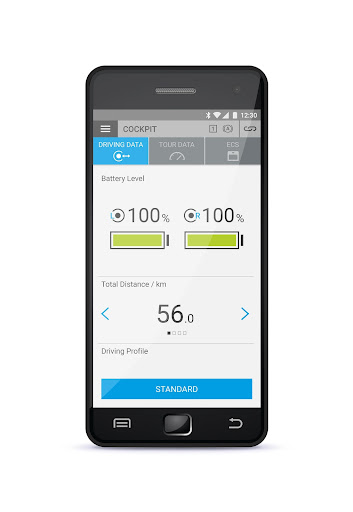
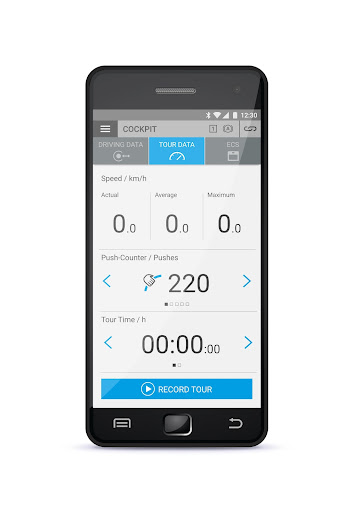
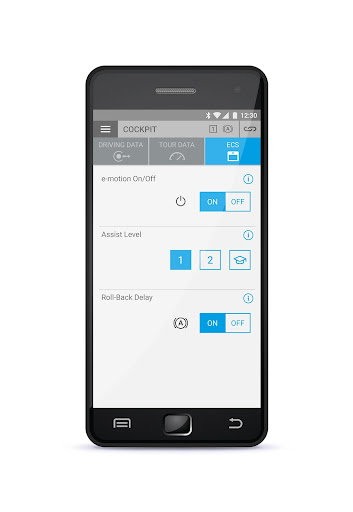
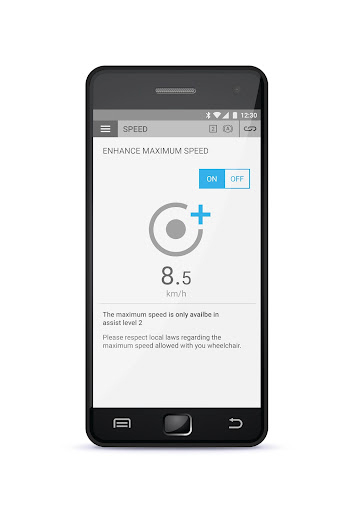
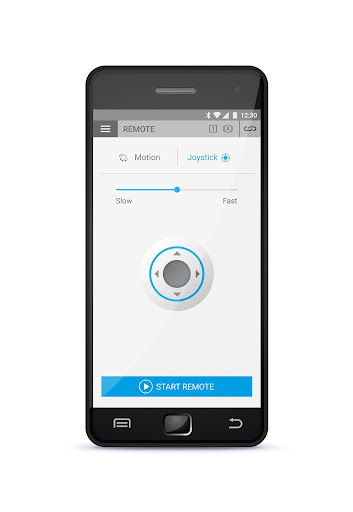
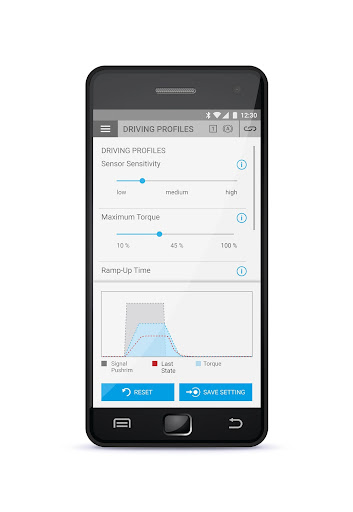
Smartphones have become an integral part of our everyday lives. It goes without saying that e-motion also makes full use of the benefits of this technology. The e-motion Mobility App is divided in three sections. The free section provides you with four pre-set driving profiles that influence the driving behaviour of your e-motion. You can also display the current speed, mileage or charge level on your smartphone and even record and save tours via GPS. In addition the app informs you about eventual errors and helps you to solve them. It shows you how to properly use the e-motion and the app helps you to prepare when travelling. If necessary you can also update the software of the e-motion wheels via your smartphone. You want to have both hands free while moving or an extra dose of speed to go faster? With the Mobility Plus Package you can activate a variety of clever additional functions in the Mobility App. With the Mobility Plus Package you can increase the support speed from 6 km/h to 8,5 km/h and benefit from the Cruise Mode that allows you to keep a permanent speed with only one deflection on the push rim. In addition you can use all functions of the ECS remote control on your smartphone and remotely control you wheelchair for parking. Moreover the Mobility Plus Package allows you to count the amount of pushes during a recorded tour. All this gives you even more from your e-motion! In the protected professional section you can individually adapt the driving behaviour of the e-motion. The following parameters can be adjusted: Maximum speed, maximum torque, sensitivity of the sensors as well as the ramp-up and follow-up time.

What e-motion® M25 Is Used For

Based on the metadata, e-motion® M25 is a medical mobility app for phone use that appears to support Alber e-motion wheelchair wheel systems. It is commonly used to monitor ride information such as speed, mileage, and battery/charge level, and to store GPS-based tours. The app also seems designed to help users manage driving behavior through preset profiles and, in a protected professional area, deeper parameter adjustments such as maximum speed, torque, sensor sensitivity, and ramp-up or follow-up timing.

The app may also be used for practical day-to-day support while traveling, since it can report error messages, suggest troubleshooting steps, and help prepare the user for use on the go. Based on the metadata, it includes optional extra functions through a Mobility Plus Package, such as Cruise Mode, higher support speed, remote-control functions for parking, and push counting during recorded tours. The listed permissions suggest use cases involving Bluetooth connectivity, network access, and GPS location for device communication and route recording, which fits a wheelchair-control and mobility-management context rather than a general consumer app.

Common uses

  • Monitor current speed, distance, and battery or charge level
  • Choose from preset driving profiles for different riding needs
  • Record and save tours using GPS
  • View error messages and follow guidance for common issues
  • Adjust driving parameters in the protected professional section
  • Use optional extra functions such as cruise mode or remote parking control
  • Update e-motion wheel software through the smartphone app
Best for:
wheelchair users mobility device owners caregivers medical device setup professional adjustment

App Details

Package:
de.alber.emotion_m25
Category:
Medical
Developer:
Alber GmbH
Version:
2.7.0.3
Updated:
Dec 13, 2024
Min Android:
7.0
Age Rating:
Everyone
Contains Ads:
No
In-App Purchases:
Yes

Official Listing

  • Official listing available on Google Play
  • Package name: de.alber.emotion_m25
  • Age rating: Everyone

Explore More

Browse more apps in Medical or explore the Phone hub .

Related Medical Apps

My Heart: Blood Pressure Log icon

My Heart: Blood Pressure Log

Medical Klimaszewski Szymon

Your portable blood pressure tracker. Record, monitor, and analyze BP anytime.

Version Google-7.4.0 11.8 MB ⭐ 4.20 10,000,000+ installs
Meds & Pill Reminder MyTherapy icon

Meds & Pill Reminder MyTherapy

Medical MyTherapy

Our health app helps with a medication reminder, pill counter & mood tracker

Version 3.259.3 85.7 MB ⭐ 4.60 5,000,000+ installs
Anatomy 3D Atlas icon

Anatomy 3D Atlas

Medical Catfish Animation Studio

Learn human anatomy interactively

Version 7.0.6 10.7 MB ⭐ 4.20 5,000,000+ installs

How to Download e-motion® M25

If this app is not hosted directly on APKApps official link, then for the safest and most up-to-date version, install it from its official Google Play listing.