Bugjaeger® Premium icon

Phone

Bugjaeger® Premium

Tools Roman Sisik ⭐ 4.50 10,000+
Version 8.0-full Everyone

Screenshots

Bugjaeger® Premium screenshot
Permissions Explained 8 permissions requested View details

This app requests 8 permissions. The table below explains what each permission may allow and what users should review before installing.

Status Permission What it means Why it may be used User safety note
ℹ️ Review Read The Contents Of Your Usb Storage read the contents of your USB storage This is an Android permission or app-specific permission requested by the app. The app may use this permission for features related to its category, device support, background behavior, storage, connectivity, or system integration. Review this permission before installing, especially if it does not match the app’s expected purpose.
ℹ️ Review Modify Or Delete The Contents Of Your Usb Storage modify or delete the contents of your USB storage This is an Android permission or app-specific permission requested by the app. The app may use this permission for features related to its category, device support, background behavior, storage, connectivity, or system integration. Review this permission before installing, especially if it does not match the app’s expected purpose.
ℹ️ Review View Wi Fi Connections view Wi-Fi connections This is an Android permission or app-specific permission requested by the app. The app may use this permission for features related to its category, device support, background behavior, storage, connectivity, or system integration. Review this permission before installing, especially if it does not match the app’s expected purpose.
ℹ️ Review View Network Connections view network connections This is an Android permission or app-specific permission requested by the app. The app may use this permission for features related to its category, device support, background behavior, storage, connectivity, or system integration. Review this permission before installing, especially if it does not match the app’s expected purpose.
ℹ️ Review Allow Wi Fi Multicast Reception allow Wi-Fi Multicast reception This is an Android permission or app-specific permission requested by the app. The app may use this permission for features related to its category, device support, background behavior, storage, connectivity, or system integration. Review this permission before installing, especially if it does not match the app’s expected purpose.
ℹ️ Review Full Network Access full network access This is an Android permission or app-specific permission requested by the app. The app may use this permission for features related to its category, device support, background behavior, storage, connectivity, or system integration. Review this permission before installing, especially if it does not match the app’s expected purpose.
ℹ️ Review Prevent Device From Sleeping prevent device from sleeping This is an Android permission or app-specific permission requested by the app. The app may use this permission for features related to its category, device support, background behavior, storage, connectivity, or system integration. Review this permission before installing, especially if it does not match the app’s expected purpose.
ℹ️ Review Google Play License Check Google Play license check This is an Android permission or app-specific permission requested by the app. The app may use this permission for features related to its category, device support, background behavior, storage, connectivity, or system integration. Review this permission before installing, especially if it does not match the app’s expected purpose.

About Bugjaeger® Premium

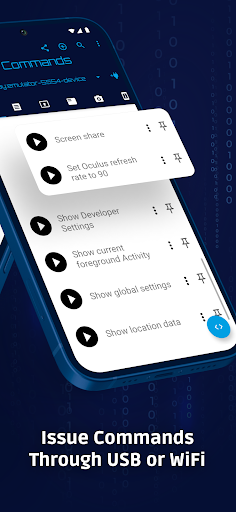
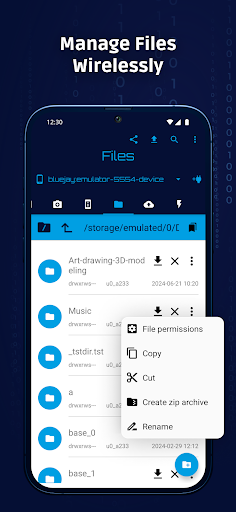
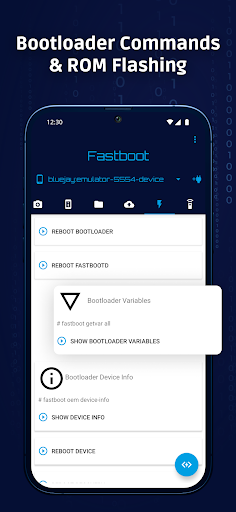
Bugjaeger® tries to give you the expert tools used by Android developers for better control and deep understanding of your Android device internals. If you're an Android power user, developer, geek, or hacker, this app might be something for you. How to use 1.) Enable developer options and USB debugging on your target device (https://developer.android.com/studio/debug/dev-options) 2.) Connect the device where you've installed this app to the target device via USB OTG cable 3.) Allow the app to access USB device and make sure the target device authorizes USB debugging I case you also have the free version installed, I suggest to uninstall the free version, so there are no conflicts when accessing ADB USB devices Please report technical issues or your new feature requests directly to my email address - [email protected] This app can be used by developers to debug Android apps or by Android enthusiast to learn more about the internals of their devices. You connect your target device through USB OTG cable or through wifi and you'll be able to play around with the device. This tool offers some features similar to adb(Android Debug Bridge) and Android Device Monitor, but instead of running on your development machine, it runs directly on your Android phone. Premium features (not included in free version) - no ads - unlimited number of custom commands - unlimited number of executed shell commands per session in interactive shell - option to change port when connecting to adb device through WiFi (instead of default 5555 port) - unlimited number of screenshots (only limited by amount of your free storage) - possibility to record the live screencast into video file - option to change file permissions After installing the premium version I recommend to uninstall the free version, so that there are no conflicts when handling connected ADB devices. Main features include - executing custom shell scripts - remote interactive shell - creating and restoring backups, inspecting and extracting content of backup files - reading, filtering, and exporting device logs - capturing screenshots - performing various commands for controlling your device (rebooting, going to bootloader, rotating screen, killing running apps) - uninstalling and installing packages, checking various details about installed apps - monitoring the processes, showing additional information related to processes, killing processes - connecting through wifi with specified port number - showing various details about the device's Android version, cpu, abi, display - showing battery details (like e.g., temperature, health, technology, voltage,..) - file management - pushing and pulling files from device, browsing the file system Requirements - If you want to connect the target device through USB cable, your phone has to support USB host - The target phone must enable USB debugging in Developer options and authorise the development device Please note This app uses the normal/official way of communicating…

What Bugjaeger® Premium Is Used For

Bugjaeger® Premium appears to be a tools app for working with Android devices through ADB-style connections. Based on the metadata, it is mainly used by developers and advanced users who want to inspect, control, and troubleshoot an Android phone or tablet directly from another Android device. The app runs on a phone and can connect over USB OTG or Wi‑Fi, which makes it more of a mobile debug utility than a general consumer app.

Common uses may include running shell commands, viewing logs, capturing screenshots, creating or restoring backups, and checking device internals. The listed permissions for network access, Wi‑Fi visibility, USB storage access, and preventing sleep fit that kind of remote device management and file-handling workflow. It also appears to support actions like rebooting and other device-control tasks, so it may be useful when a developer or power user needs hands-on access to a target Android device without using a desktop tool.

Common uses

  • Run ADB-like commands from an Android phone
  • Inspect logs and troubleshoot device behavior
  • Capture screenshots or screencasts of a connected device
  • Create, restore, and examine Android backups
  • Control a target device through USB OTG or Wi‑Fi
  • Manage files and device-related data during debugging
  • Explore Android internals as a power user or developer
Best for:
Android developers Power users Device debugging Phone-based control Tech enthusiasts

App Details

Package:
eu.sisik.hackendebug.full
Category:
Tools
Developer:
Roman Sisik
Version:
8.0-full
Updated:
Mar 21, 2026
Min Android:
7.0
Age Rating:
Everyone
Contains Ads:
No
In-App Purchases:
No

Official Listing

  • Official listing available on Google Play
  • Package name: eu.sisik.hackendebug.full
  • Age rating: Everyone

Explore More

Browse more apps in Tools or explore the Phone hub .

Related Tools Apps

ZUMIMALL icon

ZUMIMALL

Business Shenzhen Junan Technology Co., Ltd

Version 6.0.1 ⭐ 4.60 100,000+ installs
TopScan icon

TopScan

Tools TopDon HK
Version 6.20.004 ⭐ 3.10 100,000+ installs

How to Download Bugjaeger® Premium

If this app is not hosted directly on APKApps official link, then for the safest and most up-to-date version, install it from its official Google Play listing.