About High Brightness Mode
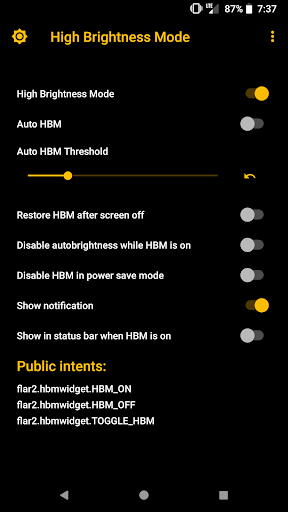
Can't see your screen in the bright sunshine? This app triggers an extra high brightness mode that is built in to many phones with AMOLED screens, including most Samsung, Motorola and OnePlus phones. See below for a list of devices with high brightness mode (HBM) capability. Even if your phone does not have the special HBM hardware setting, this app will force maximum screen brightness, which is really handy when you are outside in the sun. HBM does not require root on Samsung devices, but the screen can will be brighter if your device is rooted. With root, this app can force maximum brightness beyond what is available in system settings. HBM now requires root on OnePlus devices! HBM requires root on the Nexus 6/6P, Pixel, Pixel XL, Pixel 2 and Motorola phones. Root is required because HBM is a special hardware setting, it does NOT simply increase your brightness slider to max. This is significantly brighter than max brightness on compatible devices. Four ways to activate high brightness mode: -Auto mode, which turns high brightness mode on or off depending on ambient lighting -Widget for your homescreen -Quick Settings tile (Android Nougat or later) -Manually in the app Compatible devices: -Most Samsung phones, including Galaxy S6/S7/S8 and Note 6/7/8. Works without root on Samsung phones, but will get brighter on rooted devices -Most Motorola phones with AMOLED screens. Requires root. -Nexus 6. Requires root for HBM hardware setting -Nexus 6P, Pixel, Pixel XL, Pixel 2, Pixel 2XL, Pixel 3, Pixel 3XL, Pixel 3a, Pixel 3a XL: Requires a custom kernel such as ElementalX or Kirisakura and root. -OnePlus 3/3T/5/5T/6/6T/7: requires root On phones with the HBM hardware setting, this app can make your screen up to 20% brighter than the highest brightness setting. High Brightness Mode Widget uses a hidden hardware setting to unleash the full potential of your AMOLED screen. Auto mode will automatically turn high brightness mode on or off depending on the brightness (ambient light) of your surroundings. You can adjust the threshold for triggering high brightness mode and set auto mode using either the app, widget or quick settings tile. This app can maintain high brightness mode even if you turn your screen off and on (and even across reboots!) For Samsung and OnePlus phones, it is recommended to select the "Disable autobrightness when HBM is on" option if you use the system's auto brightness. This setting will prevent the system from turning off HBM if you enable it, but still allow you to use auto brightness the rest of the time. Tasker integration with these intents: flar2.hbmwidget.TOGGLE_HBM (this toggles high brightness mode) flar2.hbmwidget.HBM_ON (turns on high brightness mode) flar2.hbmwidget.HBM_OFF (turns off high brightness mode)
What High Brightness Mode Is Used For
High Brightness Mode appears to be a phone utility for making the display easier to see in strong sunlight or other bright conditions. Based on the metadata, it is designed for devices with AMOLED screens and, on supported models, may trigger a built-in high brightness mode that goes beyond the usual brightness slider. On phones without that hardware feature, it may still be used to force the screen to maximum brightness from within the app.
The app seems intended for users who often need better screen visibility outdoors or who want quick access to brightness control from a widget, Quick Settings tile, or auto mode. The auto feature may turn brightness mode on or off based on ambient light, while the system settings permission suggests it can adjust display brightness behavior. The startup permission implies it may remain available after reboot, which can be useful for users who rely on it regularly. Device support and root requirements vary by phone brand and model, so its practical use depends on the specific Android device.
Common uses
- Improve screen visibility in bright sunlight
- Trigger built-in high brightness mode on supported AMOLED phones
- Force maximum brightness on devices without HBM hardware
- Use a homescreen widget for quick access
- Toggle brightness from a Quick Settings tile
- Let auto mode respond to ambient light
- Keep brightness controls available after startup
App Details
Package:
flar2.hbmwidget
Developer:
flar2
Version:
6.02
Updated:
Aug 13, 2024
Min Android:
5.0
Age Rating:
Everyone
Contains Ads:
No
In-App Purchases:
No
Official Listing
-
Official listing available on
Google Play
-
Package name:
flar2.hbmwidget
-
Age rating:
Everyone
Related Tools Apps
Video Players & Editors
•
VicoTech
Version 2.91.5
⭐ 4.70
1,000,000+ installs
Business
•
Shenzhen Junan Technology Co., Ltd
Version 6.0.1
⭐ 4.60
100,000+ installs
Tools
•
Samsung Electronics Co., Ltd.
Smart Tutor is an easy, quick and safe means of consulting for Samsung devices
Version 1.5 (build 382)
16.8 MB
⭐ 4.51
100,000,000+ installs
How to Download High Brightness Mode
If this app is not hosted directly on APKApps official link,
then for the safest and most up-to-date version, install it from its official Google Play listing.