OBD 2: Torque Car Scanner FixD icon

Phone

OBD 2: Torque Car Scanner FixD

Auto & Vehicles GAM MOBILE APP ⭐ 4.10 10,000+
Version Varies with device Everyone

Screenshots

OBD 2: Torque Car Scanner FixD screenshot
Permissions Explained 10 permissions requested View details

This app requests 10 permissions. The table below explains what each permission may allow and what users should review before installing.

Status Permission What it means Why it may be used User safety note
ℹ️ Review Precise Location (gps And Network Based) precise location (GPS and network-based) This is an Android permission or app-specific permission requested by the app. The app may use this permission for features related to its category, device support, background behavior, storage, connectivity, or system integration. Review this permission before installing, especially if it does not match the app’s expected purpose.
ℹ️ Review View Wi Fi Connections view Wi-Fi connections This is an Android permission or app-specific permission requested by the app. The app may use this permission for features related to its category, device support, background behavior, storage, connectivity, or system integration. Review this permission before installing, especially if it does not match the app’s expected purpose.
ℹ️ Review View Network Connections view network connections This is an Android permission or app-specific permission requested by the app. The app may use this permission for features related to its category, device support, background behavior, storage, connectivity, or system integration. Review this permission before installing, especially if it does not match the app’s expected purpose.
ℹ️ Review Pair With Bluetooth Devices pair with Bluetooth devices This is an Android permission or app-specific permission requested by the app. The app may use this permission for features related to its category, device support, background behavior, storage, connectivity, or system integration. Review this permission before installing, especially if it does not match the app’s expected purpose.
ℹ️ Review Access Bluetooth Settings access Bluetooth settings This is an Android permission or app-specific permission requested by the app. The app may use this permission for features related to its category, device support, background behavior, storage, connectivity, or system integration. Review this permission before installing, especially if it does not match the app’s expected purpose.
ℹ️ Review Full Network Access full network access This is an Android permission or app-specific permission requested by the app. The app may use this permission for features related to its category, device support, background behavior, storage, connectivity, or system integration. Review this permission before installing, especially if it does not match the app’s expected purpose.
ℹ️ Review Control Vibration control vibration This is an Android permission or app-specific permission requested by the app. The app may use this permission for features related to its category, device support, background behavior, storage, connectivity, or system integration. Review this permission before installing, especially if it does not match the app’s expected purpose.
ℹ️ Review Prevent Device From Sleeping prevent device from sleeping This is an Android permission or app-specific permission requested by the app. The app may use this permission for features related to its category, device support, background behavior, storage, connectivity, or system integration. Review this permission before installing, especially if it does not match the app’s expected purpose.
ℹ️ Review Google Play License Check Google Play license check This is an Android permission or app-specific permission requested by the app. The app may use this permission for features related to its category, device support, background behavior, storage, connectivity, or system integration. Review this permission before installing, especially if it does not match the app’s expected purpose.
ℹ️ Review Receive Data From Internet receive data from Internet This is an Android permission or app-specific permission requested by the app. The app may use this permission for features related to its category, device support, background behavior, storage, connectivity, or system integration. Review this permission before installing, especially if it does not match the app’s expected purpose.

About OBD 2: Torque Car Scanner FixD

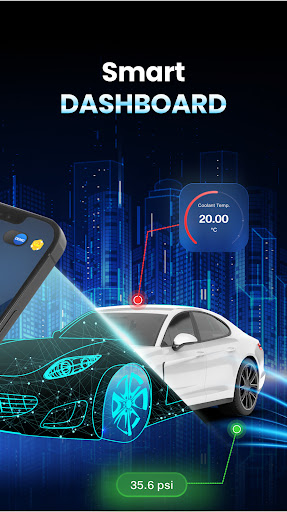
OBD 2 Car Scanner. Get to know your car better with an all-in-one diagnostics app designed for smarter driving. OBD 2 Car Scanner is a mobile application designed to help car owners diagnose and monitor their vehicle's internal systems. The app works with an OBD 2 scanner, which is a device that plugs into a car's OBD 2 port and communicates with the car's onboard computer system. The app is compatible with a range of OBD 2 scanners, including Bluetooth and WiFi enabled devices. The OBD 2 system is a standard diagnostic system that is found on all modern vehicles, and it allows car owners to access information about their vehicle's performance, such as engine speed, fuel consumption, and emissions. The OBD 2 system is used by mechanics to diagnose faults and problems with a car's internal systems, and the OBD 2 Car Scanner app brings this diagnostic capability to car owners. The app provides a range of features to help car owners diagnose and monitor their vehicle's internal systems. These features include: - Real-time data monitoring: The app provides real-time data monitoring of a range of performance metrics, including engine speed, coolant temperature, and fuel consumption. - Diagnostic trouble codes (DTC) reading and clearing: The app can read and clear diagnostic trouble codes, which are generated by the car's onboard computer system when it detects a fault or problem with one of the vehicle's systems. - Live data streaming: The app provides live data streaming of performance metrics, allowing car owners to monitor their vehicle's performance in real-time. - Vehicle performance tracking: The app allows car owners to track their vehicle's performance over time, including fuel consumption, engine speed, and other performance metrics. - Customizable dashboards: The app provides customizable dashboards, allowing car owners to display the performance metrics that are most important to them. - Repair manual database: The app provides access to a database of repair manuals, which can help car owners diagnose and fix problems with their vehicle. The app is compatible with a range of OBD 2 scanners, including popular models like FixD OBD, Bluedriver OBD, Torque OBD, Torque Pro, Veepeak OBD, ELM 327, OBD Doctor, OBD Fusion, and Carly OBD. The app is easy to use, with an intuitive interface that makes it easy to navigate and access the features that car owners need. Overall, the OBD 2 Car Scanner app is a powerful tool for car owners, allowing them to diagnose and monitor their vehicle's internal systems and stay on top of their vehicle's performance. With support for a range of OBD 2 scanners, the app provides flexibility and compatibility for a wide range of vehicles. Whether you're a car enthusiast or just looking to stay on top of your vehicle's maintenance, the OBD 2 Car Scanner app is a must-have tool for any car owner.

What OBD 2: Torque Car Scanner FixD Is Used For

OBD 2: Torque Car Scanner FixD appears to be a phone app for checking and monitoring a vehicle’s onboard diagnostics through an OBD2 scanner. Based on the metadata, it is commonly used by drivers and car owners who want to see live engine data, review performance information, and look up diagnostic trouble codes when a check-engine light or other issue appears.

The app’s described use case centers on connecting to a Bluetooth or Wi‑Fi OBD2 adapter that plugs into the car’s diagnostic port. With that connection, it may help users read and clear trouble codes, watch values such as engine speed or coolant temperature, and track some fuel or emissions-related data over time. The listed permissions like Bluetooth access, network access, and precise location suggest it is designed for connected scanning sessions and possibly nearby device discovery or vehicle-related features. It may also be useful for people comparing scanner compatibility or keeping a simple dashboard on their phone while they drive or inspect a vehicle.

Common uses

  • Connects to an OBD2 adapter for vehicle diagnostics
  • Reads and clears diagnostic trouble codes
  • Shows live engine and sensor data
  • Helps monitor fuel, temperature, and emissions-related values
  • Tracks vehicle performance data over time
  • Supports Bluetooth and Wi‑Fi scanner connections
  • Can be used on a phone during car checks or maintenance
Best for:
Car owners DIY vehicle checks Dashboard monitoring Bluetooth OBD2 users Phone app

App Details

Package:
gammapp.obdandroid.torque
Developer:
GAM MOBILE APP
Version:
Varies with device
Min Android:
Varies with device
Age Rating:
Everyone
Contains Ads:
Yes
In-App Purchases:
Yes

Official Listing

  • Official listing available on Google Play
  • Package name: gammapp.obdandroid.torque
  • Age rating: Everyone

Explore More

Browse more apps in Auto & Vehicles or explore the Phone hub .

Related Auto & Vehicles Apps

Infocar - OBD2 ELM Scanner icon

Infocar - OBD2 ELM Scanner

Auto & Vehicles Infocar Co., Ltd.

Infocar is a smart vehicle management app

Version 2.29.1 49.3 MB ⭐ 3.90 10,000,000+ installs
ZUMIMALL icon

ZUMIMALL

Business Shenzhen Junan Technology Co., Ltd

Version 6.0.1 ⭐ 4.60 100,000+ installs
TopScan icon

TopScan

Tools TopDon HK
Version 6.20.004 ⭐ 3.10 100,000+ installs

How to Download OBD 2: Torque Car Scanner FixD

If this app is not hosted directly on APKApps official link, then for the safest and most up-to-date version, install it from its official Google Play listing.