Hidden Camera Detector Gold icon

Phone

Hidden Camera Detector Gold

Tools FutureApps ⭐ 4.00 10,000+
Version 23 Everyone

Screenshots

Hidden Camera Detector Gold screenshot
Permissions Explained 11 permissions requested View details

This app requests 11 permissions. The table below explains what each permission may allow and what users should review before installing.

Status Permission What it means Why it may be used User safety note
ℹ️ Review Approximate Location (network Based) approximate location (network-based) This is an Android permission or app-specific permission requested by the app. The app may use this permission for features related to its category, device support, background behavior, storage, connectivity, or system integration. Review this permission before installing, especially if it does not match the app’s expected purpose.
ℹ️ Review Precise Location (gps And Network Based) precise location (GPS and network-based) This is an Android permission or app-specific permission requested by the app. The app may use this permission for features related to its category, device support, background behavior, storage, connectivity, or system integration. Review this permission before installing, especially if it does not match the app’s expected purpose.
ℹ️ Review Take Pictures And Videos take pictures and videos This is an Android permission or app-specific permission requested by the app. The app may use this permission for features related to its category, device support, background behavior, storage, connectivity, or system integration. Review this permission before installing, especially if it does not match the app’s expected purpose.
ℹ️ Review View Wi Fi Connections view Wi-Fi connections This is an Android permission or app-specific permission requested by the app. The app may use this permission for features related to its category, device support, background behavior, storage, connectivity, or system integration. Review this permission before installing, especially if it does not match the app’s expected purpose.
ℹ️ Review View Network Connections view network connections This is an Android permission or app-specific permission requested by the app. The app may use this permission for features related to its category, device support, background behavior, storage, connectivity, or system integration. Review this permission before installing, especially if it does not match the app’s expected purpose.
ℹ️ Review Pair With Bluetooth Devices pair with Bluetooth devices This is an Android permission or app-specific permission requested by the app. The app may use this permission for features related to its category, device support, background behavior, storage, connectivity, or system integration. Review this permission before installing, especially if it does not match the app’s expected purpose.
ℹ️ Review Access Bluetooth Settings access Bluetooth settings This is an Android permission or app-specific permission requested by the app. The app may use this permission for features related to its category, device support, background behavior, storage, connectivity, or system integration. Review this permission before installing, especially if it does not match the app’s expected purpose.
ℹ️ Review Connect And Disconnect From Wi Fi connect and disconnect from Wi-Fi This is an Android permission or app-specific permission requested by the app. The app may use this permission for features related to its category, device support, background behavior, storage, connectivity, or system integration. Review this permission before installing, especially if it does not match the app’s expected purpose.
ℹ️ Review Full Network Access full network access This is an Android permission or app-specific permission requested by the app. The app may use this permission for features related to its category, device support, background behavior, storage, connectivity, or system integration. Review this permission before installing, especially if it does not match the app’s expected purpose.
ℹ️ Review Prevent Device From Sleeping prevent device from sleeping This is an Android permission or app-specific permission requested by the app. The app may use this permission for features related to its category, device support, background behavior, storage, connectivity, or system integration. Review this permission before installing, especially if it does not match the app’s expected purpose.
ℹ️ Review Google Play License Check Google Play license check This is an Android permission or app-specific permission requested by the app. The app may use this permission for features related to its category, device support, background behavior, storage, connectivity, or system integration. Review this permission before installing, especially if it does not match the app’s expected purpose.

About Hidden Camera Detector Gold

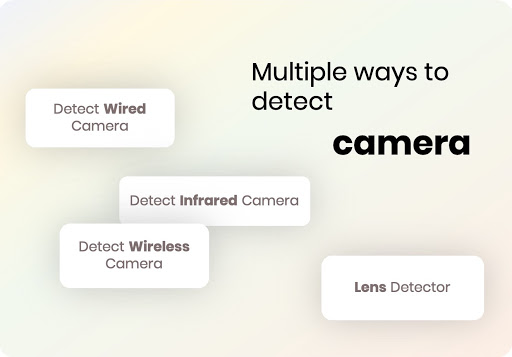
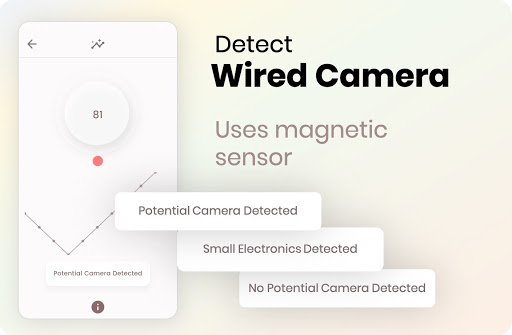
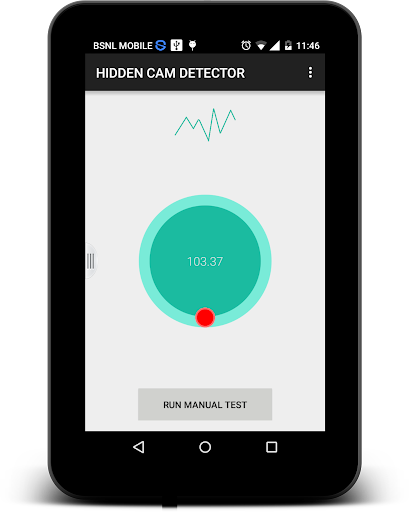
* Get app for iphone & ipad from itunes - https://goo.gl/xWHE15 .visit https://www.futureapps.site for privacy policy and more apps * * Our response via comments goes to update section of your gmail app* Magnetometer feature need to have magnetic sensor in your phone, other wise this feature will not work. How to use this app. How to find camera ? Move app near to any device that you have doubt. For example - shower, flowerpot, lens looking part or changing room mirror. This app analyse the magnetic activity around the device. If magnetic activity seems similar to that of camera, this app will beep and raise alarm for you so that you can further investigate. You have to move app facing your sensor towards the object.To know sensor position of your phone, have any camera and move nearby top of your phone and bottom of your phone. When it beeps, you find the sensor position Infrared camera detector - This app has one more tool which is detect infrared lights.Just open the infrared detector and scan for white light that appear on screen but not visible by naked eye. Such white light indicate infrared light.It could be infrared camera. Your normal cam can also detect it but what we have is inbuilt feature with luminescence effect. What less, get some easy techniques that can save you from potential exposure to hidden camera. You can share the location with friends easily if you find the camera so that they can take precaution when they visit this place. If app crashes, for Infrared detector, please close other camera apps and try again. Do rate us and for any issues write to [email protected] FAQ My phone does not have magnetic sensor - This app analyse magnetic activity based on readings from magnetic sensor of your android device. If this sensor is not available, you can only use infrared detector feature. Other way is you can try on some other device having magnetic sensor. App beeps near metal or electronics - This app is not designed to detect metals. Metals are good conductor for electricity so they have electromagnetism but it is very weak and app is designed to ignore it. But sometimes, some type of metals depending on their length, material, temperature may exhibit same magnetic activity as that of camera. In that case app may beep. If so always look for lens on the suspect if app beeps. What do I do if it beeps near metal - Check if there is any lens on the suspect. If not, then you are secure. if you find lens like object, then there should be hidden camera. Infrared detector is just a fancy green tool of normal camera. Normal camera can also detect infrared You are partially-correct. Along with this, infrared detector have luminescence effect to glow white light. If you feel better with normal camera, go for it. We never claimed something false. But please give credit to the app if you never knew IR camera can be detected using digicam. And off course, its a quick scanning feature within the app. App does not open Infrared camera…

What Hidden Camera Detector Gold Is Used For

Hidden Camera Detector Gold appears to be a phone tool for checking nearby objects or spaces for signs that may indicate a hidden camera. Based on the metadata, it uses the phone’s magnetic sensor to look for magnetic activity around an object, and it also includes an infrared-light detection mode. That means people may use it when inspecting places like changing rooms, guest rooms, bathrooms, or other unfamiliar spaces where they want to look for suspicious devices.

The app may be most relevant on Android phones that include a magnetic sensor, since the metadata notes that this feature will not work without one. If the sensor is unavailable, the infrared detector still appears to be usable. The listed permissions suggest it can access the camera, network connections, Bluetooth settings, and location services, which may support its detection tools and related app functions. It is generally positioned as a quick-check utility rather than a detailed security scanner.

Common use cases based on the metadata include scanning close to an object to see whether the app reacts with beeps or alerts, checking for white-light reflections that may suggest infrared light, and sharing a suspected location with others if needed. It may also be used to identify the phone’s sensor position before scanning.

Common uses

  • Check a room or object for signs that may point to a hidden camera
  • Use the magnetic sensor mode on compatible Android phones
  • Try the infrared detector when the magnetic sensor is unavailable
  • Scan for white light that may suggest infrared activity
  • Identify the phone’s sensor position before testing
  • Share a location with others if you want them to inspect the area too
Best for:
Phone users Quick inspections Sensor-based tools Privacy checks Android devices

App Details

Package:
hiddencamdetector.futureapps.com.hiddencamdetectoradsfree
Category:
Tools
Developer:
FutureApps
Version:
23
Updated:
Aug 27, 2025
Min Android:
5.0
Age Rating:
Everyone
Contains Ads:
No
In-App Purchases:
No

Official Listing

  • Official listing available on Google Play
  • Package name: hiddencamdetector.futureapps.com.hiddencamdetectoradsfree
  • Age rating: Everyone

Explore More

Browse more apps in Tools or explore the Phone hub .

Related Tools Apps

IPC360 Home icon

IPC360 Home

Video Players & Editors Puwell Technology Inc
Version 8.10.1.0 ⭐ 2.80 1,000,000+ installs
ieGeek Cam icon

ieGeek Cam

Tools SHENZHEN GLOBALEBUY CO., LTD.
Version 6.0.0 ⭐ 4.50 1,000,000+ installs
ZUMIMALL icon

ZUMIMALL

Business Shenzhen Junan Technology Co., Ltd

Version 6.0.1 ⭐ 4.60 100,000+ installs
Dzees Home icon

Dzees Home

Tools yuanxi creation tech
Version 2.0.10 ⭐ 4.50 100,000+ installs

How to Download Hidden Camera Detector Gold

If this app is not hosted directly on APKApps official link, then for the safest and most up-to-date version, install it from its official Google Play listing.