About aShell - Your Local ADB Shell
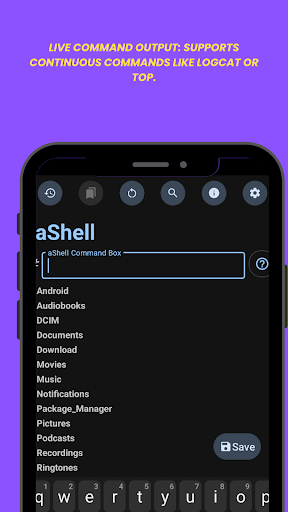
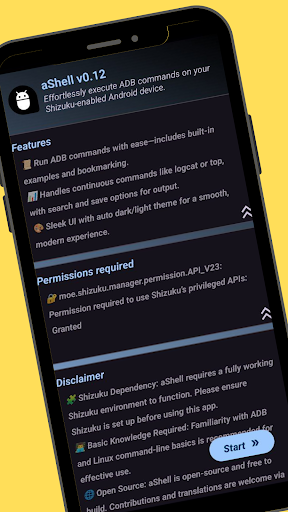
📌 Important Notes 📱 Shizuku Dependency: aShell requires a fully functional Shizuku environment. If you're unfamiliar with Shizuku or prefer not to use it, this app may not be suitable for you (Learn more at: shizuku.rikka.app). 🧠 Basic ADB Knowledge Recommended: While aShell includes examples of common ADB commands, some familiarity with ADB/Linux command-line operations will enhance your experience. 🖥️ Introduction aShell is a lightweight, open-source ADB shell designed for Android devices running Shizuku. It enables you to execute ADB commands directly from your phone, eliminating the need for a PC. Ideal for developers, power users, and enthusiasts seeking full control over their device's internals. ⚙️ Key Features 🧑💻 Run ADB Commands Locally: Execute ADB commands right from your phone using Shizuku. 📂 Preloaded Command Examples: Handy examples to help you get started fast. 🔄 Live Command Output: Supports continuous commands like logcat or top. 🔍 Search Within Output: Easily find what you're looking for in command results. 💾 Save Output to File: Export outputs to .txt for reference or sharing. 🌙 Dark/Light Mode Support: Automatically adapts to your system theme. ⭐ Bookmark Your Commands: Save frequently used commands for quick access. 🔗 Additional Resources 🔗 Source Code: https://gitlab.com/sunilpaulmathew/ashell 🐞 Issue Tracker: https://gitlab.com/sunilpaulmathew/ashell/-/issues 🌍 Translations: https://poeditor.com/join/project/20PSoEAgfX ➡️ Learn Shizuku: https://shizuku.rikka.app/ 🛠️ Build It Yourself Don’t want to purchase aShell? Build it yourself! The full source code is available at GitLab: https://gitlab.com/sunilpaulmathew/ashell
What aShell - Your Local ADB Shell Is Used For
aShell appears to be a phone-based ADB shell tool for Android users who want to run shell commands locally on their device through Shizuku. Based on the metadata, it is aimed at people who already have some familiarity with ADB or Linux-style command-line tasks and want to manage or inspect device behavior without using a computer. This makes it especially relevant for developers, power users, and anyone who regularly works with device internals.
Common uses may include running ADB commands, checking live command output, and searching through results for specific text. The app also appears to support bookmarking commands and saving output to a file, which can be useful for repeating workflows or keeping logs. The listed storage permissions suggest it may read and write files on USB storage, likely to support saving command output or handling exported text files. Because it depends on Shizuku, it is best suited for users who already have that environment set up.
Common uses
- Run ADB commands directly from an Android phone
- View live output from ongoing commands like logs or system monitoring
- Search within command results to find specific lines or values
- Bookmark frequently used commands for quicker access
- Save command output to a text file for later review
- Use preloaded command examples as starting points
- Work with exported files through device storage permissions
App Details
Package:
in.sunilpaulmathew.ashell
Developer:
sunilpaulmathew
Version:
v0.25
Updated:
Mar 30, 2026
Min Android:
7.0
Age Rating:
Everyone
Contains Ads:
No
In-App Purchases:
No
Official Listing
-
Official listing available on
Google Play
-
Package name:
in.sunilpaulmathew.ashell
-
Age rating:
Everyone
Related Tools Apps
Tools
•
F-Secure Corporation
Antivirus, Virus Cleaner & Malware Scan | Mobile Security & Hacker Protection
Version 10.57-ff32089
17.9 MB
⭐ 4.20
100,000,000+ installs
How to Download aShell - Your Local ADB Shell
If this app is not hosted directly on APKApps official link,
then for the safest and most up-to-date version, install it from its official Google Play listing.