Bluetooth Keyboard & Mouse Pro icon

Phone

Bluetooth Keyboard & Mouse Pro

Tools Appground IO ⭐ 4.50 10,000+
Version 6.19.0 Everyone

Screenshots

Bluetooth Keyboard & Mouse Pro screenshot
Permissions Explained 10 permissions requested View details

This app requests 10 permissions. The table below explains what each permission may allow and what users should review before installing.

Status Permission What it means Why it may be used User safety note
ℹ️ Review View Wi Fi Connections view Wi-Fi connections This is an Android permission or app-specific permission requested by the app. The app may use this permission for features related to its category, device support, background behavior, storage, connectivity, or system integration. Review this permission before installing, especially if it does not match the app’s expected purpose.
ℹ️ Review View Network Connections view network connections This is an Android permission or app-specific permission requested by the app. The app may use this permission for features related to its category, device support, background behavior, storage, connectivity, or system integration. Review this permission before installing, especially if it does not match the app’s expected purpose.
ℹ️ Review Pair With Bluetooth Devices pair with Bluetooth devices This is an Android permission or app-specific permission requested by the app. The app may use this permission for features related to its category, device support, background behavior, storage, connectivity, or system integration. Review this permission before installing, especially if it does not match the app’s expected purpose.
ℹ️ Review Access Bluetooth Settings access Bluetooth settings This is an Android permission or app-specific permission requested by the app. The app may use this permission for features related to its category, device support, background behavior, storage, connectivity, or system integration. Review this permission before installing, especially if it does not match the app’s expected purpose.
ℹ️ Review Expand/collapse Status Bar expand/collapse status bar This is an Android permission or app-specific permission requested by the app. The app may use this permission for features related to its category, device support, background behavior, storage, connectivity, or system integration. Review this permission before installing, especially if it does not match the app’s expected purpose.
ℹ️ Review Full Network Access full network access This is an Android permission or app-specific permission requested by the app. The app may use this permission for features related to its category, device support, background behavior, storage, connectivity, or system integration. Review this permission before installing, especially if it does not match the app’s expected purpose.
ℹ️ Review Control Vibration control vibration This is an Android permission or app-specific permission requested by the app. The app may use this permission for features related to its category, device support, background behavior, storage, connectivity, or system integration. Review this permission before installing, especially if it does not match the app’s expected purpose.
ℹ️ Review Prevent Device From Sleeping prevent device from sleeping This is an Android permission or app-specific permission requested by the app. The app may use this permission for features related to its category, device support, background behavior, storage, connectivity, or system integration. Review this permission before installing, especially if it does not match the app’s expected purpose.
ℹ️ Review Google Play License Check Google Play license check This is an Android permission or app-specific permission requested by the app. The app may use this permission for features related to its category, device support, background behavior, storage, connectivity, or system integration. Review this permission before installing, especially if it does not match the app’s expected purpose.
ℹ️ Review Receive Data From Internet receive data from Internet This is an Android permission or app-specific permission requested by the app. The app may use this permission for features related to its category, device support, background behavior, storage, connectivity, or system integration. Review this permission before installing, especially if it does not match the app’s expected purpose.

About Bluetooth Keyboard & Mouse Pro

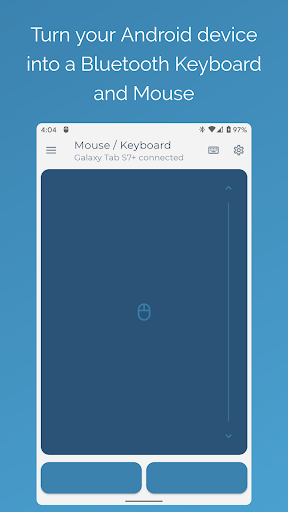
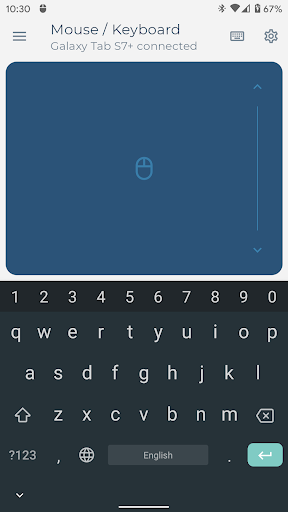
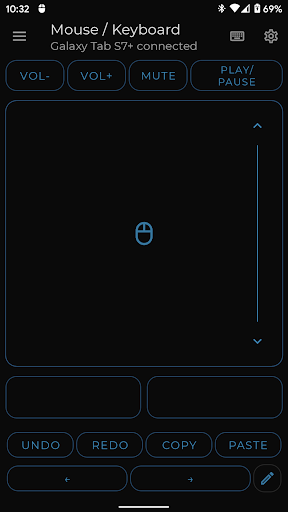
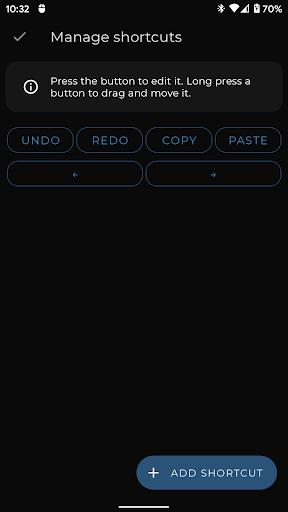
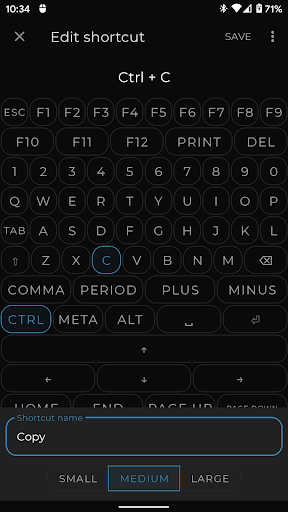
Elevate your workflow with the most powerful and secure Bluetooth remote control for your devices. Turn your Android phone into a serverless keyboard, mouse, and presentation tool—no additional software needed. Seamlessly control your computer, tablet, or media center with unparalleled versatility. Our direct Bluetooth connection ensures instant response and requires no server software, keeping your connection private and secure. Your Professional Toolkit Includes: • Precision Control: A highly responsive keyboard, mouse, and multi-touch trackpad with intuitive scrolling. • Keep-Alive / Jiggler Mode: Prevent your computer from sleeping or locking. Keep your status active on communication platforms during long tasks or when working remotely.* • Full PC Keyboard: Type efficiently with a standard layout and switch instantly between over 100 international language layouts.* • Presenter Mode: Command your presentations with confidence. Navigate slides, control your pointer, and engage your audience from anywhere in the room.* • Multimedia Control: Effortlessly manage playback, volume, and navigation for media players and streaming services.* • Integrated Scanner: Scan QR codes and barcodes directly to your connected device, streamlining data entry and inventory tasks.* • Voice & Clipboard Sync: Use voice-to-text for quick input or send copied text from your phone to your computer in a single tap.* • Custom Layouts: Engineer the perfect remote interface. Build custom controls tailored to your specific software, applications, or games. * Pro Feature Universal Compatibility: The receiving device requires only a standard Bluetooth connection. Tested and verified on the following operating systems: • Windows 8.1 and higher • Apple iOS and iPad OS • Android and Android TV • Chromebook Chrome OS • Steam Deck Support & Feedback: Have a feature request or require assistance? Join our developer and community-led Discord channel for professional support. https://appground.io/discord

What Bluetooth Keyboard & Mouse Pro Is Used For

Bluetooth Keyboard & Mouse Pro appears to be a remote-control utility for turning an Android phone into a Bluetooth keyboard, mouse, trackpad, and presentation controller. Based on the metadata, it is commonly used when you want to type on, navigate, or present from another device without installing extra server software on that device. The app seems aimed at computers, tablets, media centers, and similar Bluetooth-capable hardware, making it useful in office, home, or classroom setups.

The listed features suggest practical use cases such as controlling slides during a presentation, moving the pointer with a touchpad, entering text with a full keyboard layout, and managing media playback or volume. It also includes keep-alive/jiggler functions, which may help prevent a connected computer from sleeping during long work sessions, and scanning or clipboard features that could support quick data entry. Permissions like Bluetooth access, network access, and preventing sleep are consistent with an app that manages nearby device connections and remote input.

Because it is a phone app with Bluetooth-based control, it may be most relevant for people who regularly switch between devices or need a portable input tool for travel, meetings, or media setups. The metadata also indicates support for multiple platforms, including Windows, Android/Android TV, Chrome OS, iOS/iPadOS, and Steam Deck.

Common uses

  • Use your phone as a Bluetooth keyboard for typing on another device
  • Control a cursor or trackpad on a computer, tablet, or media center
  • Advance slides and manage a presentation from across the room
  • Adjust media playback, navigation, and volume on connected devices
  • Keep a device awake or active during long sessions
  • Send copied text or use voice input for faster text entry
  • Connect to Bluetooth-capable devices without extra server software
Best for:
Remote input Presentations Media control Work setup Travel use

App Details

Package:
io.appground.blekpremium
Category:
Tools
Developer:
Appground IO
Version:
6.19.0
Updated:
Feb 10, 2026
Min Android:
6.0
Age Rating:
Everyone
Contains Ads:
No
In-App Purchases:
No

Official Listing

  • Official listing available on Google Play
  • Package name: io.appground.blekpremium
  • Age rating: Everyone

Explore More

Browse more apps in Tools or explore the Phone hub .

Related Tools Apps

Bose Connect icon

Bose Connect

Music & Audio Bose Corporation

Bose Connect unlocks the full potential of your Bose Bluetooth® Product.

Version 21.0 49.8 MB ⭐ 4.21 10,000,000+ installs
VNC Viewer icon

VNC Viewer

Productivity RealVNC Limited

Remotely control a desktop anywhere in the world from your Android device!

Version 1.2.6.109857 4.6 MB ⭐ 4.00 5,000,000+ installs

How to Download Bluetooth Keyboard & Mouse Pro

If this app is not hosted directly on APKApps official link, then for the safest and most up-to-date version, install it from its official Google Play listing.