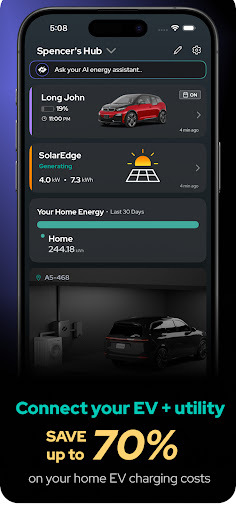
NeoCharge: Home EV Charging icon

Phone

NeoCharge: Home EV Charging

Auto & Vehicles NeoCharge Inc. ⭐ 4.10 5,000+
Version 1.2026.850 Everyone

Screenshots

NeoCharge: Home EV Charging screenshot
Permissions Explained 16 permissions requested View details

This app requests 16 permissions. The table below explains what each permission may allow and what users should review before installing.

Status Permission What it means Why it may be used User safety note
ℹ️ Review Approximate Location (network Based) approximate location (network-based) This is an Android permission or app-specific permission requested by the app. The app may use this permission for features related to its category, device support, background behavior, storage, connectivity, or system integration. Review this permission before installing, especially if it does not match the app’s expected purpose.
ℹ️ Review Precise Location (gps And Network Based) precise location (GPS and network-based) This is an Android permission or app-specific permission requested by the app. The app may use this permission for features related to its category, device support, background behavior, storage, connectivity, or system integration. Review this permission before installing, especially if it does not match the app’s expected purpose.
ℹ️ Review Read The Contents Of Your Usb Storage read the contents of your USB storage This is an Android permission or app-specific permission requested by the app. The app may use this permission for features related to its category, device support, background behavior, storage, connectivity, or system integration. Review this permission before installing, especially if it does not match the app’s expected purpose.
ℹ️ Review Modify Or Delete The Contents Of Your Usb Storage modify or delete the contents of your USB storage This is an Android permission or app-specific permission requested by the app. The app may use this permission for features related to its category, device support, background behavior, storage, connectivity, or system integration. Review this permission before installing, especially if it does not match the app’s expected purpose.
ℹ️ Review Take Pictures And Videos take pictures and videos This is an Android permission or app-specific permission requested by the app. The app may use this permission for features related to its category, device support, background behavior, storage, connectivity, or system integration. Review this permission before installing, especially if it does not match the app’s expected purpose.
ℹ️ Review View Wi Fi Connections view Wi-Fi connections This is an Android permission or app-specific permission requested by the app. The app may use this permission for features related to its category, device support, background behavior, storage, connectivity, or system integration. Review this permission before installing, especially if it does not match the app’s expected purpose.
ℹ️ Review View Network Connections view network connections This is an Android permission or app-specific permission requested by the app. The app may use this permission for features related to its category, device support, background behavior, storage, connectivity, or system integration. Review this permission before installing, especially if it does not match the app’s expected purpose.
ℹ️ Review Pair With Bluetooth Devices pair with Bluetooth devices This is an Android permission or app-specific permission requested by the app. The app may use this permission for features related to its category, device support, background behavior, storage, connectivity, or system integration. Review this permission before installing, especially if it does not match the app’s expected purpose.
ℹ️ Review Access Bluetooth Settings access Bluetooth settings This is an Android permission or app-specific permission requested by the app. The app may use this permission for features related to its category, device support, background behavior, storage, connectivity, or system integration. Review this permission before installing, especially if it does not match the app’s expected purpose.
ℹ️ Review Change Network Connectivity change network connectivity This is an Android permission or app-specific permission requested by the app. The app may use this permission for features related to its category, device support, background behavior, storage, connectivity, or system integration. Review this permission before installing, especially if it does not match the app’s expected purpose.
ℹ️ Review Full Network Access full network access This is an Android permission or app-specific permission requested by the app. The app may use this permission for features related to its category, device support, background behavior, storage, connectivity, or system integration. Review this permission before installing, especially if it does not match the app’s expected purpose.
ℹ️ Review Run At Startup run at startup This is an Android permission or app-specific permission requested by the app. The app may use this permission for features related to its category, device support, background behavior, storage, connectivity, or system integration. Review this permission before installing, especially if it does not match the app’s expected purpose.
ℹ️ Review Draw Over Other Apps draw over other apps This is an Android permission or app-specific permission requested by the app. The app may use this permission for features related to its category, device support, background behavior, storage, connectivity, or system integration. Review this permission before installing, especially if it does not match the app’s expected purpose.
ℹ️ Review Control Vibration control vibration This is an Android permission or app-specific permission requested by the app. The app may use this permission for features related to its category, device support, background behavior, storage, connectivity, or system integration. Review this permission before installing, especially if it does not match the app’s expected purpose.
ℹ️ Review Prevent Device From Sleeping prevent device from sleeping This is an Android permission or app-specific permission requested by the app. The app may use this permission for features related to its category, device support, background behavior, storage, connectivity, or system integration. Review this permission before installing, especially if it does not match the app’s expected purpose.
ℹ️ Review Receive Data From Internet receive data from Internet This is an Android permission or app-specific permission requested by the app. The app may use this permission for features related to its category, device support, background behavior, storage, connectivity, or system integration. Review this permission before installing, especially if it does not match the app’s expected purpose.

About NeoCharge: Home EV Charging

Stop wasting money on EV charging guesswork. NeoCharge delivers precision cost tracking and professional energy monitoring that saves homeowners up to 70% on charging costs. Unlike basic scheduling apps, get real-time power flow data, multi-vehicle management, and Smart Splitter integration for complete home energy control. Works with Tesla, Ford, BMW, and 90% of EV brands and most solar inverters* - all Smart Splitter energy features are free. SMART SAVINGS - Automate charging for the cheapest times, save up to 70% on energy costs - Customize your schedules for each day of week for max savings - Support for all utility rate plans and custom rates - Instant "Charge Now" override when needed TRACK - Monitor exact charging costs per session and over time - Detailed cost and usage reports and graphs - Multi-vehicle, appliance, EV charger, and/or device monitoring - Export your energy data anytime SMART POWER MANAGEMENT - Monitor your EV and/or appliances cost in real-time - Power sharing for dual Tesla owners. Split amperage 50/50 - Smart automatic power switching with the Smart Splitter - Instant EV and appliance push notifications - Historical energy usage tracking OPTIMIZE - Set your start at and finish by charging times and start saving - Reduce your carbon emissions by charging during times of higher clean energy or synced with your solar - Understand your utility bill savings and gas savings in real time CONNECT - Works with 90%+ of North American EVs and Wallbox Level 2 chargers - No additional hardware needed - Connect your solar inverter, Level 2 charger, or EV in minutes - Bank-grade security protection *Supported Vehicles/Devices: NeoCharge works with most North American electric vehicles, including Tesla, BMW, Volkswagen, Ford, Porsche, Mercedes, Jaguar, Lexus, Mini, Volvo, Nissan, and more. Note: Some features (like scheduling) are limited for certain vehicles, including Rivian. The NeoCharge app works with the top Solar Inverter brands, including Enphase, Tesla, and SolarEdge, as well as Level 2 Smart EV Chargers such as Wallbox Pulsar Plus. The NeoCharge Difference: - No hardware required to start saving - Perfect integration with Smart Splitter for real-time energy tracking, avoid panel upgrades - Weekly feature updates and improvements - Instant in-app support - just shake your phone Already using the NeoCharge app? We’d love to hear from you! Please reach out to us by shaking your phone in app or email us at [email protected]. Download now and join tens of thousands of EV owners optimizing their EV charging with NeoCharge. No credit card or hardware required to begin saving. Support: Questions or feedback? Shake your phone in-app or email [email protected] for instant assistance. For the latest updates and tips, follow us on: Facebook: https://www.facebook.com/NeoCharge/ LinkedIn: https://www.linkedin.com/company/neocharge Instagram: https://www.instagram.com/neocharge/

What NeoCharge: Home EV Charging Is Used For

NeoCharge: Home EV Charging appears to be a companion app for managing home EV charging and related energy use from an Android phone. Based on the metadata, it is meant to help homeowners monitor charging sessions, estimate or track electricity costs, and adjust charging times around cheaper utility rates or solar availability. It also seems focused on energy monitoring for a wider home setup, not just the vehicle itself.

The app may be especially useful for people who charge at home with a Level 2 charger, use a Smart Splitter setup, or want to watch power usage across more than one EV or appliance. The listed permissions suggest it can connect to Bluetooth devices, access network data, keep background activity running, and show information over other apps, which fits an app that monitors connected charging hardware and sends notifications. Based on the metadata, it also appears to support exporting usage data and viewing historical reports and graphs for longer-term tracking.

Common uses

  • Track charging cost per session and over time
  • Schedule charging for cheaper utility periods
  • Monitor real-time power flow and energy usage
  • Manage more than one vehicle or device
  • Use with supported EV chargers or solar inverters
  • Receive alerts and charging notifications
  • Review usage history, reports, and exports
Best for:
EV owners Home charging Energy tracking Solar users Phone app

App Details

Package:
io.neocharge.neoconnect
Developer:
NeoCharge Inc.
Version:
1.2026.850
Updated:
Mar 23, 2026
Min Android:
7.0
Age Rating:
Everyone
Contains Ads:
No
In-App Purchases:
Yes

Official Listing

  • Official listing available on Google Play
  • Package name: io.neocharge.neoconnect
  • Age rating: Everyone

Explore More

Browse more apps in Auto & Vehicles or explore the Phone hub .

Related Auto & Vehicles Apps

Car Scanner ELM OBD2 icon

Car Scanner ELM OBD2

Auto & Vehicles CAR SCANNER LLC

Trip computer+car diagnostic tool with widest variety of features and dashboard!

Version 2.1.3 77.2 MB ⭐ 4.70 10,000,000+ installs
Radar GO-X: HUD, GPS, Maps icon

Radar GO-X: HUD, GPS, Maps

Auto & Vehicles Appwest Limited

Find radar, speed camera, flight tracker. Use hud, location tracker, speedometer

Version 5.37.2 55.7 MB ⭐ 4.10 10,000,000+ installs
Infocar - OBD2 ELM Scanner icon

Infocar - OBD2 ELM Scanner

Auto & Vehicles Infocar Co., Ltd.

Infocar is a smart vehicle management app

Version 2.29.1 49.3 MB ⭐ 3.90 10,000,000+ installs
OBD2 Car Scanner - EOBD Facile icon

OBD2 Car Scanner - EOBD Facile

Auto & Vehicles Outils OBD Facile

Measure Torque and be your own mechanic with an ELM 327 OBD2 car code reader.

Version 3.84.1158 45.5 MB ⭐ 4.30 5,000,000+ installs
Fuelio: gas log & gas prices icon

Fuelio: gas log & gas prices

Auto & Vehicles Sygic.

Car management, gas prices, consumption, expenses, mileage log, GPS tracker

Version 9.20.1 21.0 MB ⭐ 4.30 5,000,000+ installs

How to Download NeoCharge: Home EV Charging

If this app is not hosted directly on APKApps official link, then for the safest and most up-to-date version, install it from its official Google Play listing.