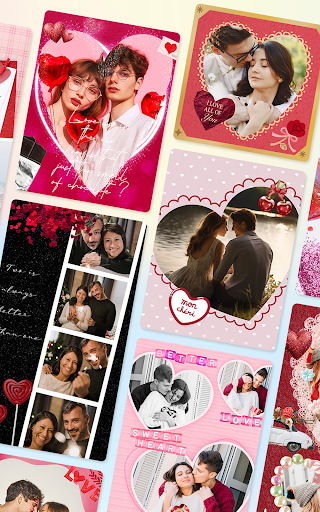
About Collage Maker & Photo Editor
FotoCollage Photo Editor is a powerful and easy-to-use photo collage maker and photo editing app. Just select some images you love and easily arrange them in a perfect layout. Add a variety of backgrounds, text, stickers, and frames to create unique and awesome collages of your own. FotoCollage will be your favorite Photo Editor. Key Features: ● Combine photos with amazing layouts into beautiful collages ● Remix up to 100 photos to create stunning layouts and collages ● Change the photo layout, including rounded corners ● Photo editing tools, allowing you to adjust sharpness and shadow ● Create various kinds of backgrounds for your photos, such as blur ● 37 unique photo effects for making a distinctive photo collage ● Stickers, tags, emojis, texts, tens of photo borders and frames ● Rotate, mirror, flip images, drag or swap them, pinch to zoom in or out ● Add emojis and tags to make your photos more stylish ● Transform your pics into art with perfect filters, effects, and photo editing tools ⭐ 500+ layouts There are over 100 popular design templates in the fascinating pic collage tool. With these templates, you can mix up to 100 images, flexibly create collaged photos, and make a shaped collage, such as a heart or diamond. Show your style with your attractive collages! ⭐ Text You can enjoy a range of features, including font sizes, colors, gradients, outlines, shadows, spacing, and background edition in a free manner. Insert words anywhere in the collage to record your wonderful mood, share your experience, and make the collaged photos look even better. ⭐ Emoji Stickers Choose from over 500 funny stickers that can lend a festive touch to your photos. They are regularly updated to stay on trend. Besides, there are a variety of amazing makeup stickers, such as neon, muscle, wing, hair and more. Try adding emojis or makeup stickers to your collage, and see how it can enhance your creation. ⭐ Background & Pattern You can choose a wide range of cute patterns as backgrounds, such as love, dot, xoxo, texture, and more. You can adjust their opacity, space, size, and angle. Subvert the traditional dull and boring styles with lively backgrounds that make your photos look more sophisticated. You can also add solid color, blur, and gradient color backgrounds to make your collage even more elegant. ⭐ Filter with Advanced Looks Photo Filter can revolutionize your photos with just one tap. Lots of great filter effects can make people, pets, and food in your pics look perfect. You can also adjust the details of brightness, contrast, and warmth. Try out our filters and see how they can enhance your photos. ⭐ Graffiti Brush Enjoy FotoCollage with our cool customizable brushes. Doodle on pictures with many different brush types and get surprising effects, including enriched colors and adjustable strokes, such as patterns, solid lines, dotted lines, fluorescent brushes, and decorative brushes. With FotoCollage photo editor, create your perfect photo collage with a…
What Collage Maker & Photo Editor Is Used For
Collage Maker & Photo Editor appears to be a phone app for combining photos into collages and making basic image edits. Based on the metadata, it is commonly used when someone wants to arrange multiple pictures into one layout, add text or stickers, and apply effects or frames before sharing or saving the result.
The app’s photography category and features suggest it may fit everyday personal editing tasks, such as making memory collages, event recaps, mood boards, or styled social posts. It also mentions layout tools, filters, background options, and image adjustments like rotation and flipping, so it seems aimed at users who want a simple all-in-one collage workflow rather than a full professional editor.
Its permissions indicate access to storage for reading and saving images, plus network access, which may relate to ads, content loading, or in-app services. Since it is designed for phones, it seems best suited for quick editing on a mobile device, especially when working with photos already stored on the device.
Common uses
- Combine multiple photos into a single collage layout
- Add text, stickers, emojis, borders, and frames
- Adjust image position, rotation, mirroring, and zoom
- Apply filters, effects, and simple photo edits
- Create themed collages for memories, posts, or sharing
- Save edited images from your device storage
- Use on a phone for quick mobile photo editing
App Details
Package:
mobi.charmer.fotocollage
Developer:
Pic Collage Maker & Photo Editor
Version:
9.3.1.1
Updated:
Mar 22, 2026
Min Android:
7.0
Age Rating:
Everyone
Contains Ads:
Yes
In-App Purchases:
Yes
Official Listing
-
Official listing available on
Google Play
-
Package name:
mobi.charmer.fotocollage
-
Age rating:
Everyone
Related Photography Apps
Photography
•
Photo Editor & Collage Maker
Pic collage maker & background eraser: 1000+ layout, grid, filter, sticker, text
Version 2.37.201
19.2 MB
⭐ 4.90
100,000,000+ installs
Photography
•
Photo Editor & Collage Maker
Collage Maker, Photo Frame App, Photo Editor: 1000+ grid, layouts, sticker, text
Version 1.55.267
21.5 MB
⭐ 4.90
100,000,000+ installs
Photography
•
Outdoing Apps
Get side by side photos, Create photo collage in photo editor & picture collage
Version 1.58
30.0 MB
⭐ 4.63
10,000,000+ installs
How to Download Collage Maker & Photo Editor
If this app is not hosted directly on APKApps official link,
then for the safest and most up-to-date version, install it from its official Google Play listing.